

Quietly Dangerous - On the Precision of Shader Variables
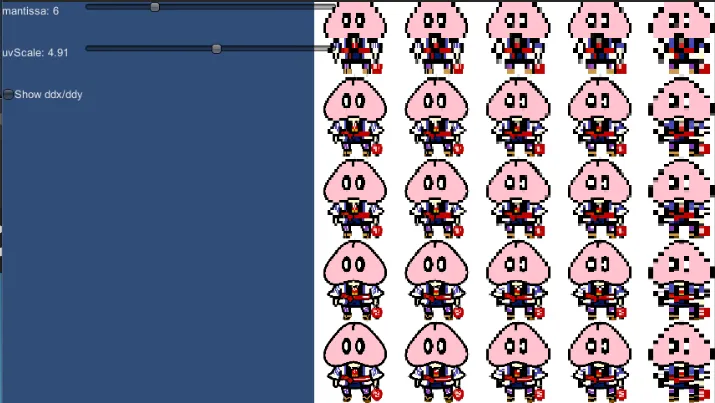
Click the screenshot to go to the sample's WebGL build.
Hello. I'm Hirayama from the Technology Department.
Today's topic is an unglamorous one: specifying precision in shaders. If you're not interested in the details, LIGHT11 has written a very concise article on it, and that will be all you need.
Summed up in one line, this article's conclusion is "don't use half for UVs and positions". Speed and power matter, but optimizing too aggressively and ending up with bugs is the bigger problem.
The sample's source code is on GitHub, but this time just running the sample should be enough. Take a look if you want more detail.
About the screenshot at the top
The screenshot at the top simulates what would happen if the precision of floating-point numbers in the shader were low.
The bottom left of the picture is texture coordinate (UV) (0,0), and the top right is roughly (5,5). You can see the image gets coarser toward the top right.
UVs that should differ from pixel to pixel can't take different values because of insufficient precision, so they read the same place in the texture and the result looks like a mosaic.
The bug that prompted this article was the same kind of thing: half had simply been written where float should have been. But the symptoms were quite nasty:
- it doesn't happen unless the resolution is high
- it happens on some devices and not on others
Why does that happen?
Floating-point numbers have a precision
Shader or not, whenever you use floating-point numbers on a computer, there's such a thing as precision. The best-known standard for floating-point numbers is IEEE754; PC CPUs naturally conform to it, and high-end GPUs satisfy it too. But some GPUs don't meet the spec, and among those that do, which spec they meet depends on the GPU.
First, let's use a simple example to see how floating-point numbers are represented.
An example: a 2-bit mantissa and a 1-bit exponent
Floating-point numbers are made of a number of bits just like integers, but they're split into a "mantissa" and an "exponent". A number is represented by multiplying the integer made from the mantissa by 2 raised to the power of the integer made from the exponent.
For example, if the mantissa is 2 bits (0 to 3) and the exponent is 1 bit (0 to 1), then using A from 0 to 3 and B from 0 to 1, a number is represented as
x = A * 2^BIf the mantissa is 2 and the exponent is 1, you multiply 2 by 2 to the power of 1 (= 2) and get 4, and so on.
But this way, "1 in the mantissa with exponent 1" and "2 in the mantissa with exponent 0" give the same number. Both are 2. Different bit patterns giving the same number means fewer kinds of numbers can be represented, which is a waste.
So we use this trick.
Always add 4 (2 squared) to the mantissa. This way, the mantissa, with its offset, runs from 4 to 7. Then, as below, each number can be represented in only one way.
- 4: mantissa 0, exponent 0
- 5: mantissa 1, exponent 0
- 6: mantissa 2, exponent 0
- 7: mantissa 3, exponent 0
- 8: mantissa 0, exponent 1
Look at 7 and 8. At 7 the mantissa has hit its maximum, so to go any higher, you set the mantissa back to 0 and raise the exponent instead.
What is precision?
So what's the precision of this floating-point number? Precision means "how small a difference between numbers can be represented". In this case there are only 3 bits in total, so let's put every pattern in a table.
| Mantissa | Exponent | Value |
|---|---|---|
| 0 | 0 | 4 |
| 1 | 0 | 5 |
| 2 | 0 | 6 |
| 3 | 0 | 7 |
| 0 | 1 | 8 |
| 1 | 1 | 10 |
| 2 | 1 | 12 |
| 3 | 1 | 14 |
Looking at the top half first, the precision is 1. A difference of 0.5 can't be represented. But looking at the bottom half, the precision is 2. After 8 comes 10; 9 can't be represented. That means that if there were a variable a of this type and you wrote
a += 1;the addition might not make it any bigger. If you try to add 1 to 8, 9 can't be represented, so the result is rounded down and you're back at 8 (if it rounded up, the addition would take effect, but the value would go up by 2).
For things like "how is 0 represented?", "how are fractions represented?" and "how are negatives represented?", see Wikipedia or a similar reference, which lays out the spec.
Running out of precision
Once you understand the above, the problem makes sense.
It got blockier toward the top right because, with floating-point numbers, "the bigger the number, the worse the precision". U gets less precise the further right you go, and V gets less precise the further up you go. The top right is where both have gone bad, so it's the worst.
And "it doesn't happen unless the resolution is high" is easy to understand too.
If the resolution is 16, you only need enough precision to represent 16 levels, but if the resolution is 64, you need to be able to represent 64 levels. For example, at a resolution of 1024, UVs are generated at equal intervals like 0/1024, 1/1024, 2/1024, 3/1024..., so you need the precision to represent them. The large end is the real problem. You need to be able to represent the difference between 1022/1024 and 1023/1024, which means a precision of 1/1024 at magnitudes close to 1.
So how many bits of mantissa does that take?
The answer is 9 bits.
With a 9-bit mantissa, you add 512, 2 to the 9th power, to the number made from the mantissa. That gives 512 if the mantissa is 0, 513 if it's 1, and so on, up to 1021, 1022 and finally the maximum, 1023. Multiplying this by the 1/1024 (2 to the power of minus 10) made from the exponent brings it near 1, so the precision near 1 is 1/1024.
So what if the resolution is 1025? 9 bits is no longer enough.
In our bug, we were rendering at a resolution above 2048 on a machine with a 10-bit mantissa. We needed precision finer than 1/2048, but had only 1/2048. Worse, because of tiling (repeat), the UVs contained values bigger than 1. If the UVs span 0 to 2, the precision near 2 is halved to 1/1024. Try increasing uvScale in the sample. The blockiness gets worse.
Why does it depend on the device?
Now let's solve the mystery of why it doesn't happen on some machines that are just as high-resolution. Simply put, it's because the number of mantissa bits differs from machine to machine.
As Unity's official "Shader data types and precision" page says, how much precision you actually get when you write float or half in a shader depends entirely on the device.
You'd naturally assume half means "half of 32 bits is 16 bits, so it must conform to IEEE754 half precision!", but whether it conforms to IEEE754 depends on the hardware, and whether it's half precision depends on the hardware too. Since it depends on the hardware, what happens when you mistakenly write half where you should have written float also depends on the hardware. It causes a really nasty type of bug: it doesn't appear in the editor, and the picture breaks only on certain real devices.
Here's what we knew about where the bug did and didn't appear.
- It doesn't appear in the editor
- Not even with the gameView at a high resolution
- A certain high-end Android device doesn't show it despite its high resolution of 1440x2560
- Slight on the iPhone 7, badly broken on the iPad Pro and iPhone XS
- Among iPhones, the iPhone SE doesn't show it
Now that we know how it works, this is easy to explain.
- It doesn't appear in the editor because on a PC, even if you write half, you get the same 32-bit (23-bit mantissa) precision as float.
- The high-end Android device has an Adreno530, and probably gets 32 bits even if you write half.
- iPhones really do give you 16 bits (10-bit mantissa) when you write half.
- The iPhone 7 is 750 wide, the iPad Pro 2048 wide and the iPhone XS 1125 wide. The higher the resolution, the worse it gets.
- The iPhone SE is 640 wide; doubled, that exceeds 1024, but not by much, so it probably went unnoticed.
To make matters even worse, there was one more trap waiting for us: "the material using that shader is in an AssetBundle, so changing half to float in the shader code in the project doesn't fix it". Placing the assets directly in a test scene fixes it, but when they're displayed through the proper pipeline, the picture stays broken. In other words, the AssetBundles need to be rebuilt.
Reading the official "AssetBundle Dependencies", you find that this is by design: if you put a material that uses a shader in the project into an AssetBundle, a copy of the shader is generated and bundled into that AssetBundle. If a copy is made for every AssetBundle, that's a pretty unpleasant state of affairs. Could you avoid the copies by putting that shader into yet another AssetBundle and resolving the dependencies? That's a hassle, though...
Closing
Understanding the theory doesn't change what we should do.
It comes down to just this: don't use half for positions or UVs.
On some machines half is faster or uses less power, so it's often better to use it. But if that introduces a device-dependent bug, the cost is no joke. And shaders can end up in AssetBundles, so if a buggy one gets in, you'll even need to rebuild the AssetBundles.
Come to think of it, the precision of rendering calculations is an old problem. There was a time when hardware with only 20 bits for UVs dominated the market, and I saw quite a few mishaps where textures were mapped in weird ways. GPUs have since evolved to the point where they handle 32-bit variables with ease, so it doesn't quite sit right with me that problems like this still happen. Does half versus float really make that much difference to power and performance? I'd like to check that sometime.
Also, though it's not about GPUs, my past experience of seeing bugs caused by "adding a value to a float variable every frame" helped this time too. float has a 23-bit mantissa, so it can only represent 16.77 million steps. In other words, once a float holds 16.77 million, doing +=1 no longer increases it. For a 60fps game, you need enough precision that adding 1/60 (0.0167) still increases the value. 16.77 million / 60 = 280 thousand, so after 280 thousand seconds, it can no longer represent the time increase of one frame. 280 thousand seconds is 4660 minutes, which is 78 hours, or a little over 3 days. It shows up as something like "leave the game running for 3 days and the animation stops".
Unity's Time.time is a float that keeps increasing, so it can't be unrelated to this problem. If the internals were a double or a DateTime, it wouldn't stop, but the precision would still drop. Arcade game machines may be kept running without ever being switched off, and Unity must have industrial uses too. How on earth do they handle it?
Bonus: using partial derivatives
What made our bug even more troublesome was that it computed partial derivatives with the ddx and ddy instructions and used them as the denominator of a division, no less. That's fine as long as the value always differs from the neighboring pixel's, but when precision runs short, the same value repeats and the partial derivative becomes 0. Use that as a denominator and you have a division by zero, where anything can happen.
As a rule, it's probably best to avoid using values obtained with ddx, ddy, fwidth and so on as the denominator of a division. What partial derivatives return depends on the device in the first place, so they call for caution.