

Trackball-Style Camera Control Using Quaternions
Click the screenshot to go to the sample's WebGL build.
Hello. I'm Hirayama from the Technology Department.
This time I built a feature that lets you move the camera by operating a trackball-like control. Try playing with the sample above. If you pretend the sphere in the top right is a trackball and roll it, the camera moves more or less the way you'd expect. Also, if you release the mouse button mid-drag (or lift your finger, on touch), it keeps spinning around and around with inertia.
Its practical value is questionable, but this is what came of my forcing quaternions into an application. Since I went to the trouble of building it, let me introduce it.
Motivation
Quaternions are used in core parts of Unity, but you don't often deal with them directly. Still, some things are easy with quaternions, and some things you can't do without them.
That's why I'm dying to spread the gospel of quaternions, but there's a serious problem: I don't really understand quaternions myself. So I figured I'd set the math aside, put out an example of "here's what I managed to build with quaternions," and wait for someone to get interested.
Now, the question is what to use quaternions for.
Recently I happened to be generating a mesh procedurally, and I wanted to look at it from various angles. In the Scene view you can rotate the camera freely, but sometimes I want to view it in the Game view, and sometimes in a build. And it's common to want a debug camera you can use on real devices, too. This time I decided to try using quaternions for that.
The source code for this article is inside a sample I made for another purpose. It's BallCameraController.cs.
Applying the rotation to the Transform
First, hold the current rotation state in a quaternion. Like a rotation matrix or Euler angles, a quaternion is data that can represent a rotation around three axes. The three axes are which compass direction you're facing, how far you tilt your head up or down, and how far you lean left or right. This "rotation state around three axes" is often called the "orientation." It's a short word, so I'll use it in this article too.
Input on the ball in the top right of the screen is applied to this quaternion to rotate the orientation. I'll get to the details later.
Then, every frame, I compute the camera position and direction from the orientation and set them on the camera's Transform.
To get the camera position, rotate (0,0,-1) by the quaternion, multiply it by the specified distance (3 in the sample), and add the resulting vector to the configured center ((0,0,0) in the sample).
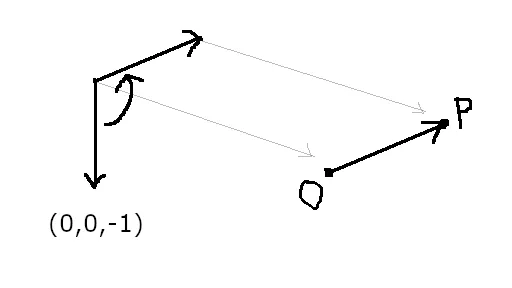
It doesn't have to be (0,0,-1). You're free to choose any reference direction for the quaternion's rotation. But not matching Unity would be inconvenient, so I've followed Unity's convention and used (0,0,-1). With this setup, the camera faces the +Z direction when the quaternion is at its default value.
The code looks like this.
var v = orientation * new Vector3(0f, 0f, -1f);
attachedCamera.transform.position = o + (v * distance);
attachedCamera.transform.rotation = orientation;
orientation is the quaternion, and when you "apply" it to (0,0,-1), you get the rotated v.
I won't go into the details of "applying" here, but you can do it with the Quaternion class's multiplication operator, like this:
Vector3 v = orientation * new Vector3(0f, 0f, -1f);It looks like multiplication at first glance, but quaternion multiplication is a different operation, so be careful: this is not multiplication.
Now multiply this v by the specified distance (distance), add o, the center point the camera moves around, and you have the camera position.
Then plug orientation straight into the camera's Transform.rotation.
Now the quaternion drives the camera.
Next, let's look at how to calculate the quaternion itself.
Integrating the angular velocity
Every frame, I create a small rotation and use it to nudge the quaternion's value. In other words, this is integration. I'll skip the theory here and just use the result.
orientation += orientation * (angularVelocity * (0.5 * dt))This is the simplest kind of integration, the Euler method. I wrote it as pseudo-code rather than in mathematical notation, but it won't work in Unity, for these reasons:
- The Quaternion class has no + operator
- Quaternion * Vector3 is the "applying" from earlier, not "multiplication".
dt is basically Time.deltaTime; the higher the frame rate, the smaller it gets, so updates happen in finer steps.
angularVelocity is the angular velocity, a Vector3 just like Euler angles.
It means "the change in the x, y and z angles per second."
So the formula says: multiply the angular velocity by half of Time.deltaTime, rotate it by the quaternion representing the current orientation, and add the result to the current quaternion.
Now let's turn it into code that actually works.
static Quaternion UpdateOrientation(Quaternion q, Vector3 w, float dt)
{
    var t = w * (0.5f * dt);
    var dq = q * new Quaternion(t.x, t.y, t.z, 0f);
    q = new Quaternion(
        q.x + dq.x,
        q.y + dq.y,
        q.z + dq.z,
        q.w + dq.w);
    q.Normalize();
    return q;
}
q is the orientation (what I was calling orientation until now) and w is the angular velocity (what I was calling angularVelocity).
The first line multiplies the angular velocity by 0.5*dt and stores it in t.
Next, it converts t to a quaternion with the Quaternion constructor and multiplies the two quaternions together. That gives the right-hand side of the formula above.
Finally, since there's no addition operator, it does the addition by passing the element-wise sums to the constructor.
It's a bit of a pain, but I couldn't find a better way.
The Normalize() at the end corrects the magnitude, which the addition throws off; without it, the magnitude gradually drifts.
Now, given an angular velocity, we can update the quaternion. Next, let's generate the angular velocity.
Making angular velocity from input
In this case, I'm imitating a trackball. So I want it to behave like this:
- Rolling the ball forward and back moves the camera up and down. The rotation axis is the view space X axis.
- Rolling the ball left and right moves the camera left and right. The rotation axis is the view space Y axis.
- Rubbing the side of the ball, or pinching it and spinning it like a top, tilts the view and can flip it upside down. The rotation axis is the view space Z axis.
All you need to do is blend these three kinds of rotation based on where you tap the on-screen ball and how you drag, but it takes a little math.
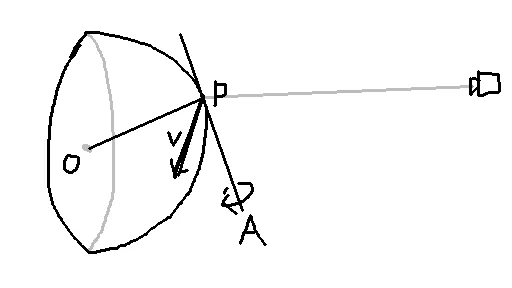
The camera only sees the near hemisphere, so I drew only half the sphere in the diagram. Imagine the camera is off to the right.
First, find the point P where a ray from the viewpoint hits the input sphere. Call the center of the sphere O. Then call the drag direction vector V (in the diagram, it's meant to point toward the viewer). The rotation that grabs P and pulls it in the direction of V is a rotation around A in the diagram. A is perpendicular to both V and OP, so you can make it with the cross product of OP and V.
An angular velocity (x,y,z) means a rotation around the vector (x,y,z), and the bigger the vector, the faster the rotation, so the A we just calculated can be used directly as the angular velocity. The bigger V is (in other words, the faster the drag), the longer A gets, and the faster the rotation.
So here's what we need to do:
- Find the point P where the ray hits the sphere
- Prepare the vector from the sphere's center O to P
- Prepare the drag vector V
- Find the axis with the cross product
- Move the axis into the camera's view coordinate system and use it as the angular velocity
Note that the final angular velocity has to be expressed in the local coordinates of the thing being rotated. Here the camera is what rotates, so "the camera's local coordinates" means the view coordinate system.
By the way, the sample does the calculation in screen coordinates to make it feel nicer to the touch, which makes it a bit more complicated. It's simpler to do it in world coordinates and then move the resulting axis into view coordinates.
If you set up the input sphere as a SphereCollider, you can easily get the point P in world coordinates from the PointerEventData passed to OnBeginDrag, with
var p = data.pointerCurrentRaycast.worldPositionAbout inertia
In this sample, if you give the ball a vigorous spin, the camera keeps turning for a while with inertia. You can see it in the GIF above.
This is done simply by decaying the angular velocity every frame.
angularVelocity *= (1f - (dt * Drag));But to get this inertia, you need to be able to integrate rotation. That's hard to do well with anything but quaternions. With Euler angles it doesn't rotate cleanly (I mentioned this with homing too), and with matrices the integration above gets quite tedious. With quaternions, it's ridiculously easy.
Sorting out what quaternions are for
As far as I know, quaternions are useful for roughly the following:
- Applying a rotation to something else as well.
- Rotating something gradually from one direction to another, or interpolating.
- Integrating.
- Reducing the amount of data used for rotations
"Applying a rotation to something else as well" means, for example, taking a person facing east, rotating them to face south while looking up, and then applying that same rotation to a person facing west. That requires matrices or quaternions; Euler angles alone can't do it.
And when you rotate something gradually, you need to be able to produce the states in between, so you need interpolation. This is where quaternions reign supreme. Spherical linear interpolation is well known. Being able to integrate is a similar strength. The only difference is that with interpolation you know the end result in advance and with integration you don't; either way, you're "animating."
As for the last one, "reducing the amount of data," a quaternion needs only four floats, fewer than a matrix's nine. That can come in handy at times, such as when sending rotations to a shader.
Another advantage of quaternions, in my view, is that "you don't have to go through angles." Turning an angle into a vector requires trigonometric functions. They're tedious and expensive, and converting a vector back into an angle loses a lot of precision. Angles feel reassuring because they only take middle school math to understand, but if you're comfortable with vector operations, I find it easier to avoid angles as much as possible.
Quaternions play nicely with vectors, and you can do most things without going through angles. If sin/cos show up while you're working with quaternions, you might be taking a pointless detour.
References
What do you think? Are you getting curious about quaternions? If so, I recommend these more rigorous explanations.
My math isn't yet up to properly understanding these sites, but put another way, quaternions are usable enough to feel handy even so.
- A complete overview of quaternions: handling the rotation and orientation of 3D objects elegantly
- It uses Unity for its examples, so it's easy for us to read, and it has the commanding feel of something written by someone who understands the subject very deeply.
- Handy notes on quaternion calculation
- It sums up what you need to know for practical use concisely, which is a huge help.
- Vectors, complex numbers and quaternions
- It's probably the best explanation mathematically, too, but it seems I'm still not ready for it. Even though I first read it 17 years ago...
Closing
I know it's odd to say this after writing the whole article in a "you can use it without understanding it, and it's handy!" spirit, but naturally there is such a thing as "knowledge you're better off having in order to use it." Quaternions are too dangerous a tool to use without studying.
For example, I had a bug where I set up the angular velocity in world coordinates, and that's a bug you'd never make with a fundamental understanding.
The integration formula means "apply the quaternion to the angular velocity in local coordinates to produce a small rotation in world coordinates, and add that," and it was precisely because I didn't get that that I made the mistake of setting up the angular velocity in world coordinates.
So I'd like to keep studying to understand it more deeply, but at the same time, if you say "I'll use it once I understand it," you'll never get to use it, so I think "just try using it" matters too. This article was one example of that.