

I Want to Fit Things on Screen Just Right in a 3D Game! Automatically!
Click the video to go to the WebGL build. The source code is also on GitHub.
Hello. I'm Hirayama from the Technology Department.
In this article I'll explain the math for fitting things in 3D space neatly on screen. In the video, 16 spheres are moving around freely, and the camera follows them so that they're all on screen. Because of the interpolation there's a slight lag, so they sometimes slip out of frame, but you can see they mostly fit.
It took me 17 years...
Actually, I first ran into this problem a full 17 years ago. I didn't have time then, so I settled for a pretty sloppy approximation and didn't think about it seriously.
I ran into this problem a few more times after that, but each time I patched it over with a sloppy approximation and manual tuning, so to this day I've only ever had so-so methods.
You'd think the web would be full of answers to this, and even now I think "there surely must be some", but for some reason I haven't been able to find one. When I hit this problem again just the other day, I thought "let's do it properly this time", and once I actually thought it through, I easily came up with something better than before, so I'd like to share it. Honestly, at this point I have no idea why I didn't think of this in the first place.
Defining the problem
Say there are several points in 3D space that you want to fit on screen. The problem is to decide the camera parameters so that they fit on screen just right.
There are three camera parameters that can change dynamically:
- Position (Vector3)
- Direction (a Vector3 if Euler angles)
- Field of view
In practice, some of these stay fixed while others move. For example, you might fit things using position alone without touching the field of view, or using direction and field of view without changing the position.
This time I'll cover the method of "moving only the position, without changing the direction or field of view". In other words, we want three numbers: the position's x, y and z.
When the camera is fixed in place, you need the method of "changing the direction and field of view", but let's leave that for another time. In realistic games (sports and so on), a fixed camera looks more true to life, so that's the method you'd need there.
2D first
3D is hard, so let's think in 2D first.
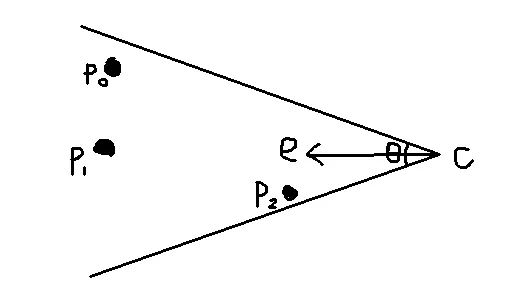
I've drawn the camera position C, the camera's forward vector e, three points for now (P0, P1 and P2), and the field of view θ.
The direction is fixed for now, so e is fixed. What we want to decide is C. In this picture, I suppose we'd move it down a little so that P0 is exactly at the top edge of the view, and move it forward so that P2 is at the bottom edge.
The question is how to compute that.
Throwing away unneeded information
The unknowns are C's coordinates, and since it's 2D, that's two numbers. That means we need two equations. There are three points now, but if each point gives one equation, that's one too many.
In fact, as you can see from the figure, P1 doesn't seem to matter whether it's there or not. So the first thing to do is throw away the unneeded information, that is P1, and keep P0 and P2. Then we set up equations with the two remaining points, solve them simultaneously, and out come the two answers. We can predict that's how it will go. Simple, isn't it? I really don't understand why, until yesterday, I couldn't see it playing out that way.
Now, what calculation throws information away from a set? The first thing that comes to mind is max and min. A set has one minimum and one maximum, so taking the min and max lets you keep two pieces of data from a set and throw away the rest.
In terms of the figure, if we had some function whose value is largest for P0, the point likely to end up at the top edge, and smallest for P2, the point likely to end up at the bottom edge, we could throw away everything except P0 and P2. Even if there were P3, P4, P5... in between besides P1, they could be thrown away in the same way.
Can we use the vertical axis to throw them away?
So, should we use the vertical axis? The original problem is 3D, so let's keep the z axis as the front-back axis and make the other axis x or y. It's a choice between looking from above and looking from the side, but since the field of view is specified vertically, and figures are easier to follow if "up is Y", let's look from the side and use the Y axis. So e points along the Z axis, and up in the figure is the Y axis. Does that mean we just take the points with the largest and smallest Y?
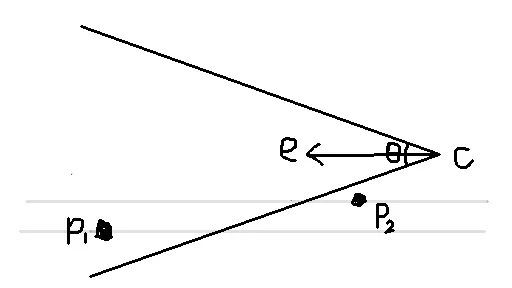
Nope.
In this figure P1 is lower than P2, but the one we should use is P2. In other words, it isn't decided simply by position on the Y axis.
Then what decides it? This.
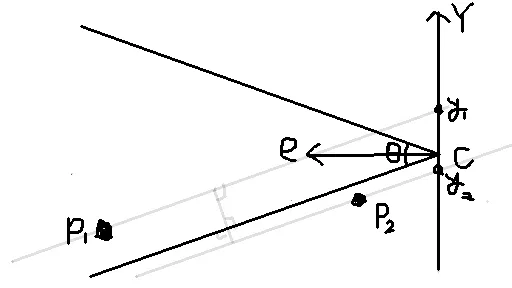
Draw a slanted line through each point, parallel to the bottom edge of the view, take the y value where it meets the Y axis passing through C, and compare those values. For the bottom edge of the view, the point with the smallest value is the one to use. y2 is below y1, so the one to use is P2, which produced y2.
Find the points projected onto the Y axis and take the max and min
Now let's think about how to find y1 and y2.
At this stage, P0, P1 and so on are in world coordinates, and so is e, so they contain messy numbers and are awkward to handle. Let's transform the coordinates.
If we transform P0, P1... so that C is the origin and e is plus Z, that is (0,0,1), things become very simple.
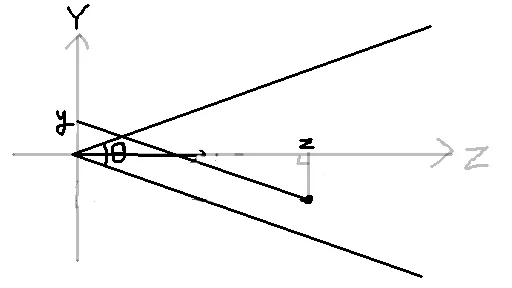
The Z axis is easier to understand pointing right, so I flipped the figure. The problem is to draw a slanted line from P in the figure and find where it meets the Y axis. If we know the slope a (change in y / change in z) of the line, it's simply
y = p.y - (a * p.z)For the lower slanted line, the slope a is negative. Find this x for every point, and the smallest one is "the one that comes lowest in the view". For the upper slanted line, find y in the same way, and this time look for the one with the largest y. That's "the one that comes highest in the view".
Turning it into code
Now we can write the code.
First, let's move all the points into the camera's local coordinates. The camera's local coordinates are often called "view coordinates", so let's call them that here too.
var toView = camera.transform.worldToLocalMatrix;
var pointsInView = new Vector3[points.Length];
for (int i = 0; i < points.Length; i++)
{
    pointsInView[i] = toView.MultiplyPoint3x4(points[i]);
}
Now the points are in view coordinates. When transforming points, use MultiplyPoint3x4.
Next, find the slope a. If the negative slope of the lower line is a0 and the positive slope of the upper line is a1, a0 and a1 simply differ in sign, since the view is symmetric top to bottom. The positive slope a1 is (yの変化量)/(zの変化量) (change in y / change in z), and that's tan(θ/2).
var a0 = Mathf.Tan(camera.fieldOfView * 0.5f * Mathf.Deg2Rad); // convert to radians
var a1 = -a0;
var yMin = float.MaxValue;
var yMax = -yMin;
foreach (var p in pointsInView)
{
    var y0 = p.y - (a0 * p.z);
    var y1 = p.y - (a1 * p.z);
    y0Min = Mathf.Min(y0Min, y0);
    y1Max = Mathf.Max(y1Max, y1);
}
Now we have yMin and yMax. All that's left is to find where the two slanted lines intersect: that's the camera position.
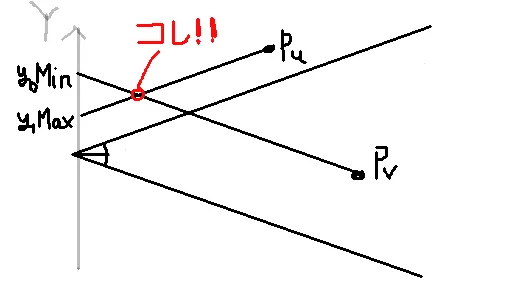
In the figure, y1Max comes from Pu (point number u) and y0Min from Pv (point number v). Let's set up simultaneous equations from here. The line through Pv is y=y0Min + a0*z, and the line through Pu is y=y1Max + a1*z. We want the point where the two y values are equal, so eliminating y gives
y0Min + a0*z = y1Max + a1*zMoving the terms with z to the left and the rest to the right,
(a0 - a1)*z = y1Max - y0Minand we can solve for z:
z = (y1Max - y0Min) / (a0 - a1)Once we have z, we also have y, so both y and z are now known.
var z = (y1Max - y0Min) / (a0 - a1);
var y = y0Min + (a0 * z);
What about X?
That takes care of the YZ plane, but what about X? We simply do the same thing for the X axis.
We need slopes again, but reusing a0 and a1 would be confusing, so let's call these ax0 and ax1, and rename the earlier a0 and a1 to ay0 and ay1.
On the X axis, that is, the screen's horizontal direction, the field of view is the vertical one multiplied by the aspect ratio. For example, when the vertical field of view is 90 degrees, half of it is 45 degrees, so the slope tan(θ/2) is 1. If the screen is 16:9, so that the width is 16/9 times the height, this value is multiplied by 16/9, so the slope becomes 16/9.
var ax0 = ay1 * camera.aspect;
var ax1 = -ax0;
You can get the aspect ratio from Camera.aspect. For 16:9 landscape it holds about 1.78, and for 16:9 portrait about 0.56.
Using these, take the min and max in the same way to throw away the unneeded points, and find x and z just as before.
Then compare the z from the Y axis with the z from the X axis, and take the smaller one. If the Y-axis z is larger than the X-axis z, the Y axis alone would let the camera move further forward. But then things wouldn't fit horizontally, so the X axis takes priority. That's why we take the smaller one, that is, the one further back. And y and x are used as they are, because that's the center.
Finally, the xyz we just found are in the view coordinate system, that is, the camera's local coordinates, so we convert them back to world coordinates and we're done.
Putting all that together, the whole code looks like this.
public Vector3 Focus(Vector3[] points)
{
    // Move all points into view space
    var toView = Camera.transform.worldToLocalMatrix;
    for (int i = 0; i < points.Count; i++)
    {
        points[i] = toView.MultiplyPoint3x4(points[i]));
    }

    // The various slopes
    var ay1 = Mathf.Tan(Camera.fieldOfView * 0.5f * Mathf.Deg2Rad);
    var ay0 = -ay1;
    var ax1 = ay1 * camera.aspect;
    var ax0 = -ax1;

    // Take the min and max on the X and Y axes and throw away unneeded data
    var y0Min = float.MaxValue;
    var y1Max = -float.MaxValue;
    var x0Min = float.MaxValue;
    var x1Max = -float.MaxValue;
    for (int i = 0; i < points.Count; i++)
    {
        var p = points[i];
        var by0 = p.y - (ay0 * p.z);
        var by1 = p.y - (ay1 * p.z);
        var bx0 = p.x - (ax0 * p.z);
        var bx1 = p.x - (ax1 * p.z);
        y0Min = Mathf.Min(y0Min, by0);
        y1Max = Mathf.Max(y1Max, by1);
        x0Min = Mathf.Min(x0Min, bx0);
        x1Max = Mathf.Max(x1Max, bx1);
    }
    // Find two z values and use the smaller one. x and y are used as is
    var zy = (y1Max - y0Min) / (ay0 - ay1);
    var y = y0Min + (ay0 * zy);
    var zx = (x1Max - x0Min) / (ax0 - ax1);
    var x = x0Min + (ax0 * zx);
    var posInView = new Vector3(x, y, Mathf.Min(zy, zx));

    // Back to world
    return Camera.transform.localToWorldMatrix.MultiplyPoint3x4(posInView);
}
How it's used in the sample
In the sample code, it's provided as a method of a class called CameraController. The interface is slightly different from the above: rather than modifying the array of points it receives directly, it copies them into a temporary List it holds internally and calculates with that. It's best to avoid modifying arguments whenever possible.
CameraController also has an interpolation feature, using the exponential interpolation I introduced in an earlier article. That's why it moves reasonably smoothly.
Extending it
What you want to fit on screen isn't always points. It could be a sphere or a box, for example. But either way, once you can handle points, you can build on that. For a sphere, taking about six points (top, bottom, left, right, front and back) is good enough in practice, and for a box, you can do the same by generating its eight corner points.
There may also be requests like "I want to leave a 10% margin around the outside of the screen" or "there's UI at the bottom and right of the screen, so I want things to fit in the part excluding that", but these take only a small change. You just account for the areas you want to keep free at the screen edges when calculating the slopes.
Closing
That was surprisingly easy, wasn't it? I have no idea why I didn't think of it. I was doing oddly wasteful things, like approximating with a sphere and wasting screen space, or approximating with a cuboid in view coordinates and, again, wasting screen space.
It's probably because I hadn't grasped just how much "fixing the direction" simplifies things, and because, for some reason, I never put into words that "max and min are a way of throwing data away", nor hit on the idea of using the planes at the edges of the view to produce the values to take the min and max of. Still, it really is strange.