

Rotating a Vector in 3D Space
Click the screenshot to jump to the WebGL build. The source code is on GitHub.
Hello. I'm Hirayama from the Technology Department.
Today I'll use the method for scattering points on a sphere to bend vectors in all sorts of directions in 3D space. You need this before you can do things like "sparks fly when a beam hits an enemy."
Once again I'll be using high school math, almost entirely vectors and geometry. If you can't handle vectors and geometry to some extent, your options when making 3D games narrow considerably. Some people may take the stance "I don't write math code myself. I get by with the Asset Store and Google," but you've found your way to this article, so it must be fate. I hope you'll stick around for a bit.
Sample
The sample fires a spreading bundle of beams from (0,0,0). The central axis of the beams rotates more or less at random, and the individual beams scatter around it with some spread. The beams are drawn with LineRenderer.
You can set how much they scatter with a slider. Its value is used as the exponent in last time's "multiply the distribution by a power of sin φ."
So what do we need to compute here?
First, scattering the vectors
First, let's get the part I covered last time out of the way. Take last time's "function that generates points distributed over a hemisphere." Any function that gives you two angles will do, but the sample uses the version where you can adjust the scatter.
public static void GetHemisphericalCosPoweredDistribution(
    out float phi, //φ
    out float theta, //θ
    float power) // The power to raise to. 8 for the 8th power
{
    theta = Random.Range(-Mathf.PI, Mathf.PI);
    var r = Random.Range(0f, 1f);
    var powered = Mathf.Pow(r, 1f / (power + 1f));
    phi = Mathf.Acos(powered);
}
What was Asin last time is Acos here because this time, following the usual convention, φ is measured from the positive z axis.
Rotating the central axis vector by two angles
Now let's prepare the vector to rotate: the beams' central axis vector.
If you were building this the usual Unity way, there would be a GameObject representing the direction the beams are fired in. In that case, take the forward of that GameObject's Transform and you get the forward vector in world coordinates. You can use that as the central axis.
But this sample has no "beam cannon" GameObject. The many-beams sample I introduced before didn't use a GameObject per beam either.
The central axis vector is just a Vector3, and in Update() I rotate it more or less arbitrarily, like this:
float t = Time.time * 3;
beamAxis.x = Mathf.Cos(t) * Mathf.Cos(t * 1.3f);
beamAxis.y = Mathf.Cos(t) * Mathf.Sin(t * 1.3f);
beamAxis.z = Mathf.Sin(t);
So the Transform's features aren't available. The main course this time is how to rotate a vector even when there's no Transform, as here, but most of you will probably be fine rotating with a Transform, so let's quickly go over that too.
When there's a Transform
First, you get the beams' central axis from Transform.forward.
var beamAxis = cannonTransform.forward;Let's say cannonTransform is the beam cannon's Transform. This beamAxis is a vector in world coordinates. We want to rotate this beamAxis by φ and θ, but rotating it directly in world coordinates isn't easy.
That's because φ and θ are angles for rotating (0,0,1) in local coordinates. If you rotate in some other coordinate system, or rotate a vector other than (0,0,1), you can't use them as they are.
Let's try it and see what happens.
For example, say we rotate 30 degrees about the world X axis. When the cannon faces due north (Z+), the world X axis points to the cannon's right, and when the cannon faces due east (X+), it points straight ahead. Rotating 30 degrees while facing north points the beam downward, but rotating 30 degrees while the cannon faces east changes nothing at all, because the forward direction coincides with the axis. The result differs depending on which way the cannon is facing.
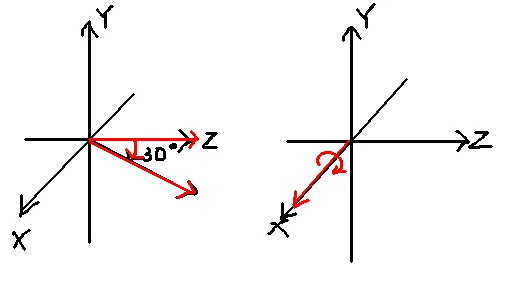
So let's rotate in local coordinates. The forward vector in local coordinates is (0,0,1), so we rotate it by φ and θ.
To convert from polar coordinates to x, y, z, we use
localVector.x = Mathf.Sin(phi) * Mathf.Cos(theta);
localVector.y = Mathf.Sin(phi) * Mathf.Sin(theta);
localVector.z = Mathf.Cos(phi);
To repeat, the difference from last time's article is that φ is measured from the pole. φ is defined so that the Z+ direction is 0 degrees, and perpendicular to the Z axis is 90 degrees.
Next we bring this vector into world coordinates. To transform a vector's coordinates you multiply it by a matrix, and the Transform has the matrix we need. Let's use it.
var toWorld = starTransform.localToWorldTransform;
var worldVector = toWorld.MultiplyVector(localVector);
That was easy. You use MultiplyVector(), not MultiplyPoint(), so don't mix them up. The distinction between points and vectors matters.
This achieves the goal perfectly, so if that's all you need, you can stop reading here. Just set up a Transform facing the central direction you want to scatter around.
When there's no Transform
Now for the main course (which is also a bonus).
Without a Transform, all you have is the bare central axis vector (beamAxis). It's in world coordinates, so you have no choice but to rotate it in world coordinates. We have to do the "rotate directly in world coordinates" that we avoided earlier.
First, having two angles makes the problem hard, so let's split it up and take them one at a time. We'll first solve the problem "rotate a vector by an angle," and then use that to solve the original problem.
Rotating a vector by an angle
Suppose we have some vector v and want to rotate it by an angle θ.
But rotate it how, exactly?
In three-dimensional space there are countless ways to rotate. A standing person turning in place is a rotation, and a standing person falling over is also a rotation.
For a person standing and facing due north (Z+), turning in place is a Y-axis rotation, falling forward or backward is an X-axis rotation, and falling to the left or right is a Z-axis rotation. In other words, you have to specify the axis of rotation.
Here, let's say that, for whatever reason, an axis is given. We're given an axis a and rotate about it.
The function would look something like this:
Vector3 RotateVector(Vector3 v, Vector3 a, float theta);Draw a diagram
For this kind of problem, pushing formulas around won't give you a picture of what's going on, so you draw a diagram. Mathematics is said to divide broadly into three fields: algebra (≈ equations), geometry (≈ figures) and analysis (≈ calculus). Some problems can be tackled with methods from more than one, but problems involving vectors are usually easiest to approach as geometry first. And with geometry, diagrams come first. It looks roughly like this:
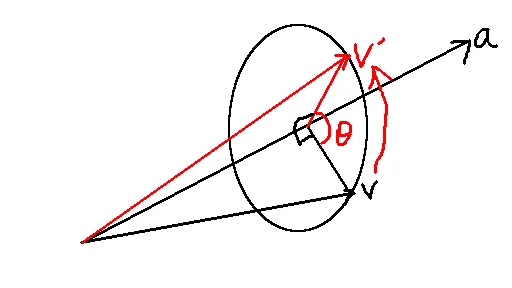
We rotate by θ about a, bringing v to v'.
First, thinking in 3D is a pain and the diagrams are hard to draw, so let's turn it into a problem in a plane. Project v onto a. "Projection" is just what it sounds like: casting a shadow.
A diagram with only v and a in it looks like this:
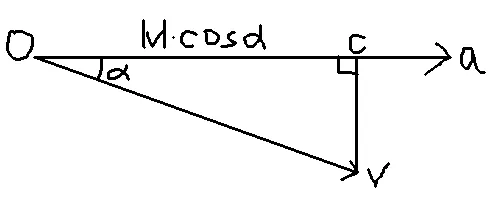
Let the point where v and a meet be O, the end point of v be V, drop a perpendicular from V to a, and call the point where it meets a C. Finding this C is the calculation called "projection". Think of capital letters as points and lowercase letters as vectors.
Now, if the angle between v and a is α, the length from O to C is |v|*cos(α), so we can write
C = O + (|v|*cos(α))*a/|a|I'd like a simpler formula, so let's just decide that a has length 1. Then it simplifies to
C = O + |v|*cos(α)*aNow let's find cos(α).
Dot product and angle
When you're working with vectors and want a cosine or an angle, your knee-jerk reaction should be: dot product. The angle θ between vectors u and v can be written as
cos(θ) = Dot(u, v) / (|u||v|)so using this we get
C = O + |v|*Dot(v, a)*a/(|v||a|)There's a |v| in both the numerator and the denominator, so they cancel. And we know the |a| in the denominator
is 1, so that goes too.
C = O + Dot(v, a)*aIf we let the vector c be the vector from O to C, we no longer need to add O, so
c = Dot(v, a)*aand we're done. Let's make projection a function.
static Vector3 ProjectVector(
    Vector3 v,
    Vector3 axisNormalized)
{
    return Vector3.Dot(v, axisNormalized) * axisNormalized;
}
a has to have length 1, so I made that explicit in the argument's name. To be extra careful you could use
Debug.Assert to check that the length is about 1, but it slows things down a lot, so I don't recommend it.
Solving it as a problem in a plane
At this point, we can treat it as a problem in the plane containing C, V and V'. Let's draw a diagram.
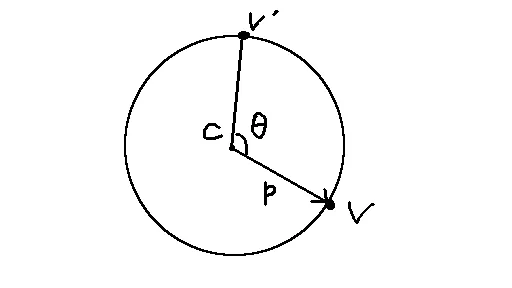
The problem is to rotate V, which lies on a circle, by θ around C to get V'. I've named the vector from C to V p. How can we express V'?
Any point in a plane can be expressed by adding two vectors, scaled appropriately, to the origin. For example, (3,1) is (1,0) times 3 plus (0,1) times 1. The only requirement is that the two vectors aren't parallel, but they're easier to handle if they're perpendicular.
So let's somehow cook up a vector q perpendicular to p, and make V' by adding the right amounts of p and q to C.
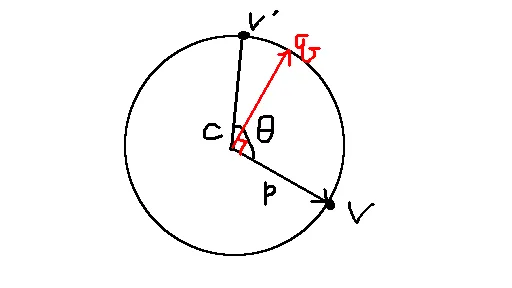
Then we can write
V' = C + p*s + q*ts and t are numbers like 0.2 or 0.4, and finding them gives us V'. So let's cook up q. Now, when you think "I need a perpendicular vector," your knee-jerk reaction should be: cross product.
Making a perpendicular vector with the cross product
Given two non-parallel vectors a and b, their cross product c is a vector perpendicular to both a and b. Being perpendicular to both means c stands upright on the plane a and b lie in. Like a pencil standing on paper.
The cross product is calculated as
c.x = (a.y * b.z) - (a.z * b.y)
c.y = (a.z * b.x) - (a.x * b.z)
c.z = (a.x * b.y) - (a.y * b.x)
To get x you use everything but x, for y everything but y, and for z everything but z. If you rename them with numbers (c.x as c0, c.y as c1, c.z as c2), the pattern becomes clear.
c0 = (a1 * b2) - (a2 * b1)
c1 = (a2 * b0) - (a0 * b2)
c2 = (a0 * b1) - (a1 * b0)
0 is 12-21, 1 is 20-02, and 2 is 01-10. In Unity you can use Vector3.Cross, so you don't need to write it out yourself, but knowing it by heart comes in handy now and then, so it doesn't hurt.
So how do we make a vector perpendicular to p?
If we have one more vector besides p, taking the cross product with it gives a vector perpendicular to p. But we want the result to lie in the plane, so ideally the other vector should stand perpendicular to the plane.
And we have one, don't we? One that's guaranteed to be perpendicular: a, the original axis of rotation.
So let's take the cross product of a and p. The catch is the order: Cross(a,p) and Cross(p,a) point in opposite
directions. If you look at the calculation, you can see the sign of the result flips.
There's an easy way to remember which way the vector from a cross product points.
- The cross product of +X and +Y is +Z
- The cross product of +Y and +Z is +X
- The cross product of +Z and +X is +Y
Can you see the pattern? Replace xyz with 012 and you get 01→2, 12→0, 20→1. And swapping the order of the cross product reverses the direction.
If the flattened diagram above is drawn looking from O in the direction a points, then a is something like the +Z
axis. Now if you rotate the diagram a little so p points right, it's like the X axis. "The cross product of +Z and
+X is +Y," so the q you get from Cross(a,p) points up in the diagram. That matches the diagram I drew earlier, so
let's go with it.
var q = Vector3.Cross(a, p);It would be a pain if q and p had different lengths, so let's make q the same length as p. Then q's end point lies on the circle, which makes it easier to think about.
q.Normalize();
q *= p.magnitude;
But actually this isn't needed: q is already the same length as p. When a and b are perpendicular and b has length 1, their cross product has the same length as a. The cross product is very handy in the perpendicular, with one of them length 1 case, so it's worth remembering. If they aren't perpendicular, or neither has length 1, you usually need Normalize().
Combining the vectors to make V'
Now let's redraw the diagram using p and q.
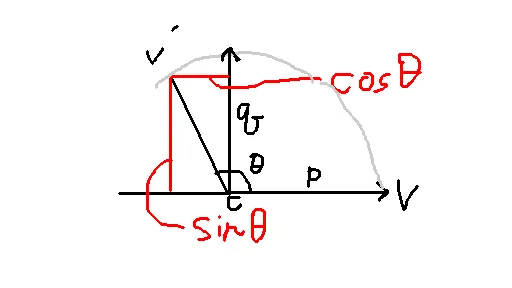
From the center C, the distances to V, C+q and V' are all the same. They're on the circle, after all. And since we
know the angle θ, we know V' is offset from C horizontally by |p|*cosθ and vertically by |p|*sinθ. Horizontal is
p and vertical is q, so
V' = C + p*cosθ + q*sinθThat's the answer. Let's put everything so far into code.
static Vector3 RotateVector(
    Vector3 v,
    Vector3 axisNormalized, // The axis vector must be normalized
    float theta)
{
    // Project v onto the axis to get the center c of the rotation circle
    var c = ProjectVector(v, axisNormalized);
    var p = v - c;

    // Get a vector perpendicular to both p and a
    var q = Vector3.Cross(axisNormalized, p);
    // a and p are perpendicular and |a|=1, so |q|=|p|

    // The end point V' of the rotated v' can be written V' = C + s*p + t*q,
    // where s=cosθ,  t=sinθ
    var s = Mathf.Cos(theta);
    var t = Mathf.Sin(theta);
    return c + (p * s) + (q * t);
}
And there we have it: RotateVector is implemented! If you write it yourself, test it by rotating some arbitrary vectors.
Start with a simple sanity check, like whether rotating +X (1,0,0) by 90 degrees about +Y (0,1,0) gives +Z (0,0,1). If that's fine, try rotating something like (1,2,3) about something like (3,2,1) by an ugly angle like 47 degrees, and check that it looks about right and that rotating again by the negative angle brings it back.
Rotating the vector with RotateVector
Now that we have RotateVector, let's get back to where we need it. We want to rotate beamAxis, a vector in world coordinates, by φ and θ, which are angles in the local coordinate system where beamAxis is the +Z direction.
All that's left is the axes. Once the axes to rotate about are fixed, we pass φ and θ to RotateVector and we're done. When rotating in local coordinates, you rotate by φ about the X axis and by θ about the Y axis, but right now we need the equivalent axes in world coordinates.
Axes means perpendicular. And perpendicular means?
Cross product. Knee-jerk reaction.
Cooking up the axes
With a Transform, you have the local +X direction (the right vector) and the +Y direction (the up vector). But right now we only have the +Z axis in world space (beamAxis), and we don't know which way is right or up. Actually, it's not so much that we don't know as that it hasn't been decided.
Whether you lie down facing north or stand facing north, +Z is north, but when you're lying down, +X (your right) points at the center of the Earth, and when you're standing, it points toward the horizon.
Since it isn't decided, let's decide it ourselves. Here we're scattering in a cone and θ covers the full 360 degrees, so the choice doesn't matter.
First, let's cook up a vector perpendicular to beamAxis and use it as the right vector. Just take the cross product of beamAxis and something, and almost anything will do. It does have to be non-parallel, though, so we need a little branch.
Vevtor3 right;
if (Mathf.Abs(beamAxis.y) < 0.8f)
{
    right = Vector3.Cross(beamAxis, new Vector3(0f, 1f, 0f));
}
else
{
    right = Vector3.Cross(beamAxis, new Vector3(1f, 0f, 0f));
}
right.Normalize();
If the absolute value of beamAxis's y is 0.8 or less, beamAxis can't be parallel to (0,1,0). Anything under 1 would do, but if it's too close to parallel you get errors, so I picked 0.8. There's nothing special about that number. In this case, take the cross product with (0,1,0) and use that as the right vector. And when it's greater than 0.8, take the cross product with (1,0,0) instead. Either way, they aren't necessarily perpendicular, so Normalize() to make the length 1.
We don't need it here, but if you need an up vector you can make that too. You need one for things like billboard calculations. Given the +X and +Z directions, their cross product gives the +Y direction.
var up = Vector3.Cross(beamAxis, right);Taking the cross product in the order +Z, +X gives +Y. In the order X, Z you get -Y, but here either is fine. We're generating vectors in a cone anyway, so rotating about the beam axis by any amount gives the same result. And "the cross product of two perpendicular vectors that both have length 1" has length 1. So up doesn't need Normalize(). But this time we only need right and forward, so we don't use it.
Now, let's rotate.
float phi, theta;
GetHemisphericalCosPoweredDistribution(out phi, out theta, n);
var v = RotateVector(beamAxis, right, phi);
v = RotateVector(v, beamAxis, theta);
Once GetHemisphericalCosPoweredDistribution, with its long name, gives us φ and θ, we call RotateVector twice. The first
time rotates by φ about the right vector (+X), the second by θ about the forward vector (+Z).
That gives us v, beamAxis bent into a cone. In the sample, the points are set on the LineRenderer like this:
v *= 1000f;
lineRenderer.SetPosition(0, cannonPos);
lineRenderer.SetPosition(1, cannonPos + v);
cannonPos is the firing point, the origin (0,0,0) this time. I multiplied v by 1000 to make the beam 1000 units long.
And with that, we can finally do what we set out to do. But setting up a Transform is easier!
Closing
I've gone on and on explaining something you don't need if each object has a Transform, but if you can work this out on your own, you can say you more or less understand the vector math used in games.
- Addition and subtraction
- Decomposing into components
- Finding angles with the dot product
- Projection
- Making perpendicular vectors with the cross product
That's about it. There are also things like finding the distance between a point and a line, finding where a line meets a plane, and reflection, but those aren't that hard either.
As for applications, you can do this calculation in a shader (for example, for SSAO). Generating several randomly scattered vectors for every pixel sounds insane, but ambitious products were doing it as far back as the PLAYSTATION 3 era, so if you only target high-end phones you could use it (though for SSAO there seem to be better ways than rotating vectors).
For uses like that you'd also need tricks to speed it up. For example, if you know the vector being rotated and the axis are perpendicular, RotateVector can skip a lot of the calculation. When rotating the forward vector by φ about the right vector, we know they're perpendicular, so the dot product is 0. You can skip computing the dot product, and the projection that uses it becomes unnecessary altogether.
I didn't cover it here, but you can also do the same calculation with quaternions. A quaternion can hold all the information of the forward, right and up vectors in just four floats, so it's more versatile. It might even be faster. I'll probably cover it on this blog some day.
References
For the calculation "rotate a vector about an axis", I think "Rotating vectors" on "Butsuri no Kagi Shippo" is easy to follow.