

I Want to Scatter Points Randomly on a Circle or a Sphere - Building Distribution Functions with High School Math
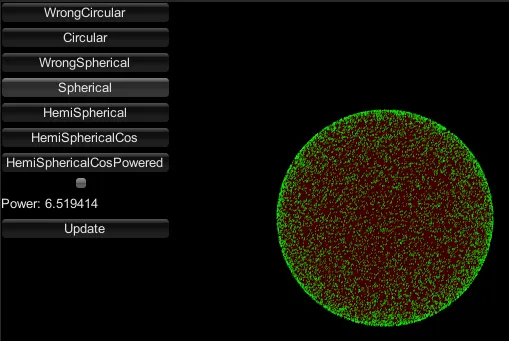
Click the screenshot to go to the WebGL build. The source code is on GitHub.
Hello. I'm Hirayama from the Technology Department.
Today's topic is related to my recent beam article. In the beam sample, sparks fly when a beam hits an enemy, but how is the direction each spark flies in decided? This time I'll explain that in detail.
In this article I'll be using high school math. When it comes to writing game programs, "requiring high school math" is actually quite advanced. If you thought "What? High school is advanced?", you're under some serious illusions. Everyone is supposed to have studied it for entrance exams, yet not many people can put it to use in practice. My impression is that not even half of people can put even junior high school math to practical use, and for high school math it's not even one in five. I'm bad at math myself, and writing this has been a real struggle.
But if you can do math, the range of areas you can work in grows. Game programming is full of "code you could never write without a firm resolve to use math". People without that resolve never go anywhere near those areas, so anyone with even a little of it gains an overwhelming advantage there.
So in this article, I'd like to show you "one example of applying math to programming".
Warm-up: scattering uniformly on a disk
How do you scatter points randomly on a circle of radius 1? You'd want this for an effect like "green particles sparkling up from a round healing zone", right?
Let's start with a method that uses as little math as possible. How about first scattering them over a square that completely encloses the circle, and throwing away the ones that fall outside the circle?
float x, y;
while (true)
{
    x = Random.Range(-1f, 1f);
    y = Random.Range(-1f, 1f);
    var sqR = (x * x) + (y * y);
    if (sqR < 1f)
    {
        break;
    }
}
Take two random numbers in the range -1 to 1, square each and add them, and you get the square of the radius. It's kept squared because square root is a slow operation. If this exceeds 1, the point is outside the circle of radius 1, so we try again. When we exit this loop, x and y hold the coordinates of a point on the circle of radius 1.
Honestly, as far as circles go, this is good enough in practice. Let's think about what fraction gets thrown away.
The area of a circle of radius 1 is 1*1*pi, and pi (π)
is about 3.14. The square enclosing it has sides of 2, so its area is 2*2=4. The probability of landing in the
circle equals the ratio of the areas, 3.14/4, so more than 75% don't need to be thrown away. When generating 1000
points, you generate about 300 extra, so you could say it's perfectly practical.
As this shows, even a method that isn't theoretically beautiful is fine if the waste is acceptable. Unfortunately, though, for "distributing on the surface of a sphere" there is no easy method like this. To be ready for cases like that, let's try doing it with math.
Starting with polar coordinates
If you decide x and y directly with random numbers, some will inevitably fall outside the circle. So let's decide x and y indirectly.
First, decide the distance from the center and the angle with random numbers.
var r = Random.Range(0f, 1f);
var theta = Random.Range(-Mathf.PI, Mathf.PI);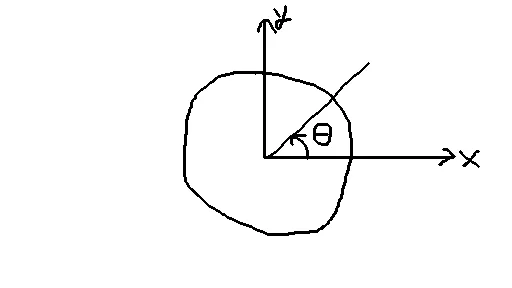
r gets the "distance from the center". Since this is a circle of radius 1, it's a random number from 0 to
- Next, theta (θ) gets a value from -π to π. If degrees are easier for you, -180 to 180 degrees is fine too. But next we'll use Mathf.Cos and Mathf.Sin, whose arguments must be in radians, so I recommend getting used to radians.
A coordinate system that expresses positions by "distance from the center" and "angle" like this is called polar coordinates, and when the problem is round-ish, it's handier than x and y.
Then convert the polar r and theta into x and y.
x = r * Mathf.Cos(theta);
y = r * Mathf.Sin(theta);
Are you comfortable with trigonometric functions?
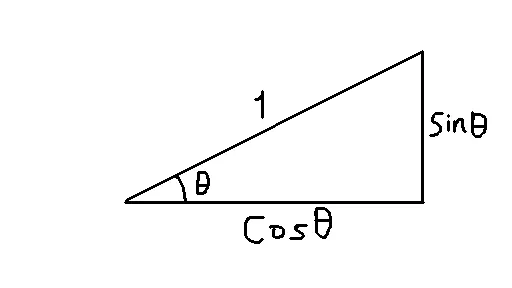
At an angle of about 30 degrees, the longer side is cos and the shorter side is sin. You can remember it as "horizontal is cos, vertical is sin", but be careful, since that only holds "when the angle starts from the horizontal axis". It's important to keep a picture of a specific angle in your head. I picture a triangle of about 30 degrees, like in the figure above.
With this we can now generate points without going outside the circle, but the result looks like this.
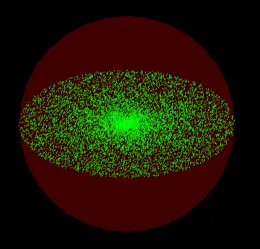
This shows small green cubes placed at the generated coordinates, viewed from diagonally above. It's oddly bright near the center, isn't it? That shows the distribution isn't uniform.
For uses where it's fine to have lots near the center, this is OK, but if you want to scatter them uniformly over the circle, this won't do.
Why it isn't uniform
So why isn't it uniform? You can see why if you split it into an outer half and an inner half.
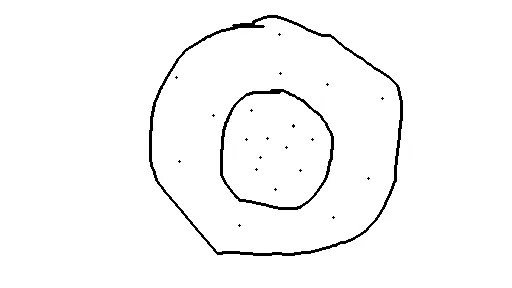
It's a terrible figure, but I put 10 points each in the inner and outer parts. The inner part is clearly denser.
The inner part with r from 0 to 0.5 and the outer part with r from 0.5 to 1 get the same number of points. To be precise, the probability of a point landing in each is the same. But what about the area?
The area of a circle of radius 0.5 is 0.5×0.5×π=0.25π, and the area of a circle of radius 1 is 1×1×π=π. So the area of the outer doughnut is (1-0.25)π=0.75π, three times as large as the inner circle. Yet the number of points is the same, so naturally the inner part is denser.
In other words, the cause is that "the farther in, the smaller the area, but the number of points doesn't drop". We have to adjust the probabilities so that the number of points changes according to the area.
From an area formula to a ratio formula
The area of a circle of radius r is π*r^2 (in this article, read ^n as "to the power of n"). The area of a
circle of radius 1 is π, so the ratio of the area of a circle of radius r to that of a circle of radius 1 is
r^2. For example, if r is 0.5, its square is 0.25, that is 25%, and if r is 0.7, it's 0.49, 49%. This means "r is
0.7 or less with probability 49%".
Let's call this ratio p.
p = r^2Since p is a ratio, it's from 0 to 1. This formula expresses "the correspondence between r and something that ranges from 0 to 1", and, working the opposite way from before, if you decide p first, you get the corresponding r. For example, if you set p=0.25, r becomes 0.5. If p is 0.5 or less, r is roughly 0.7 or less, so if you prepare lots of random values from 0 to 1 as p, roughly half of them give r of 0.7 or less and the other half 0.7 or more, which makes it possible to distribute the points in proportion to the area ratio.
Now let's make this formula easier to use. We'll put it in the form r=.... First, swap the left and right sides,
r^2 = pand take the square root of both sides.
r = sqrt(p)r could also be negative, but here it's "the distance from the center", so the positive one is enough.
So it looks like we should take the Sqrt of the value that comes out of Random.Range(0, 1) and use it as r.
var r = Mathf.Sqrt(Random.Range(0f, 1f));
var theta = Random.Range(-Mathf.PI, Mathf.PI);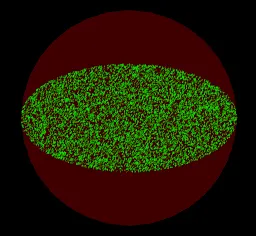
Perfect! The bunching toward the center is gone.
Generalizing
Let's go back over the procedure we just followed.
We want uniformity with respect to area, so first we build a formula for the area. Here we need a formula that
contains the variable in question. The variable in question now is the distance r from the center, so we set up a
formula giving "the area where the distance is r or less". That's π*r^2 in the earlier example.
Then we make it a formula for the ratio to the whole area. That is, we transform it so that the result of the
formula goes from 0 to 1. In this case, just getting rid of π does it, and now we have the relationship between
the variable r and the ratio p.
Then we solve the resulting formula for the variable in question.
A = π*r^2 // area formula
p = r*r // ratio formula
r = sqrt(p) // solve for r
And there, happily, is the answer. Now let's get to the main topic.
Scattering on a sphere
Let's scatter uniformly on the surface of a sphere.
If a naive approach happens to work, we're in luck, so let's start with the naive approach.
Scatter in a box and keep only the ones on the sphere
It's a similar idea to scattering in a square and keeping only the ones inside the circle, so it looks easy. The code looks easy too.
while (true)
{
    x = Random.Range(-1f, 1f);
    y = Random.Range(-1f, 1f);
    z = Random.Range(-1f, 1f);
    var sqR = (x * x) + (y * y) + (z * z);
    if (sqR == 1f)
    {
        break;
    }
}
Unfortunately, though, this is code you must not run. The probability that random numbers land exactly at distance 1 from the center is almost zero. On a computer, exactly 1 or 0 can come out, so the probability of just one of them being 1 or -1 and the other two being 0 isn't zero, but it's less than once in a hundred million.
So how about giving it a bit more leeway?
while (true)
{
    x = Random.Range(-1f, 1f);
    y = Random.Range(-1f, 1f);
    z = Random.Range(-1f, 1f);
    var sqR = (x * x) + (y * y) + (z * z);
    if ((sqR > 0.99f) && (sqR < 1.01f))
    {
        break;
    }
}
The idea is to let it slide if it's off by 0.01 or less. This probably won't loop forever, but it doesn't help much. The probability of a hit is still very low, so there's far too much waste.
Note that for "uniformly distributed inside a sphere", this approach works. The volume of a sphere is 4*π*r^3/3,
which for radius 1 is 4*π/3, roughly 4. A cube with sides of 2 has a volume of 2*2*2=8, so about 50% land
inside. That much is acceptable.
Starting with polar coordinates
Next, as with the circle, let's switch to polar coordinates. A sphere is three-dimensional, so there are two angles. On a globe, those are latitude and longitude.
Longitude, that is the horizontal rotation angle, covers 360 degrees. I like things symmetric about 0, so here it's -180 to 180 degrees, or in radians -π to π.
Latitude on a globe is the angle from the equator: -90 to 90 degrees, or in radians -0.5π to 0.5π.
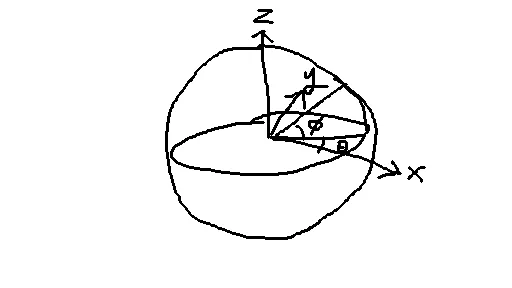
The figure is pretty rough, but please bear with it. Longitude θ is the horizontal angle starting from the x-axis direction, and latitude φ (phi) is the vertical angle starting from the equator.
I made the line connecting the south and north poles the Z axis. In Unity terms, it's like the north pole is in front and the south pole is behind. Now, let's turn it into code.
var theta = Random.Range(-Mathf.PI, Mathf.PI);
var phi = Random.Range(-Mathf.PI * 0.5f, Mathf.PI * 0.5f);
They're simply generated with random numbers. Unlike the circle, the distance from the center is fixed at 1. It's the surface of a sphere, after all. All that's left is converting this into x, y and z.
x = Mathf.Cos(phi) * Mathf.Cos(theta);
y = Mathf.Cos(phi) * Mathf.Sin(theta);
z = Mathf.Sin(phi);
First, z. Looking with the Z axis pointing up, the vertical is sinφ and the horizontal is cosφ. The vertical is z, so that gives us z.
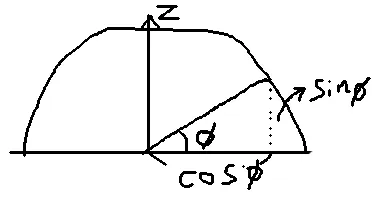
Then x and y share the horizontal cosφ between them.
A quick digression: a formula like this makes you wonder whether it's right, doesn't it? At times like that, you
can reassure yourself by checking that squaring each and adding them gives 1. Let's transform it using
sin^2 + cos^2 = 1.
x^2 + y^2 = cos(phi)^2 * (cos(theta)^2 + sin(theta)^2) = cos(phi)^2 * 1 = cos(phi)^2So cosφ2 comes out of x and y. Add the square of z to this and you get 1.
Now, let's look at the result.
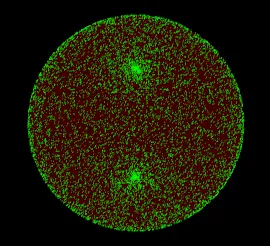
Of course, that's no good. The points are gathering in two places, aren't they? These are the north and south poles. Something similar to what happened with the circle is going on. So let's use the same procedure as with the circle.
First, express the area as a formula
First we need to express the area as a formula. The variables are latitude φ and longitude θ, but the one that matters is φ. With θ, whether at 0 degrees, 45 degrees or 150 degrees, doubling the range doubles the area, so we don't need to worry about it. But with φ, even the same 30-degree band has a completely different area depending on where it is. The area of 30 degrees near the equator is far larger than the area of 30 degrees near a pole.
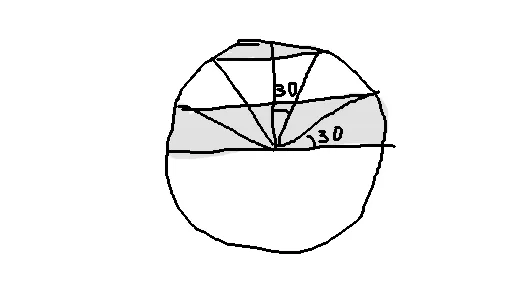
So let's express the area of a ring on the sphere in terms of φ.
But this isn't as easy as the circle. "The area of just the part of the sphere where the angle is φ or less" isn't easy to find, is it? This is where it differs from the circle.
First, express the length of a ring
First, let's write a formula for the length of the ring at angle φ.
As we saw earlier, cosφ seen from the side is the horizontal length, and that becomes the radius of the circle.
The circumference is "diameter × π", so it's 2π*cosφ.
Using integration
Now, let's integrate. Integration is a wonderful tool where you put in a formula for length and out comes a formula for area (a sloppy explanation).
The length formula we just made is 2π*cosφ, and integrating it gives the area formula (careful, this is a very
sloppy explanation).
I won't prove or explain it, but integrating cosφ gives sinφ. The derivative of sin is cos, so it's the reverse of
that. So 2π*sinφ is the formula that represents the surface area of the sphere.
To actually find the surface area, we need to decide the range of φ. In this case it's from -90 degrees (-0.5π) to 90 degrees (0.5π), so let's plug that in. Subtract the formula with the lower limit plugged in from the formula with the upper limit plugged in (this is called a definite integral, right?).
2π*sin(0.5π) - 2π*sin(-0.5π)
= 2π*1 - 2π*(-1)
= 4π
Happily, we got the surface area of the sphere. It's 4π.
Converting to a ratio
What we actually want, though, is a ratio, so we want a formula where 4π is 100%. We get that by dividing the formula by 4π, the
surface area of the whole sphere. That gives 0.5*sinφ.
So the probability p that "a point lands in the part with latitude from -90 degrees up to φ" is
p = 0.5*sinφ - 0.5*sin(-0.5π)
= 0.5(sinφ + 1)
Solving for the variable
Now, p corresponds to the value from 0 to 1 that comes out of the random number generator, so let's convert this into "a formula that gives φ when p has been decided first".
Take
p = 0.5(sinφ + 1)and move the part containing φ to the left and everything else to the right. First, let's multiply by 2.
2p = sinφ + 1Swap left and right.
sinφ + 1 = 2pMove the +1 over.
sinφ = 2p - 1φ is inside the sin, which makes it hard to get out, but the "function that pulls out what's inside a sin" is asin.
That's arcsine, the inverse sine.
The definition of asin is that when sinφ = a, asin(a) = φ, so
φ = asin(2p - 1)Happily, we've found it. The code is
var theta = Random.Range(-Mathf.PI, Mathf.PI);
var p = Random.Range(0f, 1f);
var phi = Mathf.Asin((2f * p) - 1f);
Let's look at the result.
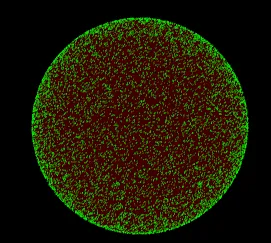
Happy days. There are no more places where points oddly gather.
Huh? Aren't they gathering near the outline?
By the way, some of you may be thinking "they're gathering near the outline". That's not a problem.
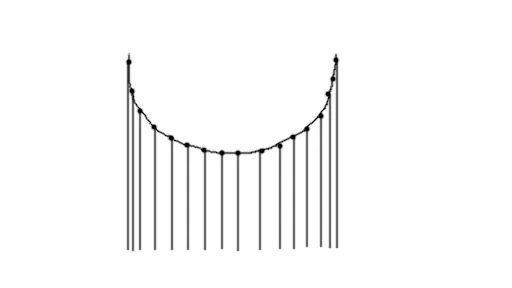
Even if you place points evenly on a sphere, seen from the side they look sparse near the center and dense near the outline, and that's not a problem.
Incidentally, this is the same phenomenon by which black stockings emphasize the outline of the legs.

Toward the edges, the apparent density of the black threads is higher. As a result they look blacker, and the outline of the legs is emphasized (I thought "someone must have written a shader for this", and sure enough, someone had).
Hemisphere
We can now scatter evenly on a sphere, but in practice you don't often want to scatter over the whole sphere.
For example, if there's a place where water spurts up from the ground, you don't need directions going into the ground, right? The upper half is enough. Partly for reasons like that, the hemisphere comes up more often. For the sparks when a beam hits, too, if they bounce back, you don't need the forward direction. Just the hemisphere opposite to the beam's direction of travel is enough.
Solving
Now we just apply everything we've done so far.
The range of integration is not -0.5π to 0.5π but 0 to 0.5π. That's because we don't need the lower half.
Take 2π*sinφ, obtained by integrating the ring length formula 2π*cosφ, and find the definite integral from 0 to
0.5π. Just subtract the value with 0 plugged in from the value with 0.5π plugged in.
2π*sin(0.5π) - 2π*sin(0) = 2πThe surface area is 2π. Of course it is: it's half. Replacing the upper 0.5π with φ gives
2π*sin(φ) - 2π*sin(0)and since sin(0) is 0, it becomes
2π*sin(φ)Next, to make it a ratio, divide by the surface area 2π.
p = sin(φ)Solve for φ. With asin it's instant.
φ = asin(p)In code:
var theta = Random.Range(-Mathf.PI, Mathf.PI);
var p = Random.Range(0f, 1f);
var phi = Mathf.Asin(p);
It's interesting that the hemisphere gives a simpler formula than the sphere.
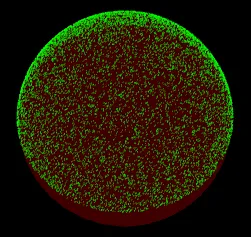
Done. It looks like more than half, but that's because we're looking down at it from a 30-degree angle.
I want them closer to the pole
In practice, though, just scattering evenly over a hemisphere isn't all that useful either.
A fountain doesn't shoot water straight out sideways along the ground, does it? The water is concentrated more toward the top. In the case of the sparks too, a beam hitting and sparks flying out exactly sideways is a bit unnatural, isn't it? If you want a sense of "bouncing back", you'd want to bias them somewhat toward the direction opposite to the beam.
So more often than not, you want them biased further toward the pole.
There are various ways to bias toward the pole, and of course there's a method like "limit the range of φ to 30 degrees from the pole". It works almost the same as when we made the hemisphere formula, so it's easy. You just change the range of integration.
But "evenly within the angle range, and suddenly nothing at all outside it" is a bit unnatural when expressing a physical phenomenon. Something like "the pole is most likely, and the probability drops gradually the farther away, reaching zero near the equator" is often more convenient.
So let's try "multiplying by an extra function that gives a higher probability the closer to the pole".
The function we multiply by is of course a function of φ, and a function that is 1 when φ is 0.5π and 0 when it's
0 looks convenient, being easy to calculate with. Something as plain as y=0.5π*φ is a candidate, and using sin,
y=sinφ, also looks good. Here, let's try sin, which we can expect to change gently.
The ring length formula was originally 2π*cosφ. We integrated it, but before integrating, we multiply by sinφ to
adjust the probability. And since we're going to "divide by a coefficient that makes the total 1 to get a ratio"
anyway, the result is the same whether or not there's a constant like 2π in front. It's a hassle, so let's drop it
and integrate cosφsinφ.
Right, we're going to use a bit more high school math!
The product rule
I won't prove it, but there's a formula taught in high school called the "product rule" for derivatives.
(fg)' = fg' + f'gIt's this one. The ' means "derivative": writing f' means the derivative of function f. This formula says that
if you differentiate the product of two functions f and g as a whole, it's the sum of the products where only one
of them is differentiated.
It also says that (fg' + f'g) integrates to fg, because differentiation and integration are inverse operations.
So if you can write the formula you want to integrate as fg' + f'g, and you know f and g, you can integrate it
(= integration by parts).
First, cosφ and sinφ are easy to integrate. Differentiating sinφ gives cosφ, and differentiating cosφ gives
-sinφ. You just trace that backwards. So you get the feeling that if you can cleverly turn these into f and g and
build the original function out of them, you'll be able to integrate it neatly.
In fact, setting f=sinφ and g=sinφ gives a result that's almost too good. Since f'=g'=cosφ,
cosφsinφ = f'g = g'fand
f'g + g'f = 2cosφsinφ = (fg)'Both f and g are sinφ, so
fg = sinφ^2And differentiating this gives 2cosφsinφ. The original formula has a 2 attached, so we divide everything by 2,
and divide the fg we just found by 2 as well. The integrated function is 0.5sinφ^2.
The definite integral from φ=0 to 0.5π is
0.5*sin(0.5π)^2 - 0.5*sin(0) = 0.5The total is 0.5, so divide by 0.5 to make it 1. That is, multiply by 2. This gives the ratio.
p = sinφ^2A simple form. All that's left is to solve for φ. Swap left and right and take the square root,
sinφ = sqrt(p)and dig out φ using asin:
φ = asin(sqrt(p))The code is
var theta = Random.Range(-Mathf.PI, Mathf.PI);
var p = Random.Range(0f, 1f);
var phi = Mathf.Asin(Mathf.Sqrt(p));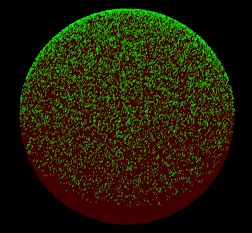
It doesn't look that concentrated in the middle, but the edges are indeed sparser. sin is a fairly gentle function, so the effect isn't very visible.
I want to adjust how close to the pole
Multiplying by some function to control the probability looks like a good approach. So to make it even more convenient, let's make it possible to adjust "how much to bias toward the pole". If you use it for a fountain, you'll want it more concentrated in the middle.
The easy way is to multiply by sinφ many times. Multiplying by sinφ once biases toward the pole, and
multiplying once more biases further. For example, when sinφ is 0.5, squaring it gives 0.25. When sinφ is close
to 1, it's still almost 1 after squaring, but squaring makes it harder to stay close to 1. So, rather than
squaring, going to the 5th or 6th power should bias even further toward the pole. Even 0.9 drops to 0.59 at the
5th power. The more times you multiply, the closer to 1 the random value has to be for the point to stay away from
the pole.
So let's make the function we multiply by sinφ^n. n becomes an adjustable parameter. The question, though, is
whether this can be integrated.
Integration
So let's integrate cosφsinφ^n.
The "product rule" formula looks usable again, but it doesn't look like we can take the easy route of making both
f and g sinφ as before. sinφ^n looks like a pain to integrate, so let's make it g for now, and make cosφ f'.
f' = cosφ
f = sinφ
g = sinφ^n
g' = ?
How do we differentiate sinφ^n? Here, there's another famous differentiation formula.
df(u(x))/dx = df/du * du/dxThis formula says that when there's a function u(x) of x, and a function f(u) with u as its variable, the result of differentiating f with respect to x is the derivative of f with respect to u multiplied by the derivative of u with respect to x.
With derivatives, "with respect to what" is important. You can only get away with just a ', as in f', when there's only one
variable; when there are two variables, u and x, as now, you need the "with respect to what", as in "f
differentiated with respect to u". That's why you need cumbersome notation like df/du.
So what's so great about this formula?
"When a formula is complicated, you can treat some convenient part of it as a single variable." We want to
differentiate sinφ^n, and sinφ is what's getting in the way. If we just call it u, it becomes u^n, and the
formula gets simpler. Then it's just a matter of differentiating a polynomial:
(x^n)' = n*x^(n-1)The n representing the power comes out in front, and the power n goes down by 1. x^3 becomes 3x^2, right? So if
we set u=sinφ, sinφ^n can be easily differentiated with respect to u.
d(u^n)/du = n*u^(n-1)The formula from before says that if u can be differentiated with respect to x, multiplying by that gives the answer.
du/dx = d(sinφ)/dx = cosφThe derivative of sinφ is cosφ. So putting it all together,
df(sinφ^n)/dφ = d(u^n)/du * d(sinφ)/dφ
= n*u^(n-1) * cosφ
= n*cosφ*sinφ^(n-1)
Differentiating made it pretty messy. Is this going to work out?
f' = cosφ
f = sinφ
g = sinφ^n
g' = n*cosφ*sinφ^(n-1)
Let's just plug it in.
(fg)' = f'g + fg' = cosφ*sinφ^n + sinφ*(n*cosφ*sinφ^(n-1))
= (1+n)cosφ*sinφ^n
cosφ*sinφ^n came out nicely, so we managed to tidy it up. Now, what we originally wanted to integrate was
cosφsinφ^n, so the (1+n) is extra. Let's divide it out.
(fg)'/(1+n) = (f'g + fg')/(1+n) = cosφsinφ^nSo the integrated function we want is f times g divided by (1+n):
sinφ^(n+1) / (n+1)Up to now, this is the point where we computed the integral over the whole range, but since we're going to turn it into a ratio anyway, we should be able to throw away the constant in front first.
sinφ^(n+1)That's simpler. Finding the definite integral from 0 to 0.5π gives
sin(0)^(n+1) - sin(0.5π)^(n+1)
= 0 - (-1) = 1
exactly 1. No need to divide by anything. So the formula for the ratio p is
p = sinφ^(n+1)Let's solve it. Swap left and right, then take the (n+1)th root of both sides. "Taking the kth root" means "raising to the power of 1/k", so let's use pow.
cosφ = pow(p, 1/(n+1))Then dig out φ using asin.
φ = asin(pow(p, 1/(n+1))Let's turn it into code.
var theta = Random.Range(-Mathf.PI, Mathf.PI);
var p = Random.Range(0f, 1f);
var phi = Mathf.Asin(Mathf.Pow(p, 1f / (n + 1f)));
In the sample I've added a slider to adjust n.

As n increases through 2, 4, 8..., the points get closer to the pole.
Note that the formula for n=0 is the same as "uniform distribution on a hemisphere". The 0th power is 1, so inside the Asin is just p. And for n=1, it's the same formula as when we first multiplied by sinφ. p to the power of 0.5 is sqrt. And so, with this one function prepared, you can get all sorts of scattering patterns.
Digression: tuning n
Even putting in a large value like 128 for n doesn't make them gather to a single point. You'd need to put in thousands or tens of thousands. The larger n gets, the smaller the effect of increasing it by 1.
This is where logarithms come in, just as with decibels. In the sample, the slider is in fact logarithmic.
By the way, this formula cosφsinφ^n was often used for rendering reflected light, and n was used as a parameter
where larger values give a "smoother texture" and smaller values a "rougher texture". In fact, what I did here
was apply a distribution function from lighting calculations to scattering sparks.
In closing
As you can see, there are situations in game making where high school math is useful. Vectors are especially important, followed by trigonometric functions, then matrices and calculus.
Everything this time is within the scope of high school textbooks, and is something everyone is supposed to be able to do. But when you actually run into a situation at work where you need it, it's hard to apply. Worse, in reality it's hard even to notice that "this is something you can solve with calculus". If you're stuck the moment googling doesn't turn up exactly the thing you want, it's probably because the idea "couldn't this be solved with math?" never comes up in the first place.
If you feel a bit weak at math, it may be a good idea to start with junior high school math. I recommend the book "Professor from the University of Tokyo! Please teach super-easy-to-understand math to me, a humanities person!", which is just too good.
Summary of the procedure
Let's summarize the procedure.
- Set up a formula for the length
- If you want to control the probability, multiply by some suitable function
- Integrate
- Divide the formula by the value of the integral over the whole range to make it a ratio (= build the cumulative distribution function)
- Find the inverse function
That's it. With a uniform distribution, integrating gives an area, but once you've adjusted the probability and
turned it into a ratio, it's no longer an area; it's called the
cumulative distribution function.
It's the formula I've been writing as p=... in this article. It's "the probability of landing between the start
of the variable and a certain value".
If you find the inverse of this cumulative distribution function and solve for the original variable, you get a formula where feeding in a random number from 0 to 1 gives a nicely distributed variable.
Note: the formulas/code differ from what I saw elsewhere
In other references you'll often see sin and cos swapped. In fact, the beam sample has the same function, but with sin and cos, and asin and acos, swapped. That's because in the beam sample φ starts from the pole, while this time it starts from the equator. The definition of φ is different.
In standard polar coordinates, it starts from the pole, and that's usually more convenient. But this time I thought the word "latitude" would be easier to understand, so I wrote it starting from the equator. If you want to measure the angle from the pole, try redoing the derivation yourself!
Coming next time
Next time I'll explain how to actually use the "scattered points" obtained this way. As it stands, they're just "points scattered on a hemisphere of radius 1", and that alone has limited uses. To use them for things like bending a beam moving in any direction, or sending particles flying around an arbitrary vector, you need one more trick.