

What I Wondered About When I Wanted to Use Random Numbers from Threads in Unity
I'm Hirayama from the Technology Department, and in this hobby article I'll dig into a problem that UnityEngine.Random would solve 99.9% of the time. The sample code is on GitHub.
Note that multithreading is only what got me started; this article isn't about threads. The sample does use threads, though, to speed various things up.
Motivation
A while ago, I was writing some AI that did so much computation that I wanted to parallelize it with threads. That meant whatever random number generator I used had to be callable from multiple threads.
However, UnityEngine functions can't be called from other threads. I could just keep a separate System.Random, but System.Random has been around for a very long time. In C libraries, the standard random number generator is still the old one for compatibility's sake, and I've heard stories of games that used it naively and shipped with bugs because of it. Couldn't the same thing happen in C#?
So I decided to look into it. Just for fun.
Can't I use UnityEngine.Random?
If I could use UnityEngine.Random, that would be best. I was curious what's inside it, so I looked into it a bit. I can't vouch for it, but apparently it's the 128-bit version of XorShift. That's a method invented in the 21st century, and you see it a lot. It must be good. So let's actually call it from another thread and see whether that's really not allowed.
using UnityEngine;
using System.Threading;

public class Hoge : MonoBehaviour
{
    void Start()
    {
        int value = 0;
        var thread = new Thread(() =>
        {
            value = Random.Range(0, 100);
        });
        thread.Start();
        thread.Join();
        Debug.Log("Thread End! " + value);
    }
}
I attach this script to some gameObject and run it.

No luck, as expected. Let's think of something else.
Three methods
Besides, even if UnityEngine.Random could be used, the fact that you call it statically means there would have to be a lock inside to make it thread-safe, and that's bound to be slow.
So if you're serious about it, you should have a separate random number generator instance for each thread.
With that in mind, let's examine three random number generators.
When people think of random numbers, the Mersenne Twister tends to be what comes to mind, but it isn't simple enough to write yourself in a few minutes, and the drawback is that you can't use it without adding a library. Random number generators have a habit of seeming to work surprisingly well even when you've gotten something wrong somewhere, so it's hard to tell whether you've really written one correctly. I'd rather avoid writing a complicated method myself.
But finding a library is a hassle too, and so is checking whether the library I bring in is sound, so as a first step I picked the three above as candidates, since each can be written in a few lines without looking anything up.
System.Random is just a function call, so I'll show the implementations of the other two.
MWC (Multiply-with-carry)
class Mwc
{
    uint _x;
    public Mwc(int seed)
    {
        _x = 0xffff0000 | (uint)(seed & 0xffff);
    }
    int Next()
    {
        _x = ((_x & 0xffff) * 62904) + (_x >> 16);
        return (int)(_x & 0xffff);
    }
}
The key part is inside Next(), and it's really simple: AND, multiply, add, shift and a final AND, just five operations. It certainly looks fast. It holds a 32-bit state variable, but the output is 16 bits.
Since each thread has to generate a different sequence, I gave the constructor an argument for setting the seed. However, with MWC, once the state variable becomes 0 it only ever outputs 0, so I use only the lower 16 bits of the seed and fill the upper bits with 1s (if you need more than 60,000 generator instances, this won't do). It's important to make sure nothing breaks even if the user accidentally passes in 0.
What I like about this generator is that you can roughly understand how it works even if you're not a math expert. Put simply, it's the same idea as "1 divided by 19 is 0.052631578947368..., and the digits look random, right?" It's also interesting that there's no division in the code, yet it amounts to doing a division. If you're interested, please read the original paper.
This goes for any random number generator: if you draw random numbers a hundred million times or more, say for
ray tracing, a method with a 32-bit state variable will run out. Once _x returns to a value it has had before, the
sequence repeats from there, so no matter what, it cycles back before it's been called 2 to the 32nd power times. In
that case you'd want a method with a state variable of about 64 bits.
XorShift
class XorShift
{
    uint _x;
    public XorShift(int seed)
    {
        _x = 0xffff0000 | (uint)(seed & 0xffff);
    }
    public int Next()
    {
        _x ^= _x << 13;
        _x ^= _x >> 17;
        _x ^= _x << 5;
        return (int)(_x & 0xffff);
    }
}
This one is simple too: just six operations, xors and shifts. How on earth does this produce random numbers? The final AND that takes the lower 16 bits is only there to match MWC; it can actually use the full 32 bits. However, using the full 32 bits gives it decidedly un-random properties, such as "the same value never comes up twice in a row" and "0 never comes up", so using about half of the state variable is just right.
As for how this generator works, I don't really understand it either. Skimming the paper, it seems to boil down to a matrix-vector product. If you hear the explanation "multiplying a vector of 32 bits by a matrix that becomes the identity matrix when raised to the power 232-1 gives random numbers with a period of 232-1" and think "oh, I see", you probably have better things to do than read this. Please read the original paper.
If you want 32 bits of output, or you call it a hundred million times or more, I think it's better to use the 64-bit version of XorShift. In that case, the three shift amounts are different from the example above (for example 21, 35 and 4, in that order). See Numerical Recipes. It's a handy book to keep around. I reach for it several times a year.
Measurements
Now let's take these two, add System.Random and the 128-bit XorShift that's apparently inside UnityEngine.Random (XorShift128 below), and measure their speed. I'll call each one about 100 million times.
const int N = 1000 * 1000 * 100; // 100 million
var t0 = Time.realtimeSinceStartup;
int sum = 0; // prepared because the result seems likely to be optimized away unless it's used for something
for (int i = 0; i < N; i++)
{
    sum += rand.Next();
}
var t1 = Time.realtimeSinceStartup;
Debug.Log((t1 - t0) + " sum:" + sum);
It goes something like this, where rand is MWC, XorShift and so on (in the sample code it's abstracted with an interface called IRandom). Here are the results.
| Mwc | XorShift | System.Random | XorShift128 | |
|---|---|---|---|---|
| Editor | 2.13 | 2.49 | 5.38 | 3.36 |
| Standalone | 0.312 | 0.682 | 0.876 | 0.303 |
| WebGL | 1.57 | 1.67 | 5.01 | 1.96 |
The unit is seconds, measured on a mid-2014 MacBook Pro (i7 3 GHz) in the editor, a Standalone build and a WebGL build (Chrome). Each platform has its strengths and weaknesses, and the Standalone results in particular are a bit of a mystery, but even the slowest takes under 6 seconds for 100 million calls, so in a 60 FPS game, spending 1% of the CPU works out to 3,000 calls. Plenty of other things are slower, so it's not worth worrying about (though in WebGL, 64-bit integer arithmetic is slow, and integer division by anything other than a power of two is painfully slow. It's JavaScript, so there's nothing to be done).
Now that we've confirmed there's no big difference in speed, let's look at quality. Are these things really producing random numbers?
Checking the quality of random numbers
That said, you can never fully confirm that "the random numbers are random", because if they really are random, anything can happen. A die coming up 1 a hundred times in a row might happen if you repeat it 6 to the 100th power times (though it probably wouldn't happen even by the end of the universe).
Unfortunately, "do the random numbers look random?" is a pretty difficult subject, more than an amateur can really handle. In probability and statistics, the counterintuitive answer is often the right one, and if you've only dabbled, it's easy to fall into the traps.
Still, not checking at all whether the random numbers work properly would be a mistake. For example, you need some way to test that a lottery is implemented correctly. Even if the random numbers themselves have no problem, using them wrongly breaks things. You always want to check that the final result that matters to the player follows the probability distribution you intend. For lotteries, item drops and the like, it's probably a good idea to do a chi-squared test at least once.
Here, though, I won't go that deep, and will focus on weeding out the "obviously bad" cases. Everything is easier when you can see it at a glance, so first let's turn the randomness into an image.
Start by preparing a texture.
_texture = new Texture2D(Width, Height, TextureFormat.RGBA32, false);
_image.texture = _texture;
_image is a RawImage I set up to display the texture, and I assign the texture to it.
Then I prepare an array of Color32 and fill it with random numbers.
for (int i = 0; i < PixelsPerUnit; i++)
{
    var x = _random.Next() % Width;
    var y = _random.Next() % Height;
    var color = _random.Next();
    var r = ((color >> 10) & 0x1f) << 3; // take 5 bits and multiply by 8 to get 0 to 248
    var g = ((color >> 5) & 0x1f) << 3;
    var b = ((color >> 0) & 0x1f) << 3;
    var offset = ((y * Width) + x);
    pixels[offset].r = (byte)r;
    pixels[offset].g = (byte)g;
    pixels[offset].b = (byte)b;
}
pixels is an array of Color32 of size Width*Height, and PixelsPerUnit is "how many pixels to paint at a time"; in
the sample it's 10,000. The code picks x and y at random, and the color at random too. Here I take 5 bits at a
time from a single random number to decide RGB, but that's just personal preference. You could use a separate random number for each of
R, G and B.
I write this into the texture with Texture2D.SetPixels32(). In the sample, the texture is split vertically and each part is processed in a separate thread, but that has nothing to do with the quality check.
And here are the resulting images.
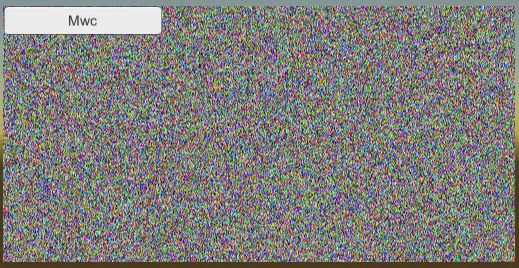
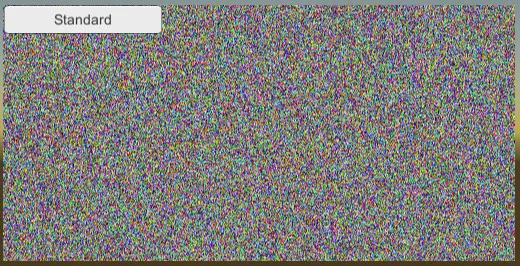

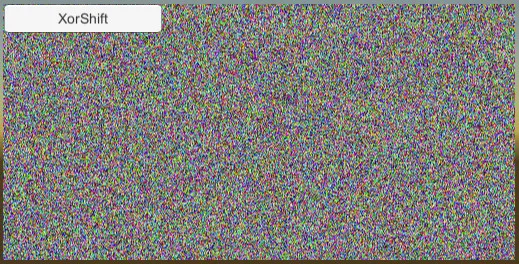
Three of them look random. The bottom right, on the other hand, is plainly not random.
This one uses the linear congruential method, which I included as a bad example. It isn't random enough, so it can't paint every point. It's so bad that odd and even numbers simply alternate. Apparently people used random numbers like this, with various tricks, until around 2000, but now that we have MWC, XorShift and the Mersenne Twister, there's no need. If you're interested, see the sample code. If you just want to see it running, try the WebGL build.
Unfortunately, in this test MWC, XorShift and System.Random all look "random enough". But some people say "System.Random isn't random enough and is no good", so I'd like to know what it takes to make it fail. Once you know that, you can turn it around and say "I'm not going to push it that far, so this is fine".
The gorilla test
While looking for a test that would easily reveal differences, I found this paper. It claims that "generators that pass these tests usually pass the existing tests", which is attractive if true. It's by the person who invented MWC and XorShift, which somehow makes it feel trustworthy, too. Of the tests in it, the one called the "gorilla test" has simple reasoning and looks easy to implement. Let's give it a try.
The principle is simple. Suppose a monkey bangs randomly on a keyboard with the keys a to z, 26 times in all. It will probably hit some letters more than once, so other letters won't appear at all. If it really is random, you can calculate how many letters appear on average. The probability that a given letter doesn't appear is (25/26), and it has to not appear on all 26 tries, so raise that to the 26th power: (25/26)26. The probability that it does appear is that subtracted from 1: 1-(25/26)26. Multiply this by 26 and you know "how many letters appear on average". It's about 16.6 letters.
Next, instead of single letters, think of two-letter pairs as words, like ai or go. There are 26*26 = 676 of them. In the text produced by hitting keys 676 times, you can slide along one letter at a time picking up two-letter words, and count the distinct words that appeared. For a text of five letters, abcde, you get ab, bc, cd and de. The same kind of calculation works here too, and you know in advance how many of the 676 kinds of two-letter words appear on average.
In practice it doesn't need to be the alphabet, so let's do it in binary, with 0 and 1. The paper measures how thoroughly the 26-bit strings are covered, and judges by how far that is from the theoretical average. There are 226 = about 67 million strings of 26 0s and 1s, so you make about 67 million random numbers, take some bit from each and join them. In theory about 42 million kinds should appear.
Here I built a separate string from each of the 16 output bits, to see whether any bit is biased. The results are shown as colors. For each bit, it's red if the count is well above the theoretical average, green if it's well below, and grayish if it's about the same (the color saturates at four standard deviations).
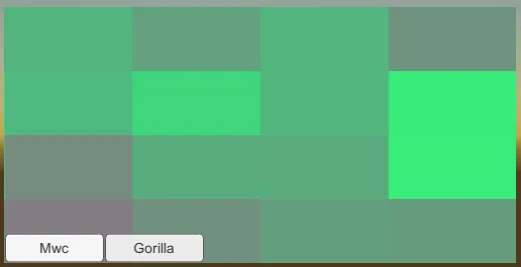
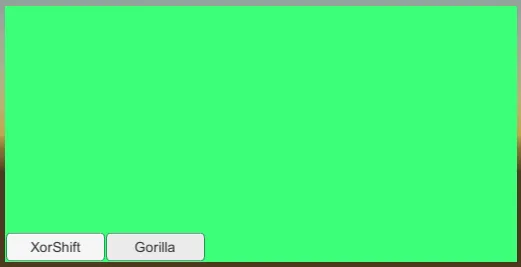
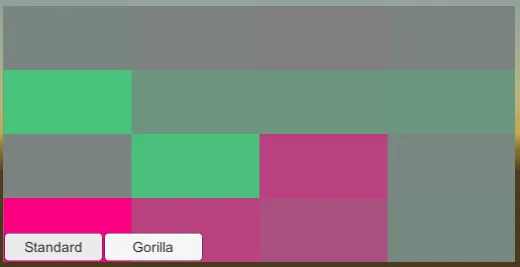
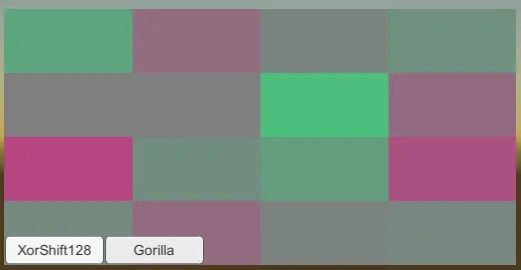
Simply put, grayish is good, and strong red or strong green is bad. By that measure, XorShift is in trouble: it's completely green. That means fewer words appeared than expected, in other words the same words kept showing up, which suggests the random numbers lack variety. MWC is also green, but looks better than XorShift. System.Random, labeled Standard in the figure, looks fairly gray, but the bottom left is quite red. And finally, XorShift128 came out with the most muted colors of them all. If everything were reddish or everything greenish it would look bad, but that doesn't seem to be the case.
So with a test this strict, differences start to show. Whether a bias that only appears when you call the generator 67 million times and pick apart each bit like this actually matters depends on what you're using it for.
By the way, why "gorilla"? There has long been something called the monkey test, as in "a test like a monkey banging on the keys at random", and apparently the gorilla comes from "this time we do it an enormous number of times, so it's stronger than a monkey. Yes, a gorilla!!"
Comparing memory usage
For reference, here's how much memory each method uses. MWC and XorShift are the 32-bit versions introduced above.
| Mwc | XorShift | System.Random | XorShift128 |
|---|---|---|---|
| 4 | 4 | 288 | 16 |
The unit is bytes. The System.Random figure is what the profiler showed after a new, so the algorithm's own data is
probably a few dozen bytes smaller.
The System.Random algorithm is apparently by Professor Knuth,
and if it's implemented as is, it uses 55 32-bit variables, so that's probably around 220 bytes. You could say "it
uses all that memory and isn't even particularly good", but I don't think it's worth worrying about. It's the
standard, after all. Departing from the standard takes courage. If going along with the powers that be doesn't
cause you any trouble, then just go along.
Summary
If you aren't multithreading, I think UnityEngine.Random is fine. As shown above, XorShift128 shows little bias even under a very strict test. Is it really XorShift128? Are the parameters the same? I don't know, but surely it's fine. It's the standard, after all.
And if you are multithreading, I think System.Random is fine. It didn't excel at anything in these tests, but it's the standard and everyone uses it. That beats picking a method yourself and risking falling into a trap.
That said, for things like deciding which piece falls next in Tetris, or dropping a treasure chest with a probability of 20/256 in a game, I think even the 32-bit MWC is no problem at all.
By the way, these days even phone CPUs have 64-bit arithmetic units. With 64 bits you can multiply two 32-bit numbers, so if you make the variable a ulong and write
_x = ((_x & 0xffffffff) * 4294957665) + (_x >> 32);you easily get an MWC with 32-bit output. In the gorilla test it came out even grayer than XorShift128.
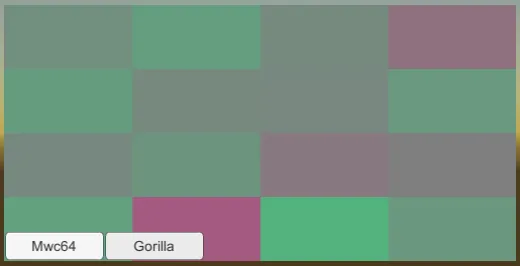
The state variable is 64 bits, and it doesn't return to its original state until it's been called about 2 to the 60th power times, so it's effectively infinite. 2 to the 60th is about 10 to the 18th, so using it 100 million times a second (10 to the 8th) on 10,000 machines (10 to the 4th) for 10 years (roughly 1 million seconds, 10 to the 6th) would only just about use it up, so for us game developers it's as good as infinite. On the Mac I tried it on, it also ran at almost the same speed as the 32-bit version, if anything slightly faster.
Still, I can't take responsibility if there's some trap hidden in it, so I'll close by saying "the standard one is probably fine". Let's go along with the powers that be.