

Which DownloadHandler Is Fastest for Downloading and Saving AssetBundles?
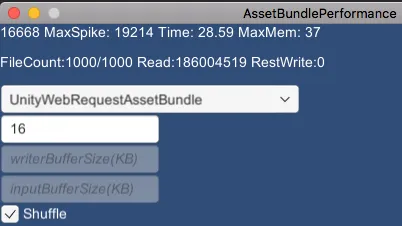
I'm Hirayama from the Technology Department, and in this article I look at which DownloadHandler is fastest for downloading and saving asset bundles.
Let me say up front that this is still just my own independent research. As before, the program is on GitHub, but none of it is ready for real-world use as is. For one thing, I haven't even built the part that reads from the cache. This time it's purely a speed test of downloading and saving.
I want to make a habit of publishing what I build for in-house use on the tech blog and getting feedback before we use it in-house, so I'd really appreciate your help.
For those in a hurry, here are the conclusions:
- Getting the degree of parallelism right matters most.
- Randomizing the download order usually helps.
- If you're happy with it, the standard way (DownloadHandlerAssetBundle + Caching) is fine.
- If you build your own cache, DownloadHandlerFile looks like the easy option, though there are a few things you need to verify.
- Even writing your own DownloadHandler and saving logic doesn't seem that hard, as long as decent performance and features are enough.
Introduction
Many commercial smartphone games need to be able to replace or add data independently of the app itself. If you want to do that in Unity, whatever your gripes with them, AssetBundles are the sensible choice. You put the AssetBundles on a web server and fetch them with UnityWebRequest.
That makes waiting time the big concern. You want an implementation that keeps the wait as short as possible. So I looked into which DownloadHandler is fastest.
Personally, I dislike designs that make you wait for a huge download on first launch, and prefer downloading and caching data on the spot when it's needed. But there are also requests like "I want to download explicitly while on Wi-Fi," and having "a guarantee that all data is local once you're past a certain screen" greatly cuts down the effort of debugging and testing. Sometimes you'll go with a bulk download for those benefits.
Measurements
First, the results. I made a standalone build of the sample program I wrote for this article and measured with it. The machine is a Mid-2014 MacBook Pro, and Unity is 2018.3.1f1.
I put 1000 AssetBundle files, about 190 MB in total, on a remote server and measured how long it takes to download them. If you want to try it yourself, you'll need to prepare the data and the server (there's a script to generate the data).
| Method | Parallel | Randomized | Time (s) | Max memory (MB) | Max spike (ms) |
|---|---|---|---|---|---|
| DownloadHandlerAssetBundle | 1 | No | 123-242 | 33-34 | 33-50 |
| DownloadHandlerAssetBundle | 4 | No | 34.1-36.3 | 34-35 | 33-51 |
| DownloadHandlerAssetBundle | 4 | Yes | 27.5-30.7 | 34-34 | 18-19 |
| DownloadHandlerAssetBundle | 16 | No | 24.1-28.2 | 40-40 | 57-80 |
| DownloadHandlerAssetBundle | 16 | Yes | 27.2-28.6 | 37-37 | 19-106 |
| DownloadHandlerAssetBundle | 64 | No | 35.6-38.6 | 56-63 | 117-167 |
| DownloadHandlerAssetBundle | 64 | Yes | 29.7-30.6 | 42-45 | 103-233 |
| DownloadHandlerFile | 1 | No | 93.5-126 | 32-32 | 18-19 |
| DownloadHandlerFile | 4 | No | 24.1-28.0 | 32-32 | 18-19 |
| DownloadHandlerFile | 4 | Yes | 19.0-21.0 | 32-32 | 18-33 |
| DownloadHandlerFile | 16 | No | 14.0-16.6 | 32-32 | 18-33 |
| DownloadHandlerFile | 16 | Yes | 13.1-15.3 | 32-33 | 19-67 |
| DownloadHandlerFile | 64 | No | 13.5-15.5 | 33-33 | 35-54 |
| DownloadHandlerFile | 64 | Yes | 12.1-13.6 | 33-33 | 32-33 |
| DownloadHandlerBuffer + synchronous save | 1 | No | 102-137 | 59-59 | 32-50 |
| DownloadHandlerBuffer + synchronous save | 4 | No | 23.1-27.5 | 95-95 | 18-50 |
| DownloadHandlerBuffer + synchronous save | 4 | Yes | 18.4-19.4 | 68-69 | 65-83 |
| DownloadHandlerBuffer + synchronous save | 16 | No | 14.3-16.3 | 131-132 | 50-83 |
| DownloadHandlerBuffer + synchronous save | 16 | Yes | 14.5-16.1 | 81-101 | 34-51 |
| DownloadHandlerBuffer + synchronous save | 64 | No | 14.7-16.1 | 169-169 | 51-100 |
| DownloadHandlerBuffer + synchronous save | 64 | Yes | 13.6-15.9 | 144-146 | 34-84 |
| Custom DownloadHandler + asynchronous save | 1 | No | 133-196 | 33-33 | 20-94 |
| Custom DownloadHandler + asynchronous save | 4 | No | 32.2-40.0 | 34-35 | 18-63 |
| Custom DownloadHandler + asynchronous save | 4 | Yes | 37.0-29.3 | 33-34 | 18-32 |
| Custom DownloadHandler + asynchronous save | 16 | No | 15.0-16.4 | 37-38 | 18-33 |
| Custom DownloadHandler + asynchronous save | 16 | Yes | 11.9-13.8 | 35-35 | 18-18 |
| Custom DownloadHandler + asynchronous save | 64 | No | 13.3-14.7 | 39-41 | 18-40 |
| Custom DownloadHandler + asynchronous save | 64 | Yes | 12.1-14.5 | 39-39 | 18-19 |
A rough explanation of the columns
First, a quick explanation of the table's columns.
"Parallel" is how many UnityWebRequests are in flight at once. I keep them in an array and check them every frame; when one's isDone is true, I Dispose it and issue a new one. Over a network, latency is high, so raising the parallelism makes it more likely that other files are transferring while you wait, which speeds things up. But the higher the parallelism, the more memory it will probably use, and it also costs CPU time to check whether requests are done and so on.
"Randomized" means shuffling the order in which files are downloaded. By default they're sorted by file size, smallest first, so at the start it downloads nothing but small files, and toward the end nothing but big ones. In real products too, files ordered by name can end up close to sorted by size. For example, everything starting with banner_ might be about 20 kb, with 100 of them in a row. This column shows whether shuffling changes performance.
The rest are measured values. Each shows the range over 3 runs.
"Time" needs no explanation. It's how long it takes to finish downloading all 1000 files, 190 MB.
"Max memory" is the maximum of Profiler.GetTotalAllocatedMemoryLong(), called every frame during the download. The bigger it is, the more memory the method uses.
The last one, "Max spike," is the duration of the longest frame, in milliseconds. In a 30 FPS game, if this goes over 33, frames drop. Because I measured on a PC, many spikes come from outside causes such as Gmail or Slack notifications, so this number isn't very reliable. Still, I'd be suspicious when the minimum of the 3 runs goes over 50 or the maximum goes over 100 ms. That suggests something heavy is being done synchronously.
Here are a few things we can say right away.
The effect of parallelism
Whatever the method, parallelism has the biggest effect. With a parallelism of 1, that is, "don't start the next download until the current one has finished," it gets tremendously slow, the time varies wildly with the network conditions of the moment, and the measurements are all over the place.
Every method shows the same trend: 4 is too few, and going beyond 16 changes little. The optimal number might be 8, or it might be 10, so it's best to experiment for each product. Server-side constraints will also come into play.
If there's no clear difference, lower parallelism is the safer choice. The higher the parallelism, the more spikes and memory consumption tend to rise. Creating a UnityWebRequest is slow, so issuing many in the same frame can also cause a sizable spike.
The effect of randomization
With pretty much every method and every degree of parallelism, randomizing gives better results. The difference is especially large when parallelism is low.
We can make an educated guess as to why. The smaller the file, the larger the share of time spent just making the request to the server. If it takes 0.2 seconds to ask the server and then the data arrives in 0.1 seconds, nothing is being received for 2/3 of the time. If you request nothing but small files, only a small fraction of the time is spent actually transferring data, which is inefficient. But if you randomize, big and small files run in parallel, so even while you're waiting on a request for a small file, big files keep streaming in.
Also, with a method where bigger files use more memory, processing several big files at once naturally eats up memory. Randomization probably eases that too.
Characteristics of each method
Let's take a quick look at the differences between the methods.
"DownloadHandlerAssetBundle" is on the slow side, and my impression is that at high parallelism it eats memory and is prone to spikes.
"DownloadHandlerFile" is fast when parallelism is high, and its memory use is constant. It seems somewhat prone to spikes at high parallelism, but nothing serious.
"DownloadHandlerBuffer + synchronous save" seems fine on speed, but its memory consumption smells dangerous.
"Custom DownloadHandler + asynchronous save" is, well, decent. It happened to post the top speed, but with a margin this small, that may just be luck.
In detail, including the implementation
Let's take a closer look at what I did.
About the test data
The test data was generated by a script called TestDataGenerator.cs.
The distribution is roughly: about 400 files under 10 KB, about 400 of 10–100 KB, about 170 of 100 KB to 1 MB, and the remaining 30 of about 1 MB to 30 MB (made with a log-normal distribution; I wrote a blog post about that too).
Some of you are probably thinking, "Hey, wouldn't you normally bundle files this small together?" So would I.
But for operational reasons, there are cases where each asset bundle contains only one file, and then you end up with thousands of asset bundles of a few KB each. How do you still get good speed out of that? That question is what started all this, so the file sizes are skewed toward the small side.
By the way, the product that started all this doesn't have a mere 1000 files. It has 7000, and the number will keep growing. Measuring would take too long, so I went with 1000 here, but if you want to see how a real product behaves, testing with around 10000 files would be better.
Now let's look at each method.
DownloadHandlerAssetBundle
This implementation relies on what Unity provides as much as possible, and takes the least effort. It downloads roughly like this:
// wait for Caching.ready beforehand
if (!Caching.ready)
{
    yield return null;
}

var req = new UnityWebRequest(path);
req.downloadHandler = new DownloadHandlerAssetBundle(path, hash, crc);
req.SendWebRequest();
yield return req;

var assetBundle = DownloadHandlerAssetBundle.GetContent(req);
assetBundle.Unload(true);
First, after startup, wait for Caching.ready. Then new up a UnityWebRequest, and new up a DownloadHandlerAssetBundle and set it as the downloadHandler. Using a class called UnityWebRequestAssetBundle lets you write it more concisely, but that class didn't exist in 2017.4, and supporting multiple Unity versions is a pain, so I wrote it as above.
Aside: about the cache folder
In the sample, to place the cache under the project directory, I put a directory called AssetBundleCache next to Assets, like this:
var cachePath = Application.dataPath + "../AssetBundleCache";
System.IO.Directory.CreateDirectory(cachePath);
cache = Caching.AddCache(cachePath);
Caching.currentCacheForWriting = cache;
This isn't just because it's a sample. When testing with several instances running on the same PC, a shared cache makes testing hard, so I want each instance to have its own. I do this in the editor and in Standalone builds.
Results
Here are the measurements.
| Method | Parallel | Randomized | Time (s) | Max memory (MB) | Max spike (ms) |
|---|---|---|---|---|---|
| DownloadHandlerAssetBundle | 1 | No | 123-242 | 33-34 | 33-50 |
| DownloadHandlerAssetBundle | 4 | No | 34.1-36.3 | 34-35 | 33-51 |
| DownloadHandlerAssetBundle | 4 | Yes | 27.5-30.7 | 34-34 | 18-19 |
| DownloadHandlerAssetBundle | 16 | No | 24.1-28.2 | 40-40 | 57-80 |
| DownloadHandlerAssetBundle | 16 | Yes | 27.2-28.6 | 37-37 | 19-106 |
| DownloadHandlerAssetBundle | 64 | No | 35.6-38.6 | 56-63 | 117-167 |
| DownloadHandlerAssetBundle | 64 | Yes | 29.7-30.6 | 42-45 | 103-233 |
| DownloadHandlerFile | 4 | No | 24.1-28.0 | 32-32 | 18-19 |
| DownloadHandlerFile | 16 | No | 14.0-16.6 | 32-32 | 18-33 |
| DownloadHandlerFile | 64 | No | 13.5-15.5 | 33-33 | 35-54 |
Compared with DownloadHandlerFile, a few things stand out:
- Slow
- Bloats memory
- Spiky
As you can see, it takes longer. Raising the parallelism too far actually makes it worse. Memory consumption grows as parallelism goes up, and spikes get worse too. It all happens inside Unity, so I can't say why.
But I can guess.
DownloadHandlerAssetBundle is designed for "if it's in the cache, read it from there; if not, download it and read it," not "download it and store it in the cache." Its main job is loading AssetBundles into memory, not downloading. Could the slowness and spikes come from the extra work of loading the AssetBundle into memory? (Pure speculation.)
Also, it seems you can't Dispose the UnityWebRequest as soon as isDone becomes true without calling DownloadHandlerAssetBundle.GetContent. Errors pop up constantly and it doesn't work properly (could someone please try to reproduce this?).
So it has its weak points, but these drawbacks are basically a non-issue when the number of files is small. Our Tokyo Prison used this too, and we didn't run into any problems. That's probably because the assetBundles were grouped to some extent by period and type, so there weren't that many files.
Usability problems with the standard cache
To be honest, the real problem may be features rather than performance.
For example, the cache expiration can't be set beyond 150 days. While the service is running, that's not much of a problem, but it's a headache if you want content that doesn't need the network to stay usable after the service ends. Data that can never be downloaded again might get deleted without your say-so.
There's also a problem in normal operation: old versions stick around after you download a new one, so they take up extra storage. There's a way to delete them manually, but frankly it's a pain. The behavior isn't well documented, and you can't tell when files get deleted, among other things.
[Unity 2018.2] Fully Understanding the AssetBundle Cache covers all this in detail, and it was a great help.
But frankly, I can't shake the feeling that "if I build it myself, I'll understand it completely, right?"
DownloadHandlerFile
There's a handler that goes as far as writing the file for you: DownloadHandlerFile. Using it saves you from writing the file IO yourself, which makes life easy. All you have to build is the version management. Writing is asynchronous, so frames don't drop, and it doesn't gobble memory either.
It's used roughly like this.
var req = new UnityWebRequest(path);
var handler = new DownloadHandlerFile(writePath);
handler.removeFileOnAbort = true; // delete the file if something goes wrong partway
req.SendWebRequest();
This gets rid of the DownloadHandlerAssetBundle problem where the AssetBundle gets loaded even though you have no intention of using it, which is slow and bloats memory.
Measurements
| Method | Parallel | Randomized | Time (s) | Max memory (MB) | Max spike (ms) |
|---|---|---|---|---|---|
| DownloadHandlerFile | 4 | No | 24.1-28.0 | 32-32 | 18-19 |
| DownloadHandlerFile | 4 | Yes | 19.0-21.0 | 32-32 | 18-33 |
| DownloadHandlerFile | 16 | No | 14.0-16.6 | 32-32 | 18-33 |
| DownloadHandlerFile | 16 | Yes | 13.1-15.3 | 32-33 | 19-67 |
| DownloadHandlerFile | 64 | No | 13.5-15.5 | 33-33 | 35-54 |
| DownloadHandlerFile | 64 | Yes | 12.1-13.6 | 33-33 | 32-33 |
Performance is good, there are no spikes, and it doesn't change much whether you raise or lower the parallelism. Why not just go with this?
Things to check
If you do use it, though, there are a few things you should verify.
- Is the partially downloaded file a temporary file?
- Is file writing asynchronous, with no spikes even on slow devices?
- When do you find out a write failed? How do you detect it?
- Can the file be read the moment isDone becomes true? Or not yet?
DownloadHandlerFile starts writing before the whole file has arrived, so if the connection drops or the app crashes mid-download, you should be left with a partial file. That's fine if it has a temporary placeholder name, but if not, you might mistakenly think the write completed. Unless you separately store "how many bytes it should be if it succeeded," you can't tell afterward whether it's partial, and checking the size is extra work. Setting removeFileOnAbort to true makes it "delete the file on abort or error," but what about the file name?
Also, if you want people to be able to play while the download is still going, you want to avoid dropped frames. That's fine if all writing is asynchronous, but if anything brings the main thread to a hard stop, a design that lets people play during the download becomes tough. Nothing guarantees that it stays asynchronous regardless of hardware performance, OS, or Unity version, and there might be optimizations like "write small files synchronously for speed," so you need to separately verify that it's OK on smartphones with slow storage.
Error detection is also unclear for now. If an IO error occurs because storage is full, you need to test where and how that gets reported.
Finally, when can the file be read? This matters if you're going to open files as soon as each one finishes and use them in the game. Naturally you'll want a design where you download what the tutorial needs first, start the tutorial as soon as that's done, and keep downloading the rest in the background, and for that you need to know when writing has finished.
DownloadHandlerBuffer + synchronous save
This implementation uses DownloadHandlerBuffer, the default DownloadHandler used when you specify nothing, and saves with a synchronous write.
var req = new UnityWebRequest(path);
req.downloadHandler = new DownloadHandlerBuffer();
req.SendWebRequest();
yield return req;
System.IO.File.WriteAllBytes("hoge.unity3d", req.downloadHandle.date);
Here I new up a UnityWebRequest and then separately new up a DownloadHandlerBuffer, but with UnityWebRequest.Get() these two lines become one. It's a simple DownloadHandler that keeps everything in memory. Naturally it uses memory, but if there's enough memory, or the files are small, that's not a drawback.
When the download finishes, write it all out in one go with File.WriteAllBytes(). If the sizes aren't that big and file IO is fast enough, this is plenty. The implementation is simple too, and since it doesn't do anything extra, you can expect low overhead. In practice it's better to write under a temporary file name first and, once writing is done, rename it with File.Move(). You also need to wrap it in a try block to catch any errors.
Performance
| Method | Parallel | Randomized | Time (s) | Max memory (MB) | Max spike (ms) |
|---|---|---|---|---|---|
| DownloadHandlerBuffer + synchronous save | 4 | No | 23.1-27.5 | 95-95 | 18-50 |
| DownloadHandlerBuffer + synchronous save | 4 | Yes | 18.4-19.4 | 68-69 | 65-83 |
| DownloadHandlerBuffer + synchronous save | 16 | No | 14.3-16.3 | 131-132 | 50-83 |
| DownloadHandlerBuffer + synchronous save | 16 | Yes | 14.5-16.1 | 81-101 | 34-51 |
| DownloadHandlerBuffer + synchronous save | 64 | No | 14.7-16.1 | 169-169 | 51-100 |
| DownloadHandlerBuffer + synchronous save | 64 | Yes | 13.6-15.9 | 144-146 | 34-84 |
| DownloadHandlerFile | 16 | Yes | 13.1-15.3 | 32-33 | 19-67 |
| DownloadHandlerFile | 64 | Yes | 12.1-13.6 | 33-33 | 32-33 |
The memory consumption is scary. The spikes look big too. But the time itself is pretty good. With synchronous processing, questions like when a file has finished writing or how errors are handled become dramatically easier to reason about, so if this does the job, it's fine.
If, like many games, you don't let people play during the download and just make them wait, using a bit more memory or causing spikes isn't a big deal. If you randomize the order, big files are less likely to be processed at the same time, so memory consumption improves a lot. Asynchronous processing and writing files in chunks inevitably make the implementation complicated and bug-prone, so if this does the job, why not use it?
It probably loses slightly to DownloadHandlerFile on time because "it can't do anything else while it's writing a file." If writing were asynchronous, it could keep downloading or issue new requests in the meantime. However, going asynchronous always adds overhead and memory consumption, and a clumsy implementation won't deliver the gains you expect. When you go asynchronous for performance, always keep a synchronous version for comparison. If that's good enough for your use case, I think you'll be far happier just using it and not going asynchronous at all.
Custom DownloadHandler + asynchronous save
From here on, it's just for fun.
If the standard way works for you, great, and if you have feature requirements and want to build your own cache, DownloadHandlerFile will do. If DownloadHandlerBuffer + synchronous save is good enough for your use, it cuts down the implementation even further (especially error handling). If downloads happen on a dedicated download screen, spikes and memory use don't matter much, so I recommend synchronous saving.
But stopping there is no fun, so I tried building a simple one myself: a component that writes files asynchronously, and a DownloadHandler that uses it.
The file-saving side
I called it FileWriter.
public class FileWriter : System.IDisposable
{
    public class Handle{...};

    public FileWriter(string root);
    public void Dispose();
    public Handle Begin(string path);
    public void Write(
        out int writtenLength,
        Handle handle,
        byte[] data,
        int offset,
        int length);
    public void End(Handle handle);
}
You get a Handle from Begin, call Write with that Handle to write, and finally call End to close it.
The constructor takes the root of the write directory because with an interface that takes a full path every time, it's hard to prevent writes to places it shouldn't touch. If the full path is built by appending (+=) to root, it can only write below root. If ".." appears in the path, the program halts, treating it as a bug.
At first I implemented it without threads, using FileStream.BeginWrite() and FileStream.EndWrite(), but the FileStream constructor and FileStream.Close() were unacceptably expensive (1 ms or more), so I moved the work onto a thread.
It's still a prototype, so the implementation is extremely simple.
Begin, Write and End all push a request onto a queue. On the thread side, a function pulls requests off the queue and runs them in an infinite loop, like this:
void ThreadFunc()
{
    Request req;
    while (true)
    {
        _semaphore.WaitOne(); // wait until something is put in
        lock (_thread)
        {
            req = _requestQueue.Dequeue();
        }
        if (req.handle == null) // end the thread when a dummy job arrives
        {
            break;
        }
        Execute(ref req);
    }
}
Request is a struct holding a Begin, Write or End request. Inside the loop, it waits with Semaphore.WaitOne() until the semaphore count is greater than 0, then calls Queue.Dequeue() to take out the job and runs it. When you write a thread that loops forever, the basic rule is to make it "sleep when there's no work." Otherwise it gets in the way of other threads and wastes power. That's what the Semaphore is for. Every request pays for a semaphore and a lock, so it's not an ideal implementation, but I started simple. Also, when a request with a null handle comes off the queue, it's treated as the signal to stop, and the thread exits.
Next, Write:
public void Write(
    out int writtenLength,
    Handle handle,
    byte[] data,
    int offset,
    int length);
}
One of the arguments is marked out; that's where the number of bytes successfully written comes back. FileWriter holds a fixed-size ring buffer internally and copies the data it receives into it. If the buffer is full, it can't write everything. At some point I might handle that, say by growing the ring buffer dynamically or allocating a separate temporary buffer, but for now it does nothing.
The DownloadHandler side
You can make your own DownloadHandler by writing a class that inherits from DownloadHandlerScript.
public class DownloadHandlerFileWriter : DownloadHandlerScript
{
    public DownloadHandlerFileWriter(
        FileWriter writer,
        FileWriter.Handle writerHandle,
        byte[] inputBuffer) : base(inputBuffer)
    {
        _writer = writer;
        _writerHandle = writerHandle;
    }

    protected override bool ReceiveData(byte[] data, int length)
    {
        // if the writer gets clogged, block here. TODO: think of something later
        int offset = 0;
        while (true)
        {
            int written; // the amount written comes back
            _writer.Write(out written, _writerHandle, data, offset, length);
            length -= written;
            if (length <= 0) // wrote it all! get out!
            {
                break;
            }
            System.Threading.Thread.Sleep(1); // sleep and wait
            offset += written;
        }
        return true;
    }

    protected override void CompleteContent()
    {
        _writer.End(_writerHandle);
        _writerHandle = null;
    }

    FileWriter _writer;
    FileWriter.Handle _writerHandle;
}
First, pass a byte[] buffer to the constructor. If you pass it on to the constructor of the base class DownloadHandlerScript, it becomes the buffer that receives incoming data, and buffers are no longer allocated automatically.
If this buffer is too small, ReceiveData gets called a ridiculous number of times and the load goes up. In the profiler, every ReceiveData call carries a somewhat heavy cost and a 17-byte GCAlloc, so many calls add up to quite a lot.
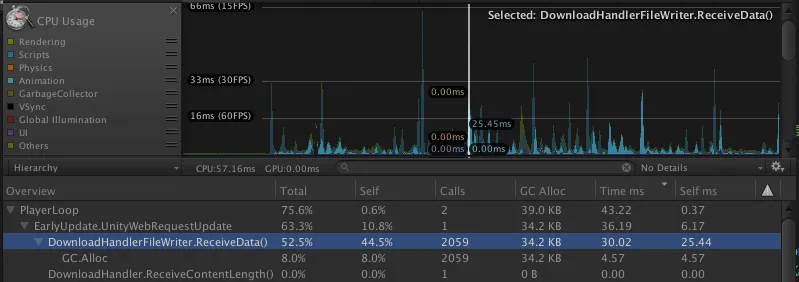
On the other hand, a buffer that's too big is wasteful and adds to the initialization cost. In this implementation it's configurable, but going beyond 16 KB didn't change performance much, so I measured with 16 KB.
Next, when data arrives, ReceiveData is called, and it passes the data to FileWriter.Write. The thing to watch out for here is that the data argument gets reused. data is the very array passed to the constructor, and once you return from ReceiveData, new data is written into it. An asynchronous write doesn't finish right away, so you either need to make a copy, or not return from ReceiveData until the write has finished. The latter would defeat the point of being asynchronous, so here the copy is made inside FileWriter.Write.
Also, if FileWriter's ring buffer is full, Write can't accept the data, so it loops with Sleep(1) until everything has been written. If you allocate a new buffer and hold the data until there's room to write, it won't block, but memory use goes up. In asynchronous processing, blocking time and memory use are a trade-off, so there's no perfect answer. The crux of the design is the compromise, the balance, that fits your use case.
Finally, when all the data has arrived, CompleteContent() is called. Here it calls FileWriter.End() to request that the file be closed. For real-world use, you'll also need separate error handling. The DownloadHandler callbacks don't include one for errors, so you'll probably need to write your own and call it directly.
Results
| Method | Parallel | Randomized | Time (s) | Max memory (MB) | Max spike (ms) |
|---|---|---|---|---|---|
| DownloadHandlerFile | 16 | Yes | 13.1-15.3 | 32-33 | 19-67 |
| DownloadHandlerFile | 64 | Yes | 12.1-13.6 | 33-33 | 32-33 |
| Custom DownloadHandler + asynchronous save | 16 | Yes | 11.9-13.8 | 35-35 | 18-18 |
| Custom DownloadHandler + asynchronous save | 64 | Yes | 12.1-14.5 | 39-39 | 18-19 |
On time, memory and spikes alike, I think it holds up pretty well.
The absence of spikes is probably just luck, but in this implementation, as long as FileWriter's ring buffer doesn't fill up, nothing blocks the main thread. Memory consumption is a bit high because a fixed 16 MB is allocated to FileWriter's ring buffer. If you started it small and grew it as needed, you could cut that down further (though with multithreading involved, that's quite a pain).
However, allowing unlimited growth invites bugs where memory consumption balloons and the app dies. If downloading consistently outpaces writing, memory use grows without bound, so you need a cap somewhere. There are various ways to decide how big and how to enforce it, but personally I prefer capping it at a low memory footprint. If memory runs out, the app dies; blocking a little won't kill it. If you can fix it at an acceptable size, there's no need to complicate things by making it growable.
Is the copy necessary?
In this implementation there are buffers in two places, the DownloadHandler and the FileWriter. That's why a copy is needed. But copying is the classic slow operation, and it's better avoided if possible. Can't we do something about it?
Normally, when input and output happen asynchronously, you can get by with a single buffer. For example, say we use a 10-byte array as the buffer. Downloaded data comes into slots 0, 1, 2, 3... The class that writes the file watches the buffer and writes incoming data out to the file. Once 10 bytes of downloaded data have accumulated, if slots up to 5 have already been written to the file, then 0, 1, 2, 3, 4, 5 can be overwritten. After 9 you wrap around to 0, so you can keep going forever with a fixed-size buffer. This technique is called a ring buffer, which uses the array cyclically; everything happens in one buffer, so there are zero copies.
So why is a copy needed here?
Because that's how Unity's interface works. The array you get in DownloadHandler.ReceiveData is reused. Even if you hand it as is to another thread to write to a file, its contents may already have changed by then. An interface that exposes a ring buffer is bug-prone, so I guess they avoided it.
In fact, if you don't pass a buffer to the DownloadHandlerScript constructor, a new buffer is allocated for every ReceiveData call, so nothing is reused and the copy becomes unnecessary. But the more data is waiting to be written, the more memory is used (the reference doesn't go away until the write finishes, so the buffer sticks around the whole time). If writing gets backed up while lots of downloaded data keeps pouring in, memory might run out and take the whole app down. Besides, in C#, allocating an array fills it with the default value (that is, 0), so it's costly, if not as costly as a copy. So I chose to copy.
I believe this predates DownloadHandlerFile, but some people went as far as not using UnityWebRequest at all. Impressive, but these days you can just use DownloadHandlerFile.
Conclusion
Why not use the standard way, that is, DownloadHandlerAssetBundle? It's perfectly usable. In fact, we shipped a game with it (Tokyo Prison). If you run into performance problems, consider bundling files together to reduce their number. Deleting unneeded cache files is also possible, if a pain.
Also, it looks like the Addressable Assets System will take care of this area sooner or later, so there's arguably no point in building anything yourself at this stage.
That said, there are situations where that won't do, so I'm currently building a library that covers downloading asset bundles, caching, loading assets, automatic release via reference counting, and so on. I hope to cover it in the next article (update: I wrote the article).