

[WebGL2] Computing and Drawing Huge Numbers of Instances on the GPU with GPU Instancing x Transform Feedback
Hello! I'm Fukasawa from the hyper-casual game team.
In this article, I'll use WebGL2 to display a huge number of meshes with GPU Instancing, and hand the computation of each instance's data over to the GPU with Transform Feedback.
↓ Here's the demo. You can jump to it from the image or the URL.
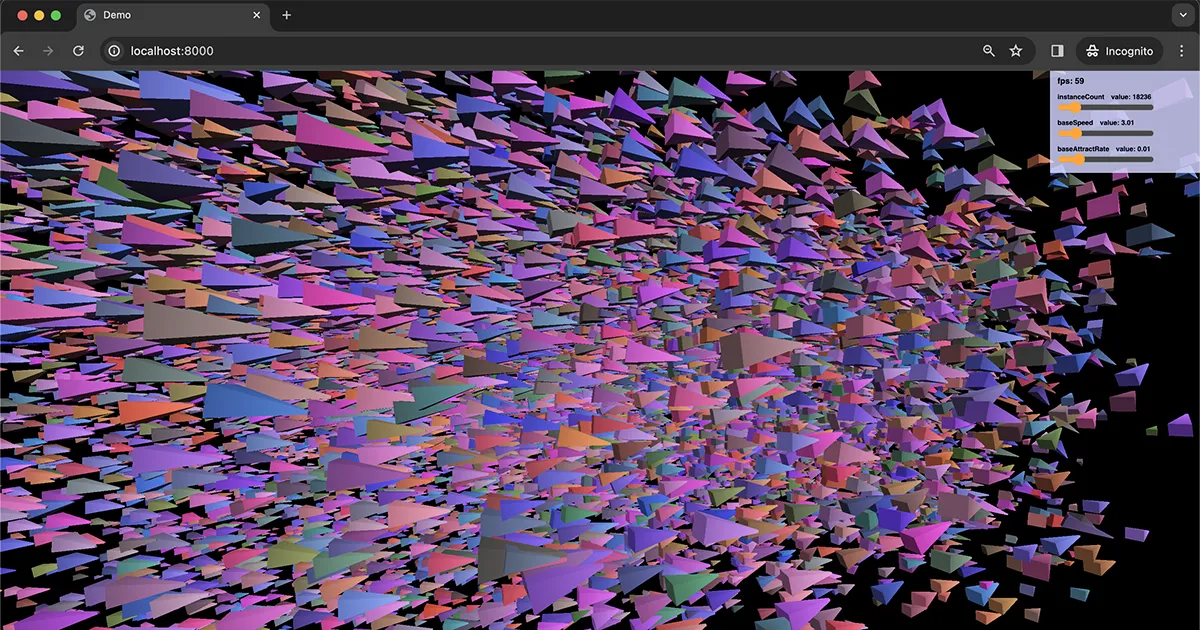
Demo: https://takumifukasawa.github.io/webgl-transform-feedback-gpu-instancing/
↓ The repository URL
Each mesh has 24 vertices. For the color, I compute only diffuse lighting from a directional light, factoring in each instance's color. It uses GPU Instancing, so there is a single draw call.
As for performance on actual devices:
- On a 2020 MacBook Pro (M1, 16 GB memory) with Chrome, it seems to draw over 100,000 instances while holding 60 FPS
- My own iPhone X with Safari seems to get close to that too
- My own Android S4-KC, which we often use in hyper-casual development, seems to manage 30 FPS up to about 15,000 instances, but beyond that the FPS gradually drops
About 3,000 instances
About 30,000 instances
About 100,000 instances
Working out the implementation approach
GPU Instancing
I'll store the mesh data in a Vertex Array Object (VAO from here on).
GPU Instancing can display multiple instances from one VAO with a single draw call.
Think of it as being able to draw several cubes even though the VAO contains only one cube's shape.
Concretely, the VAO also holds a vertex buffer containing per-instance data (position, velocity, color and so on), and the mesh's shader receives and processes that per-instance data.
The problem is where and how to handle "updating the per-instance data".
We want to compute things like position and velocity every frame, so depending on the number of instances, we can expect a considerable amount of computation per frame.
You can of course do the computation itself in JavaScript, making full use of Web Workers and the like, but updating the data of tens of thousands of instances or more on the JavaScript side every frame isn't very realistic given the number of loop iterations. On mobile devices it would be even harder.
Transform Feedback
That's where the GPU comes in. Compute Shaders aren't available in WebGL2, so instead we take a similar approach using Transform Feedback. Transform Feedback became a standard feature in WebGL2.
The advantage of Transform Feedback is that the results of the vertex shader can be written directly into a vertex buffer. And since rasterization can be skipped, there's no need for approaches like writing the data into a texture, fetching the texture in a shader and extracting the data...
The diagram below shows the idea.
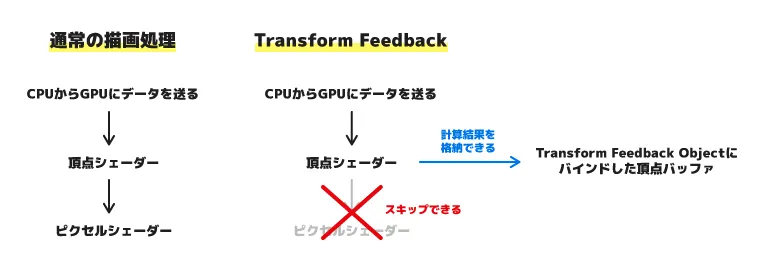
Another handy point is that once the data is written to a vertex buffer, you can read it from the JavaScript side with the getBufferSubData function.
(e.g. you can use it like a calculator, doing heavy computation in a shader and pulling the data out of the vertex buffer in JavaScript)
In other words, a GPGPU-like approach becomes possible: using Transform Feedback, without drawing anything, to hand a large amount of computation over to the GPU.
This time, I'll use Transform Feedback to update a vertex buffer holding the per-instance data every frame, and rebind it to the mesh's VAO.
I'll also make the velocity change continuously, gradually speeding up or slowing down, by adjusting it based on the previous frame's data.
Supporting GPU Instancing
Data structure
Before getting to Transform Feedback, let's first sort out the data structure of the VAO when drawing a simple triangle with GPU Instancing, at a different position for each instance.
Suppose the code that creates the VAO looks like this.
    ...

    const vao = gl.createVertexArray();
    gl.bindVertexArray(vao);

    attributes.forEach(attribute => {
        const {data, size, location, divisor, usage} = attribute;
        const vbo = gl.createBuffer();
        gl.bindBuffer(gl.ARRAY_BUFFER, vbo);
        gl.bufferData(gl.ARRAY_BUFFER, data, usage);
        gl.enableVertexAttribArray(location);

        gl.vertexAttribPointer(location, size, gl.FLOAT, false, 0, 0); // vertex data is limited to float32 this time

        if (divisor) {
            gl.vertexAttribDivisor(location, divisor);
        }
    });

    gl.bindBuffer(gl.ARRAY_BUFFER, null);

    gl.bindVertexArray(null);

    ...
Let the triangle's vertices be p0, p1, p2. For now I won't consider UVs or normals and will focus on the vertex positions only. I won't consider interleaving or indices either.
The per-instance positions follow one after another: instance0_position, instance1_position, and so on.
// vertex attributes
attributes = [
    // positions of the triangle's vertices
    {
        data: new Float32Array([
            p0.x, p0.y, p0.z,
            p1.x, p1.y, p1.z,
            p2.x, p2.y, p2.z
        ]),
        size: 3,
        location: 0,
        usage: gl.STATIC_DRAW,
    },
    // all the per-instance positions stored together
    {
        data: new Float32Array([
            instance0_position.x, instance0_position.y, instance0_position.z,
            instance1_position.x, instance1_position.y, instance1_position.z,
            instance2_position.x, instance2_position.y, instance2_position.z,
            ...
        ]),
        size: 3,
        location: 1,
        usage: gl.STATIC_DRAW
        divisor: 1,
    }
];
Within one VAO, a vertex buffer containing the triangle's vertex positions and a vertex buffer containing all the per-instance data live side by side.
By calling gl.vertexAttribDivisor(location, divisor); when binding a vertex buffer to the VAO, you can split the vertex buffer into per-instance data (more on this later).
The method for drawing with GPU Instancing takes the form
gl.drawArraysInstanced(glPrimitiveType, startOffset, drawCount, instanceCount);
To display 100 instances with the VertexArrayObject from before, it would be
gl.drawArraysInstanced(gl.TRIANGLES, 0, 3, 100);
There are 3 vertices, so drawCount is 3, and there are 100 instances, so the instanceCount part is 100.
The shader side
The shader side needs no special handling for GPU Instancing. That's because the gl.vertexAttribDivisor function has already set things up so that, by the time the data is passed to the vertex shader, the vertex buffer holding the instancing data has been split per instance. Let's look at this in detail.
For example, you can write a vertex shader that offsets the local coordinates to determine each instance's position, like this.
#version 300 es

layout(location = 0) in vec3 aPosition;
layout(location = 1) in vec3 aInstancePosition;

void main() {
    gl_Position = projectionMatrix * viewMatrix * worldMatrix * vec4(aPosition + aInstancePosition, 1.);

    ...
Below is the per-instance data from earlier again. It has location = 1, size = 3, divisor = 1. I'm not considering interleaving.
First, gl.vertexAttribPointer(location, size, gl.FLOAT, false, 0, 0); is called so that the vertex attribute at location = 1 is recognized as a vec3.
When gl.vertexAttribDivisor(location, divisor); is called here, divisor = 1 splits the vertex buffer into chunks of size * divisor = 3, so
for vertex 0 processed by the vertex shader above, the three values instance0_position.x, instance0_position.y, instance0_position.z are passed to aInstancePosition as the components of a vec3.
In this way, you can use gl.vertexAttribDivisor's ability to split a vertex buffer to set things up so that, by the time the data is passed to the vertex shader, the vertex buffer holding the instancing data has been split per instance. That's why the shader side needs no special handling for GPU Instancing.
    {
        data: new Float32Array([
            instance0_position.x, instance0_position.y, instance0_position.z,
            instance1_position.x, instance1_position.y, instance1_position.z,
            instance2_position.x, instance2_position.y, instance2_position.z,
            ...
        ]),
        size: 3,
        location: 1,
        usage: gl.STATIC_DRAW
        divisor: 1,
    },
That sorts out the data structure and the shader-side processing for using GPU Instancing.
All that remains is to somehow update the "per-instance vertex data" bound to the VAO, and then we should be able to change the instances' positions dynamically.
Now it's finally Transform Feedback's turn.
Updating per-instance data with Transform Feedback
As mentioned above, continuous changes in velocity, such as gradually speeding up and slowing down, can be achieved by adjusting the velocity based on the previous frame's data.
Using the previous frame's data, however, raises a problem: the WebGL rule that "a single vertex buffer can't be used as the write target and the read source at the same time".
Specifically, when updating with Transform Feedback, the vertex buffer bound to the VAO for reading and the vertex buffer being updated can't be the same one at the same time. In other words, you can't update instancing data across frames with just one vertex buffer.
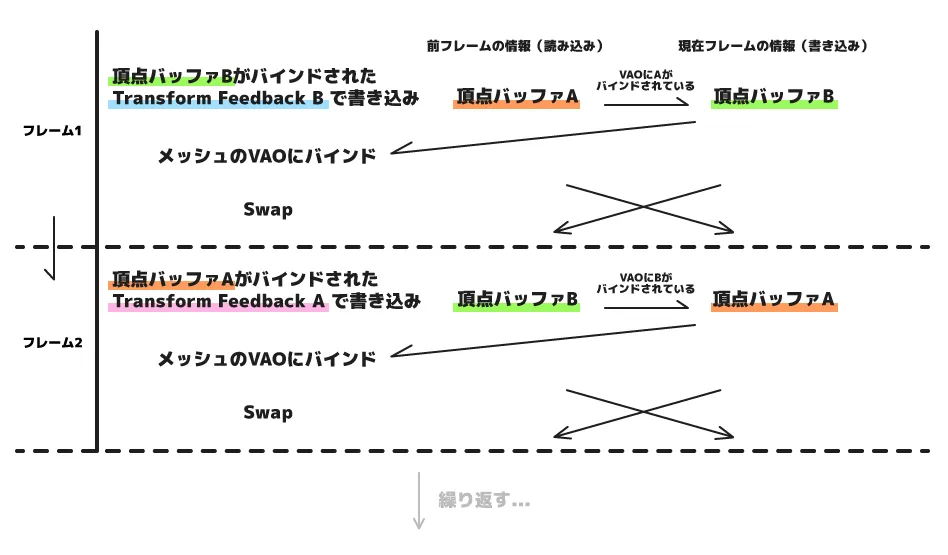
The way around this is a Double Buffer-style approach.
Double Buffer
I think the best-known kind of double buffer uses two textures/render targets. You read data from one texture and write data to the other, and in the next frame you swap their roles, updating the data step by step.
This trick exists because textures/render targets can't be used as the write target and the read source at the same time either.
In the same way, we prepare two Transform Feedbacks and two vertex buffers, and update the position and velocity in the vertex buffers while swapping reading and writing every frame.
Then, by rebinding the vertex buffer updated by Transform Feedback to the mesh's VAO, the mesh's instancing data gets updated.
The diagram below shows the idea.
Implementation
Now we're ready. Let's finally look at the concrete implementation.
The following is code excerpted from the sample implementation.
VAO code
I wrote a function that wraps the VAO, with helpers such as one that gets the vertex buffers.
The sample also uses an Index Buffer Object, so that implementation is included too.
function createVertexArrayObjectWrapper(gl, attributes, indicesData) {
    const vao = gl.createVertexArray();
    let ibo;
    let indices = null;

    const vertices = []; // array of { name, vbo, usage, location, size, divisor }

    gl.bindVertexArray(vao);

    const getBuffers = () => {
        return vertices.map(({vbo}) => vbo);
    }

    const findBuffer = (name) => {
        return vertices.find(elem => elem.name === name).vbo;
    }

    attributes.forEach(attribute => {
        const {name, data, size, location, divisor, usage} = attribute;
        const vbo = gl.createBuffer();
        gl.bindBuffer(gl.ARRAY_BUFFER, vbo);
        gl.bufferData(gl.ARRAY_BUFFER, data, usage);
        gl.enableVertexAttribArray(location);

        gl.vertexAttribPointer(location, size, gl.FLOAT, false, 0, 0); // vertex data is limited to float32 this time

        if (divisor) {
            gl.vertexAttribDivisor(location, divisor);
        }

        vertices.push({
            name,
            vbo,
            usage,
            location,
            size,
            divisor
        });
    });

    if (indicesData) {
        ibo = gl.createBuffer();
        gl.bindBuffer(gl.ELEMENT_ARRAY_BUFFER, ibo);
        gl.bufferData(gl.ELEMENT_ARRAY_BUFFER, new Uint16Array(indicesData), gl.STATIC_DRAW);
        indices = indicesData;
    }

    gl.bindBuffer(gl.ARRAY_BUFFER, null); // unbind array buffer

    gl.bindVertexArray(null); // unbind vertex array to webgl context

    if (ibo) {
        gl.bindBuffer(gl.ELEMENT_ARRAY_BUFFER, null); // unbind index buffer
    }

    return {
        vao,
        indices,
        vertices,
        getBuffers,
        findBuffer
    }
}

function setBufferToVAO(vaoWrapper, name, newBuffer) {
    const target = vaoWrapper.vertices.find(elem => elem.name === name);
    target.buffer = newBuffer;
    gl.bindVertexArray(vaoWrapper.vao);
    gl.bindBuffer(gl.ARRAY_BUFFER, newBuffer);
    gl.enableVertexAttribArray(target.location);
    gl.vertexAttribPointer(target.location, target.size, gl.FLOAT, false, 0, 0);
    gl.bindVertexArray(null);
}
The setBufferToVAO function above is what rebinds the vertex buffer computed by Transform Feedback to the mesh's VAO.
You bind the VAO and then the vertex buffer. Apart from not having to specify the divisor again, the flow is almost the same as creating and binding the buffers when the VAO is created.
* Copying the data into the vertex buffer with something like bufferSubData might be faster than rebinding, but I haven't tried it this time.
Transform Feedback code
function createTransformFeedback(gl, buffers) {
    const transformFeedback = gl.createTransformFeedback();
    gl.bindTransformFeedback(gl.TRANSFORM_FEEDBACK, transformFeedback);
    for (let i = 0; i < buffers.length; i++) {
        const buffer = buffers[i];
        gl.bindBuffer(gl.ARRAY_BUFFER, buffer);
        gl.bindBufferBase(gl.TRANSFORM_FEEDBACK_BUFFER, i, buffer);
        gl.bindBuffer(gl.ARRAY_BUFFER, null);
    }
    gl.bindTransformFeedback(gl.TRANSFORM_FEEDBACK, null);

    return transformFeedback;
}

function createTransformFeedbackDoubleBuffer(gl, vertexShader, fragmentShader, attributes, varyings, count) {
    let shader;
    const buffers = [];
    let drawCount;

    // the VAO updated in the previous frame
    const getReadVAOWrapper = () =>  buffers[0].vertexArrayObjectWrapper;

    // the VAO to update in the current frame, and the Transform Feedback used in the current frame
    const getWriteTargets = () => {
        return {
            vertexArrayObjectWrapper: buffers[1].vertexArrayObjectWrapper,
            transformFeedback: buffers[1].transformFeedback,
        }
    }

    const swap = () => {
        buffers.reverse();
    }

    shader = createShader(gl, vertexShader, fragmentShader, varyings);
    drawCount = count;

    attributes.forEach((attribute, i) => {
        attribute.location = i;
        attribute.divisor = 0;
    });

    const attributes1 = attributes;
    const attributes2 = attributes.map(attribute => ({...attribute}));

    const vertexArrayObjectWrapper1 = createVertexArrayObjectWrapper(
        gl,
        attributes1,
    );
    const vertexArrayObjectWrapper2 = createVertexArrayObjectWrapper(
        gl,
        attributes2,
    );

    const transformFeedback1 = createTransformFeedback(
        gl,
        vertexArrayObjectWrapper1.getBuffers()
    );
    const transformFeedback2 = createTransformFeedback(
        gl,
        vertexArrayObjectWrapper2.getBuffers()
    );

    buffers.push({
        vertexArrayObjectWrapper: vertexArrayObjectWrapper1,
        transformFeedback: transformFeedback1,
    })
    buffers.push({
        vertexArrayObjectWrapper: vertexArrayObjectWrapper2,
        transformFeedback: transformFeedback2,
    });

    return {
        getReadVAOWrapper,
        getWriteTargets,
        swap,
        shader,
        drawCount
    }
}

...

// example call
const transformFeedbackDoubleBuffer = createTransformFeedbackDoubleBuffer(
    gl,
    vertexShader,
    fragmentShader,
    varyingNames,
    count
);
The shader for Transform Feedback
This is the Transform Feedback vertex shader that updates the position and velocity.
* The demo at the URL may differ in things like tuned values, but the overall structure should be the same.
The instances move loosely toward the mouse/tap position. I want each instance to move at a different speed, so I vary the velocity using gl_VertexID.
Since this is per-vertex data in Transform Feedback, I use gl_VertexID, not gl_InstanceID.
The idea is to generate random numbers from gl_VertexID and use them to adjust things like the speed and how widely the instances move.
#version 300 es

precision mediump float;

layout (location = 0) in vec3 aPosition;
layout (location = 1) in vec3 aVelocity;

out vec3 vPosition;
out vec3 vVelocity;

uniform vec3 uChaseTargetPosition;
uniform float uTime;
uniform float uDeltaTime;
uniform float uBaseSpeed;
uniform float uBaseAttractRate;

// ref: https://thebookofshaders.com/10/
float rand(vec2 co){
    return fract(sin(dot(co, vec2(12.9898, 78.233))) * 43758.5453); // 0 ~ 1
}

void main() {
    float fid = float(gl_VertexID);

    float hashA = rand(vec2(fid * .2, fid * .3));
    float hashB = rand(vec2(fid * .3, fid * .4));
    float hashC = rand(vec2(fid * .4, fid * .5));

    vec3 targetPositionOffset = vec3(  // shift the direction to follow slightly
        cos(uTime * (hashA + hashA * 1.) + hashA * 10.) * (.6 + hashA * .2),
        sin(uTime * (hashB + hashB * 1.1) + hashB * 20.) * (.6 + hashB * .2),
        sin(uTime * (hashC + hashC * 1.2) + hashC * 30.) * (1. + hashC * .2) + 2.2
    );
    vec3 targetPosition = uChaseTargetPosition + targetPositionOffset;

    vVelocity = mix( // use mix to bring it closer to the direction to follow
        aVelocity,
        normalize(targetPosition - aPosition) * (uBaseSpeed + hashA * hashB),
        uBaseAttractRate + hashC * .01
    );

    vPosition = aPosition + aVelocity * uDeltaTime;
}
Processing inside the loop
Below is an excerpt of the Transform Feedback update code inside the loop.
        ...

        // get the Transform Feedback and VAO for writing
        const writeBufferTargets = transformFeedbackDoubleBuffer.getWriteTargets();
        // get the previous frame's vertex array object
        const readVAO = transformFeedbackDoubleBuffer.getReadVAOWrapper().vao;

        gl.bindVertexArray(writeBufferTargets.vertexArrayObjectWrapper.vao);

        gl.useProgram(transformFeedbackDoubleBuffer.shader);

        // update the various uniforms
        gl.uniform3fv(
            gl.getUniformLocation(transformFeedbackDoubleBuffer.shader, 'uChaseTargetPosition'),
            chaseTargetPosition.elements
        );

        ...

        gl.enable(gl.RASTERIZER_DISCARD); // skip rasterization

        gl.bindTransformFeedback(gl.TRANSFORM_FEEDBACK, writeBufferTargets.transformFeedback);
        gl.beginTransformFeedback(gl.POINTS);
        gl.drawArrays(gl.POINTS, 0, debuggerStates.instanceCount.currentValue);
        gl.endTransformFeedback();
        gl.bindTransformFeedback(gl.TRANSFORM_FEEDBACK, null);

        gl.disable(gl.RASTERIZER_DISCARD); // stop skipping rasterization

        gl.useProgram(null);

        gl.bindVertexArray(null);

        // assign the buffers updated by transform feedback to the buffers of the mesh to draw
        setBufferToVAO(
            boxVertexArrayObjectWrapper,
            "instancePosition",
            writeBufferTargets.vertexArrayObjectWrapper.findBuffer("position")
        );
        setBufferToVAO(
            boxVertexArrayObjectWrapper,
            "instanceVelocity",
            writeBufferTargets.vertexArrayObjectWrapper.findBuffer("velocity")
        );

        transformFeedbackDoubleBuffer.swap();  // we've written and read, so swap

        ...

        // draw: the sample uses indexed drawing, so call drawElementsInstanced
        gl.drawElementsInstanced(gl.TRIANGLES, meshDrawCount, gl.UNSIGNED_SHORT, 0, debuggerStates.instanceCount.currentValue);
Finally
What did you think? It's really appealing that even a browser can draw meshes by the tens of thousands, and drawing in such quantities packs in so much visual information that I find it just plain fun.
Thank you for reading this far!
↓ Once again, here's the demo. You can jump to it from the image or the URL.
Demo: https://takumifukasawa.github.io/webgl-transform-feedback-gpu-instancing/
↓ The repository URL
Kayac is also hiring engineers who love WebGL!
Why not sign up for Kayac's newsletter?
References
wgld.org | WebGL: VAO(vertex array object) |