

In Praise of Decibels
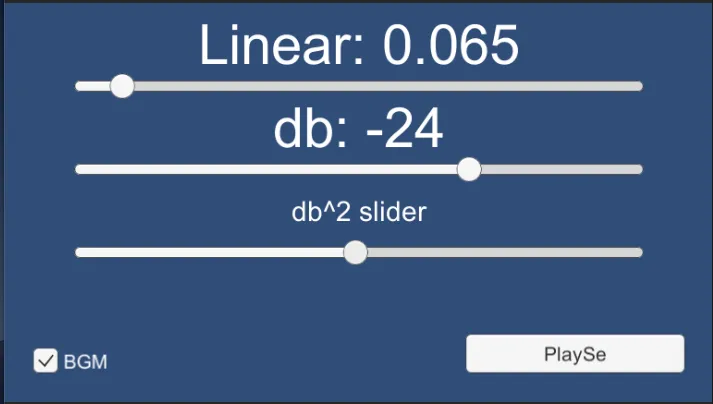
Clicking the screenshot takes you to the WebGL build.
Hello. I'm Hirayama from the Technology Department.
Today's topic is decibels (db). Are you comfortable working with them?
If you are, there's no need to read this.
Volume for Unity people
If you want to adjust volume in Unity, you put a value from 0 to 1 into AudioSource.volume.
0 is silence, 1 is the original data as is, and otherwise the smaller it is the quieter the sound. That's all there is to it. Nothing hard to understand.
A programmer who knows a little more may also know that sound data is an array of values representing a wave. For example, if the wave is represented with 16-bit values, sound data is a long row of values from -32768 to 32767. That gets multiplied by AudioSource.volume's 0-to-1 value and comes out of the speakers. 0.5 halves it, and 0.1 makes it 1/10.
Easy to understand. So what's the problem?
Volume for sound people
Actually, sound professionals use a unit called the "decibel (db)" to express volume. It goes up by 20 for every tenfold increase; for example, -6 decibels halves the volume.
| Original value | Decibels |
|---|---|
| 1 | 0 |
| 0.5 | -6 |
| 0.1 | -20 |
| 0.01 | -40 |
| 0.001 | -60 |
"What? That's confusing."
That's what you're thinking, right? What's wrong with 0.5?
But for sound professionals, decibels are much easier to use. Why?
The reason lies in the characteristics of human hearing.
Characteristics of human hearing
Human senses are, in many cases, logarithmic.
A 1,000 yen lunch with 500 yen off, and a 1 million yen car with 500 yen off: the difference is the same 500 yen.
But a 1 million yen car becoming 999,500 yen doesn't make you happy at all, does it? For 1,000 yen it's half price, 50%, but for 1 million yen it's 99.95%, so as a ratio it's practically nothing.
As this shows, people in many cases look at ratios rather than differences. The same goes for hearing.
Sound data going from 1 to 0.1 and going from 0.1 to 0.01 feel like similar changes. Both are 1/10, after all. Even though the former drops by 0.9 and the latter by only 0.09.
The slider problem
This becomes a particular problem when volume is adjusted with a slider. Imagine a slider from 0 to 1.

Say the left end is 0 and the right end is 1. Suppose that after dropping from 1 to 0.1, you think "I want to lower it again by about as much as I just did". Making it 1/10 again should do, so 0.01 looks right. But the slider range you have to work with is only 1/10 of what it was. And if you want to make it 1/10 once more, there's only 1/100 of the width left, so fine adjustment is nearly impossible.
So you end up with this: "on the right, moving it quite a lot doesn't change much, but on the left, moving it just slightly changes it drastically".
But when you adjust with a slider, you want moving it 1 cm to produce the same change wherever you are. With decibels, you get quite close to that.
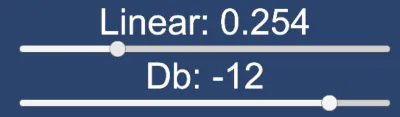
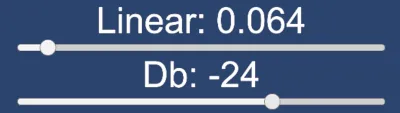
The second slider is for setting in decibels. Say you first lower it from 0 to -12, then down to -24. Both differences are 12, but the corresponding original volumes are "1 to 0.25" and "0.25 to 0.625". The differences are 0.75 and 0.1875, completely different, but in decibels they become the same width. Do try playing with it in the sample.
This is why decibels are so widely used. You can make almost all adjustments with "two-digit integers".
In general, when the adjustment range is wide, you make it adjustable with a logarithmic value, like decibels. Otherwise the range spans many digits, like 0.0001 to 1, and adjusting gets hard.
The same thing happens in graphics, for example: it's probably better to be able to set the brightness of lights logarithmically. The brightness of a star and the brightness of the midday sun can differ by a factor of 10 billion (see the Wikipedia page on "magnitude").
How easy "two-digit integers" are to use
This isn't limited to volume: it's handy to make most adjustments possible with "two-digit integers". That's probably about how many steps humans can tell apart.
For example, an enemy's attack power ends up something like 5 or 10 early on and 10,000 near the end, right? Early on, a single point matters enormously, but near the end, changing it by not just 1 but even 100 makes little difference.
If you had people adjust this with a slider, it would be as awkward to use as volume. In cases like this, too, making it logarithmic might make it easier to adjust with a slider.
Implementation
Converting back and forth
First we need to convert between 0-to-1 values and decibels. I'd like a name for the 0-to-1 values too, so let's call them "linear values" for now.
public static float ToDecibel(float linear, float dbMin)
{
    var decibel = dbMin;
    if (linear > 0f)
    {
        decibel = 20f * Mathf.Log10(linear);
        decibel = Mathf.Max(decibel, dbMin);
    }
    return decibel;
}

public static float FromDecibel(float decibel)
{
    return Mathf.Pow(10f, decibel / 20f);
}
Take the base-10 logarithm (Log10) of a linear value and multiply by 20, and you get decibels. For example, the logarithm of 0.1 is -1. Multiply that by 20 and you get -20.
Here, Log10(0) is minus infinity, so values below a certain point are clamped to the minimum. The point at which we treat it as silence is dbMin in the code, and something around -80 is probably good.
If the sound data is 16-bit, it's -32768 to 32767, and -80 db is 1/10,000, so it drops to a range of -3 to 3. You could call that almost silent. If you want to drop it completely to 0, maybe -90 or -100 would be fine too.
A narrower range makes the slider easier to adjust, but at around -60 you can faintly hear it when the speaker volume is high. Based on my own testing, -80 seems fine.
Make everything people see decibels
What remains is how the data is handled: which parts of the data pipeline are in decibels and which are linear values. My current conclusion is decibels wherever possible.
That is, just before passing a value to AudioSource.volume, convert it to a linear value with FromDecibel(), and conversely, when exposing AudioSource.volume to the outside, immediately turn it into decibels with ToDecibel().
For example, if you make something like a function that sets the BGM volume, have it take decibels, and if you make a slider that lets players adjust the volume, make that decibels too. When saving it on the device, decibels; when setting sound effect volumes in Excel or a spreadsheet, decibels. Set things up so that nobody but the programmers who touch AudioSource directly ever sees anything but decibels.
Combining several settings
When several settings stack up, you add the decibels.
For example, if a sound asset's default volume is -6 db, a scene is set to play it at -12 db, and on top of that the player has set the overall volume to -6 db, add them all up and you get -24 db.
With linear values this is multiplication. If the original data is 0.5 (= -6 db), the scene setting is 0.25 (= -12 db), and the player has set 0.5 (= -6 db), you multiply them all to get 0.0625. In decibels that's -24 db, so the result is the same. Don't you think decibels are simpler, since you just add?
A little trick when making sliders
Making a decibel slider is easy: just prepare a slider that's -80 at the left end and 0 at the right end.
However, you rarely want to fine-tune the region at or below -40, that is, 1/100. Between very quiet and silent, you don't need such fine adjustment, do you?
Devoting slider length to the places where you want fine adjustment is what makes it easy to use, and if you use -80 to 0 evenly, quite a lot of length goes to -80 to -40, where it isn't really needed.
So how about adding one more trick?
Just square it
Insert one more conversion function so that the range from -40 to 0 is bigger than the range from -80 to -40. There are various ways, but "squaring" is probably the simplest.
Say -80 db is 0 and 0 db is 1. Then -40 db, for example, is in the middle, so 0.5. Instead of using this as is, square it to 0.25 and use that as the slider position.
How's that?
-40 db at 0.25 means -80 db to -40 db uses only 1/4 of the slider's length. The remaining 3/4 is used for -40 db to 0 db. You can use more distance for the upper part, where you want fine adjustment, so adjusting becomes easier.
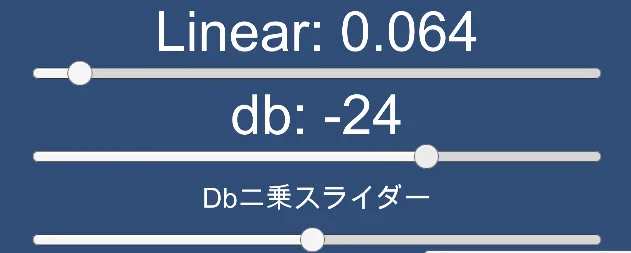
The code would be something like this.
static float DbToSliderPos(float db)
{
    float pos = (db + 80f) / 80f; //[-80,0]→[0,1]
    return pos * pos; // square it
}
Conversely, when going from the slider to decibels, take the inverse of squaring, that is, the square root. In code, something like this.
static float SliderPosToDb(float pos)
{
    pos = Mathf.Sqrt(pos);
    float db = (pos * 80f) - 80f; //[0,1]→[-80,0]
    return db;
}
For a UI that players use to adjust things, I think this is about right.
In fact, in sound editing software used by sound professionals, such as Cubase, the volume sliders get narrower toward the bottom too. I think a trick like this is worth having.
Closing
I think it's best to get this sort of thing in place before full-scale data production begins.
It's quite common, isn't it, for early development to play dummy sounds any old way without worrying about volume, with the sound people joining partway through.
When that happens, the sound expert joins after a programmer who's an amateur at sound has finished building the sound-related processing and even designing the data input pipeline. If the sound effect parameter spreadsheets, json and so on are all specified in linear values, it becomes quite hard for the sound people to make proper adjustments. Even if the sound person says "BGM at -8 db while dialogue is playing", it has to be converted into a linear value every single time.
In fact, that's what happened in the development of Tokyo Prison. Much later, we hurriedly added a debug volume graph in decibels for the sound people, and reworked the sliders on the players' options screen to be decibel-based (and without the squaring trick, at that). And by then it was too late to switch the input data to decibels.
Even if you end up in a similar situation where you can't touch the input data side, there are things you can do. A volume UI for players and a decibel volume display for the sound people should be possible even after the fact. You have nothing to lose by doing them.