

A Debug HTTP Server on Smartphones (2): Browsing the File Tree and Editing in Place
Hello. I'm Hirayama from the Technology Department.
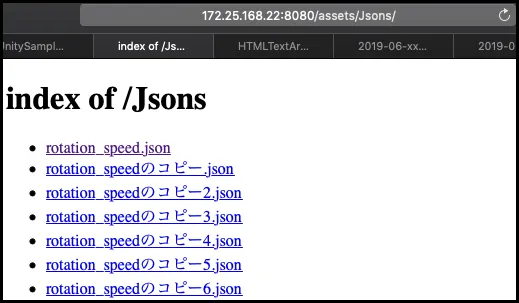
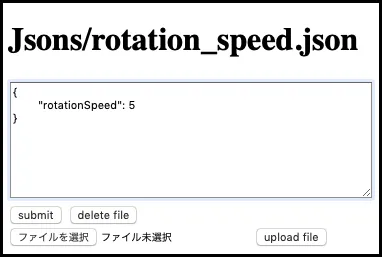
This is a sequel to the article about running an http server on a smartphone. You can now edit text files in the browser and view the file tree under StreamingAssets. Text files can be edited on the spot, and anything else can be replaced by uploading.
It's still far from finished and I haven't put it to real use yet, but I'd like to get some feedback and put it to use in development, so I decided to write it up now.
The code is on GitHub in the form of a sample project. I haven't quite settled on how to preserve or update code that goes with a blog post written mid-development, but basically I plan to keep the old code in a branch and overwrite it.
What's improved this time
In the previous article I only implemented uploading and deleting files. If you wanted to "fix the stage 3 data and run it", it took all this: edit the file on a PC, enter the destination path on the browser page, choose the file in the file dialog, then press the send button.
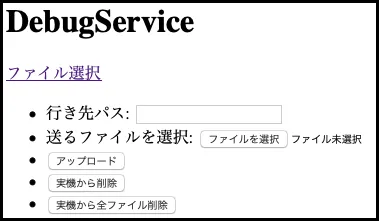
But I think the fundamentals of tool-making are "save every click you can" and "remove steps where you can make mistakes", so this state of affairs is no good at all.
- Entering the destination is a pain, and easy to get wrong.
- Right now, it uploads even if you get it wrong
- You probably don't remember destination paths anyway
- For a small change, editing and saving in a separate editor is a pain
- Most changes are probably just trying out different numbers, maybe only a few characters.
So this time I set out to improve that. To cut to the chase, I added two features:
- A simple version of something like Finder on Mac or Explorer on Windows, in the browser.
- You can select files without typing strings.
- On-the-spot editing of text files.
You select files via the "File selection" link in the screenshot above.
Implementation
The DebugServer I made last time simply held a dictionary mapping server paths to callbacks and called the callback for a given path. Implementing features was left entirely to the user; both uploading and deleting lived on the user's side. The boundary between the library and the user code may not be very clear in the sample, but everything under the Kayac directory is meant to be a library that the app doesn't touch. The idea is to package it up and distribute it.
This time I extended the library itself so that "a dedicated class treats everything under a specific folder as file access".
It's a class called DebugFileService, and when, say, a request for a path under /assets/ comes in, it interprets it as a file path inside StreamingAssets and handles it accordingly. For example, http://192.168.1.5/assets/StageData/stage1.json is interpreted as StreamingAssets/StageData/stage1.json, and since it's json, it serves an edit form prefilled with the file's contents.
Generating HTML
This time, for things like generating file lists, I really did need to emit HTML dynamically, which raised the question of how.
In this sample I'm using System.Xml.XmlWriter for now. I'm sure someone out there offers something better suited to the job, but checking licenses is a pain, and "being standard" counts for a lot. It's only for debugging after all, so I think this is fine.
XmlWriter has quite a few features, but for something like this, these are about all you'll use.
- The XmlWriterSettings class
- Create() taking a StringBuilder
- WriteDocType()
- WriteStartElement()
- WriteEndElement()
- WriteAttributeString()
- WriteString()
- Close()
For example, if you write code like this,
var sb = new StringBuilder();
var settings = new XmlWriterSettings();
settings.Indent = true;
settings.IndentChars = "\t";
settings.NewLineChars = "\n";
settings.OmitXmlDeclaration = true; //don't emit <?xml ...
var writer = XmlWriter.Create(sb, settings);
writer.WriteDocType("html", null, null, null);
writer.WriteStartElement("html");
writer.WriteStartElement("head");
writer.WriteStartElement("meta");
writer.WriteAttributeString("charset", "UTF-8");
writer.WriteEndElement(); // close meta
writer.WriteElementString("title", "DebugService");
writer.WriteEndElement(); // close head
writer.Close();
you get an html fragment like the following.
<!doctype html>
<html>
<head>
   <meta charset="UTF-8">
   <title>DebugService</title>
</head>
If you write convenience functions that bundle several XmlWriter calls for common patterns (HtmlUtil), generating html takes a, well, tolerable amount of effort.
For example, for an A element,
public static void WriteA(XmlWriter writer, string hrefAttribute, string innerText)
{
    writer.WriteStartElement("a");
    writer.WriteAttributeString("href", hrefAttribute);
    writer.WriteString(innerText);
    writer.WriteEndElement();
}
a function like this makes it much less painful.
I also tried the DOM style (the approach using XmlDocument), but you still need XmlWriter in the end and the code gets longer, so it isn't much of a win.
You can also write html directly into a StringBuilder, which makes the code shorter, but it turns into a painful mess of double quotes and tabs.
Writing out javascript
Writing out javascript is quite a hassle. For this, though, I decided to just embed prewritten strings as is, since for now the code is all fixed. Putting more than a few lines of code in a string literal is quite a nuisance, but @-prefixed literals (verbatim string literals) make it a bit easier.
const string script = @"
var log = document.getElementById('log');
var onUpdate = function () {
  var request = new XMLHttpRequest();
  request.onload = function () {
      log.value = '編集受理\n';
  };
  request.onerror = function () {
      log.value = '編集失敗\n';
  };
  request.open('PUT', document.location.href, true);

  var textArea = document.getElementById('text');
  request.send(textArea.value);
};";
A \ inside isn't treated as an escape, so the code is easy to write.
Still, I don't like having something like this suddenly show up in the middle of C# code. I'd like a cleaner solution, but making a separate file every time and loading it through a TextAsset reference is really overkill. For now, I think it can't be helped.
The trailing slash problem in URLs
This is probably common knowledge for people who work with web technology, but whether a url ends with a slash makes quite a difference.
When you access http://hoge/StageData/, the current directory is /StageData. So if the html has <a href="fuga.png">, it points to http://hoge/StageData/fuga.png.
On the other hand, for http://hoge/StageData without the slash, the current directory is /. So if it has <a href="fuga.png"> there, it points to http://hoge/fuga.png.
It's nice to be forgiving and show the contents of StageData even when the slash is missing, but if the file list links in the html you emit are the same as when the trailing / is there, the files aren't found and you get errors. It took me about an hour to figure out this behavior. You have to change the a element's href value depending on whether the url ends with /.
Still, I didn't want to bother with that this time, so I decided to use HttpListenerResponse.Redirect(). When there's no trailing /, it redirects to the url with the / added.
url += "/";
response.Redirect(url);
This way, even if you type a url without the / in the browser's address bar, you end up at the url with the /. This function sets the StatusCode to Redirect (302), so be careful not to touch HttpListenerResponse.StatusCode after that.
Android can't search inside StreamingAssets
The most tedious part this time was supporting Android. On Android, everything under StreamingAssets is packed into the app's one huge file and can't be read with the normal System.IO features. Exists(), GetDirectories() and GetFiles() of System.IO.Directory can't be used.
In other words, given a directory, you can't tell whether it exists or what's in it, so you can't return lists of files and directories.
Implementation
In the end, I decided to get by without System.IO.
- In the editor, write what's under StreamingAssets into a json
- Put the json under Resources
- When DebugFileService starts, read the json and build a table
- When a request to look inside a directory comes in, consult that table to build the list of its contents
That's roughly it.
I put the editor extension that writes the json in StreamingAssetsMap.cs.
First I write a static function GenerateMap() and give it the MenuItem attribute so it can be run from the menu.
Next, I implement IPreprocessBuildWithReport so it's called automatically before a build. You also need to implement IOrderedCallback.callbackOrder; here I just return 0.
On top of that, so it's also called automatically when you enter play mode in the editor, I register a callback with EditorApplication.play/ModeStateChanged.
static StreamingAssetsMap()
{
    EditorApplication.playModeStateChanged += OnPlayModeStateChanged;
}

static void OnPlayModeStateChanged(PlayModeStateChange state)
{
    if (state == PlayModeStateChange.EnteredPlayMode)
    {
        GenerateMap();
    }
}
The static constructor adds a handler to the event, so the json is generated when play mode starts.
Generating the json, deserializing it and searching at run time would take a long time to explain and are fairly primitive code, so if you're interested, please take a look at the code.
Supplement: JsonUtility's restrictions and representing a tree
There's just one point that's hard to grasp from the code alone, so let me add a note. Because I use JsonUtility to convert to json and to create class instances from json, a little trickery is needed.
JsonUtility can't handle a type that contains a reference to that same type.
[System.Serializable]
class Hoge{
    public Hoge next;
}
Something like this won't work, because Hoge contains a Hoge.
But what I want to store this time is file system information. A file system has directories inside directories, so the natural way to write it ends up looking like the above.
I could just use another Json library, but JsonUtility's speed is attractive, and above all, bringing in something else is a pain. So I dusted off an old-school technique to make JsonUtility work anyway.
[System.Serializable]
class Directory
{
    public string name;
    public int firstChild;
    public int nextBrother;
}

[System.Serializable]
class Map
{
    public List<Directory> directories;
}
firstChild is the first subdirectory the directory contains, and nextBrother is the next directory alongside it in the same parent directory. Why int? Because instead of holding references to Directory directly, they hold indices into the List in the Map class.
- A
- B
- C
A directory structure like this is serialized as follows.
{
    "directories":[
        {
            "name":"A",
            "firstChild":1,
            "nextBrother":-2147483648
        },
        {
            "name":"B",
            "firstChild":-2147483648,
            "nextBrother":2
        },
        {
            "name":"C",
            "firstChild":-2147483648,
            "nextBrother":-2147483648
        },
 ]
}
A's first child is B, at index 1. C is also a child of A; it's B's nextBrother, at index 2. Since null can't be used, int.MinValue, or -2147483648, goes in instead, and when deserializing you just treat any negative value as null. By laying out the data in this "first child, next sibling" form in an array, you can serialize a tree. Deserializing is just the same thing in reverse.
Another way to represent a tree is for each node to hold an array of its children. It's intuitive, but the json gets more complicated with an array in every node, and memory efficiency suffers. I like the "first child, next sibling" form.
Where is the official information on JsonUtility's restrictions?
Speaking of which, where are JsonUtility's restrictions officially documented? The manual doesn't say anything like "a type can't contain itself". But when I tried it, nothing was output.
[System.Serializable]
class Hoge
{
    public List<Hoge> hoges;
}
If you put a List in between like this, it does get output, but then you get a warning that "7 levels is the limit".

That's why I chose this approach, which is tedious to implement but guaranteed to work.
What's next
These changes have made it somewhat easier to use, and tidying up the HTML-generation code has made future work easier too.
So, what should I do next?
Show the hierarchy window and inspector window in the browser
Once generating HTML dynamically isn't so painful, you start wanting to put something like the hierarchy window in the browser and show a list of scenes and gameObjects. Tree structures can be expressed with ul and li elements, so it's merely tedious, not difficult.
For the inspector, I suppose you'd call GetComponents() on the selected gameObject, enumerate each component's fields with reflection, and display every variable you can. Apparently reflection even lets you forcibly change private fields, so it looks doable if I put my mind to it.
I want to edit JSON in a form other than raw text
There are JSON editors out there, such as JSON Editor Online.
Editing raw text is painful for non-programmers, and I can already see the grim future: accidentally deleted commas, false misspelled as folse, forgotten double quotes ("), and so on. So I think it would be good to provide a UI that's easy to use and hard to get wrong.
Better still would be type definitions and value range constraints. You give rules like "enemyCount is between 0 and 100 inclusive" and make it impossible to even enter values outside them.
But when I think about how to actually implement it, it's quite daunting. Even setting aside type definitions and range checks for now, once you need to add elements, you can't just emit static HTML and call it done. You'd need javascript to modify the html structure in response to user input, and I suspect I'd have to emit quite a lot of javascript. Daunting.
If I do it, how about using yaml instead of json? You can write comments, and it's harder to make mistakes writing it by hand than with json. There's also a library called YamlDotNet.
If it's just standing in for json, you don't need all of yaml's features, so I'm tempted to write a faster implementation of my own, but I'd better not. Wanting to roll my own right away is a bad habit of mine.
Closing
I'm a client-side developer and a web amateur, doing what I can on the side. I think even that can make development somewhat more efficient, but I'm gradually starting to see the limits of "on the side".
To make tools that non-programmers can use, you need a lot of polish, including how the UI looks. Otherwise, the cost of teaching and learning it, the cost of dealing with problems, the losses when someone messes up and so on make it worthless. A rough tool is still usable up to a point, of course, so it's not that "it's completely useless unless polished", but I'd like to do a bit better. Especially the raw-JSON part.
Maybe it's about time I asked our web engineers for help. We have plenty of them at our company.