

Game Programming Training
Hello. I'm Hirayama from the Technology Department.
For the first time in maybe 15 years, I taught something like a training course, so I'm going to write about it.
Overview
I prepared two Unity projects as templates, one for 2D (GitHub) and one for 3D (GitHub), and ran a training course in which participants make games in them "with code only".
The rules are the same for both: nothing may be added to the Hierarchy, the only assets you may add are C# files, and those C# files may not use any UnityEngine features.
Both have an interface called IMachine, and you make the game through it. For example, the main part of the 2D IMachine looks like this.
public interface IMachine
{
    public int Width { get; } // horizontal screen resolution
    public int Height { get; } // vertical screen resolution
    public void Draw(int x, int y, byte red, byte green, byte blue); // draw a point
}
In other words: do everything with Draw() alone. You implement a class that inherits from UserApplicaion, and its Update() gets called every frame; that's all there is to it. For example, SampleApplicaion, which I prepared as a sample, looks like this.
public class SampleApplication : UserApplication
{
    public override void Update(IMachine machine)
    {
        if (machine.Up)
        {
            machine.Draw(30, 70, 0, 255, 0);
        }
        else
        {
            machine.Draw(30, 70, 0, 0, 0);
        }
    }
}
It asks IMachine whether the up key is pressed, then makes the point at (30,70) green if it is and black if it isn't.
You could call this a "modern Unity version" of the exercises at the start of Techniques to Learn Before Becoming a Game Programmer, which I wrote long ago, and of This Is How Programs Are Made.
Does the skill of "game programming" still exist?
Let me explain why I did this.
Our games are almost all made with Unity. We do sometimes use Unreal or Godot, but those are game engines too, and you don't write everything in code.
In game development with a game engine, what's the ratio between the parts made in code and the parts made in the engine's editor? It depends on the person, but I suspect that for many people the editor's share is the larger one. In other words, code has become relatively less important. So this kind of "code skills above all" training isn't usually done, and in fact it had never been done at our company either. After all, if you have that kind of time to spare, learning Unity's features gets pictures on screen and things moving right away.
But there are still games that can't be made, or are hard to make, without writing code.
A game like Tetris is one of them. If you try to make a grid-based puzzle game with Unity's features, you end up preparing 12x20 GameObjects with Sprites and so on, and something that could be written in 500 lines of code turns into a rather complicated implementation. And when you need a recursive search, as in Puyo Puyo or Othello, I can't imagine doing it by "detecting contact with colliders" or the like.
Also, if you're making something like a big social game, you have to write lots of parts that the engine doesn't do for you with GameObjects and components, such as networking and resource management. Even if the engine provides the features themselves as a library, using them correctly takes the ability to write code.
Why we ended up running this kind of training now
For the last few years, our company has been making lots of casual games. Many of them are quite small in scope even for casual games, and a defining trait is that there's little room to divide up the work. In the early stages there's only one programmer.
That means what can be made is limited by that programmer's coding ability. Games where you build the shapes out of physics and colliders and drive the game forward by writing handlers for collider-fired events are relatively easy even for beginners to write, but if your coding ability doesn't improve, it's easy to end up making nothing but that kind of game. If you plan the game yourself, you tend to keep it within what you can write, and if someone else hands you a plan that's beyond your ability, it may never take shape, or may take too long.
These days there's also the option of having ChatGPT write it, so the algorithm for an individual part can more often be taken care of, but when it comes to the overall design or how to hold data, it's harder to lean on ChatGPT.
For example, there are several ways to hold the data in Tetris, with choices like "manage the moving cells and the non-moving cells separately or together", or "hold the moving cells as a 4x4 two-dimensional array, or as an array of offsets from an origin". Leaving that choice to ChatGPT would still be hard. And someone who can't think about those choices in the first place probably won't be able to read "how the data is held" even when looking at the code ChatGPT spits out.
So I decided to set, as training, the challenge of "deliberately making a simple game with code only".
Training schedule and how it ran
The training lasted three days. I prepared three assignments, and anyone who finished one moved on to the next.
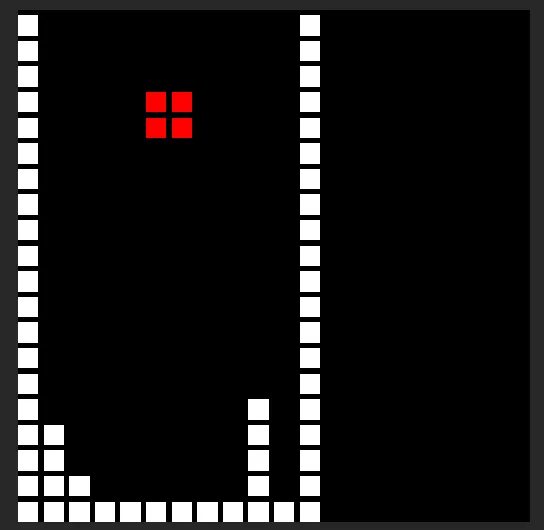
- 2D Tetris
- 2D Flappy Bird
- 3D Ball Run 2048
The third is one of our products. Fully reproducing the 3D mesh generation, camera control, physics and so on in the time available is impossible, so participants just get as far as they can.
2D Tetris was to take at most two days, and on the third day participants chose Flappy Bird or Ball Run. Tetris was built step by step and submitted in four stages:
- Single cells fall one at a time, and a complete row disappears
- Two connected cells fall and can be rotated
- Two kinds of three-cell shapes fall
- Seven kinds of four-cell shapes fall
Spelling out the stages makes it harder to wander off course, while also asking participants to "write code that anticipates the next stage". Then, on the evening of the second day, we ran each person's work on a projector one by one, and I opened the code and commented on it. On the evening of the third day, I did the same for the code of the second assignment.
On Slack, each person had a thread where they wrote their progress in real time and posted screenshots. I watched those and spoke up if someone seemed to need help, or corrected course if I felt there was a problem with progress. Checking work in progress is also important, so on day one, at around 2 p.m., they uploaded their work as of then to Google Drive and mentioned me, and I looked at the code and wrote comments in the thread.
Tricks to keep things running smoothly
For me to comment on the work quickly, I needed an environment where submitting was easy and I could quickly run what was submitted on my own machine.
For 2D, I made it a rule that a submission "must be self-contained in one file, with a class name / file name containing the author's name". That way, if they submit a single .cs file, I can put it in the project and look at it. If file names or class names clash, you get compile errors or overwrite files, which is a pain.
I also made it possible to switch which submission runs by dropping the script's .cs onto the inspector.
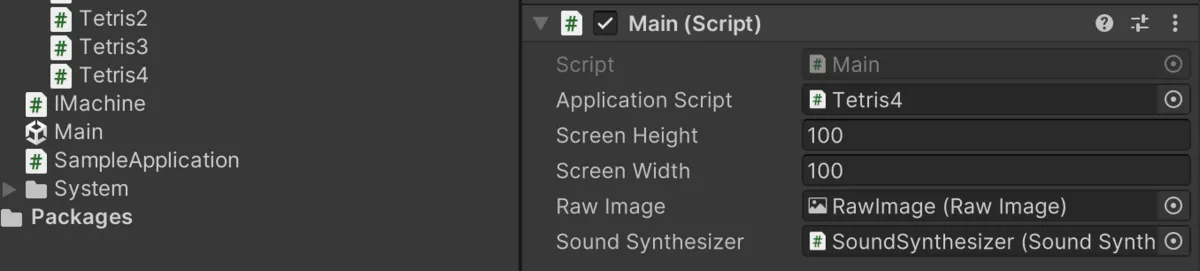 Switching between submissions
In the screenshot, Tetris4 is specified in the Main class's inspector, but if you drop, say, FlappyBird.cs here, the class that runs switches. You can switch even while running, so you can run several submissions while staying in play mode.
The implementation isn't hard: a .cs file can be obtained as a UnityEngine.Object, so you look at its name, find the class with the same class name in the current assembly, and call Activator.CreateInstance on it.
This kind of usability is my attempt to reproduce on Unity, as far as possible, the runtime environment of Sunaba, the custom language I covered in "This Is How Programs Are Made". It builds on my experience teaching about ten classes at Kyushu University.
Try it yourself!
I've put the Unity projects that serve as the development environment on GitHub (for 2D | for 3D), so why not give it a try yourself? So as not to spoil that, I haven't uploaded the Tetris and other games I wrote "for reference" to these repositories. In the training, it's important to "implement without looking at anyone else's code at all".
For 2D, if you can make Tetris in half a day, I think that's quite something for a new hire. If you keep the specification to a minimum, it'll be under 500 lines.
Doing this kind of training as a new hire gives you an early feel for the fact that "you don't need colliders or GameObjects for a grid-based game". It should also give you some pointers for weighing the callback-centric style that leans heavily on delegates against the age-old "the game loop comes around" style, and choosing between them appropriately. My impression is that many people now mainly learn the callback style, but knowing the primitive method firsthand lets you step back and think about "when the newer style is the better one".
You can also see quite clearly how much each person can write, at what stage and in what way they stumbled, what habits they have and so on, so I think it makes it easier to plan their development too.
I wish there were a book like this
"Techniques to Learn Before Becoming a Game Programmer", which I wrote in the past, has become dated, and these days I think making games without a game engine like Unity or Unreal is hardly an option anymore. DirectX used to have lots of books, but hardly any come out now, and it has become a tough thing for a beginner to dive straight into.
So I think a promising approach is to build, on top of Unity or Unreal, an environment with the "flavor" of pre-engine game programming, and learn there. For education at a school, course credits provide the compulsion, so a custom language might be fine, but many people will want at least the language to be the same one the pros use, so it's safest to match the language itself with Unity or Unreal. What I've presented here is one example of that.
If there were a "code-centered game programming book" with this approach, like the two books I wrote long ago, I think some people would find it useful. Especially for 3D, I think using an environment like this one and explaining step by step is a good way to leave out the extra stuff that depends on the engine or the graphics API, and get across that "basically, you just need to draw triangles".
Would anyone like to write one?
As for the 3D environment, I'll give a brief outline of its specification below.
Bonus: the specification of the 3D version
The main part of the 3D version's IMachine looks like this.
public interface IMachine
{
    public void SetCamera(
        Vector3 position,
        Quaternion rotation,
        float fieldOfViewYInDegree);

    public void DrawTriangle(
        Vector3 p0,
        Vector3 p1,
        Vector3 p2,
        Color color); // draw a triangle

    // screen aspect ratio (width/height)
    public float Aspect { get; }

    // pointer detection
    public bool PointerDown { get; }
    public Vector2 PointerPosition { get; }
}
In short, it's a simple specification: set the camera, draw lots of triangles with DrawTriangle, and you have a 3D game. Even without "complicated concepts" like view space and projection matrices, specifying the camera and vertices in world space gets a picture on screen. You can also get the pointer, so you can make smartphone games with this.
It's far easier than learning OpenGL, and there's less to learn than packing polygons into a Unity Mesh, so it might be good practice for mesh generation too. You can also study lighting without needing to know shaders.
There are Vector3 and Quaternion, but these are fakes I prepared. The interface is almost the same, but they only
have some of the features. I went this far because I didn't want people writing using UnityEngine;.
There are no matrices. As long as there's no scale, a pair of Quaternion and Vector3 can do the equivalent of a matrix, so especially when using Unity, I think hardly anyone but experts uses matrices.