

Do We Even Need UnloadUnusedAssets()?
Hello. I'm Hirayama from the Technology Department.
Today I'm writing about Unity's Resources.UnloadUnusedAssets().
The conclusion is a thoroughly unexciting "It looks like you have to call it, so call it, as often as makes sense," so only read on if you're curious how I got there.
Motivation
Recently I came across some code that called UnloadUnusedAssets() extremely often. So often that "pretty much whenever user input makes something appear on screen, it gets called."
I thought, "Come on, surely you don't need to call it this much," but then it occurred to me that I didn't actually know whether you need to call it in the first place. People say all sorts of things, but none of it is an official statement from the people who make Unity, and even articles by people who did investigate are, in the end, only "about a specific version."
Still, not having something this basic straight in my head scares me to death, so I decided to do my own "I tested it on a specific version" too.
This article uses 2018.4.11, and I only looked at the editor and the macOS Standalone build.
What happens if you don't call it?
The experiment is simple.
Load a big texture, put it on a UI.RawImage to display it, and repeat.
public class Main : MonoBehaviour
{
    [SerializeField] RawImage rawImage;
    int index;
    int count = 100;
    UnityWebRequest req;
    string message;

    void Update()
    {
        if (req == null)
        {
            var appDir = System.IO.Path.GetFullPath(".");
            var url = string.Format("file://{0}/TestData/{1}.png", appDir, index.ToString());
            Debug.Log(url);
            message = url;
            req = UnityWebRequestTexture.GetTexture(url);
            req.SendWebRequest();
            index = (index + 1) % count;
        }
        else if (req.isDone)
        {
            rawImage.texture = DownloadHandlerTexture.GetContent(req);
            req.Dispose(); // Don't forget this!! (I actually forgot it at first)
            req = null;
        }
    }
}
Make a folder called TestData in the project folder and put huge 4096x4096 png files in it, from 0.png to
99.png. Then just run it. It keeps loading PNGs with UnityWebRequest and putting them on the RawImage. Once a
new texture is set on the RawImage, there are no more references to the old texture, so if Unity frees it
automatically, memory usage should not grow beyond a certain point.
This test program is on GitHub, along with the whole project. The test pngs can be generated from a menu (they'd be too big to upload).
In the editor
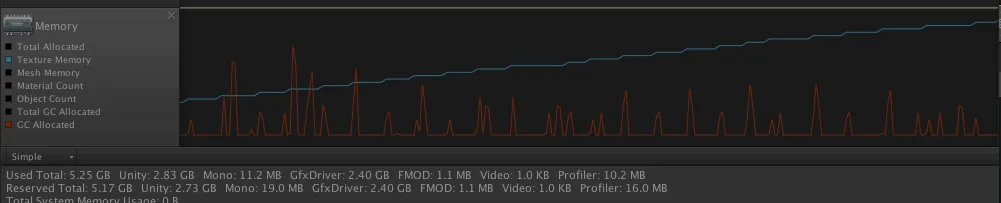

The images above show what I saw in the Unity profiler and in macOS's standard Activity Monitor. In the profiler, texture memory keeps growing, and Unity's memory usage is over 5 GB.
Activity Monitor shows a big number too: over 12 GB. That screenshot was taken a little later than the profiler one, so the value is larger than in Unity's profiler, but either way it shows no sign of stopping.
In fact, if you leave it running, the OS runs out of memory and shows a warning:
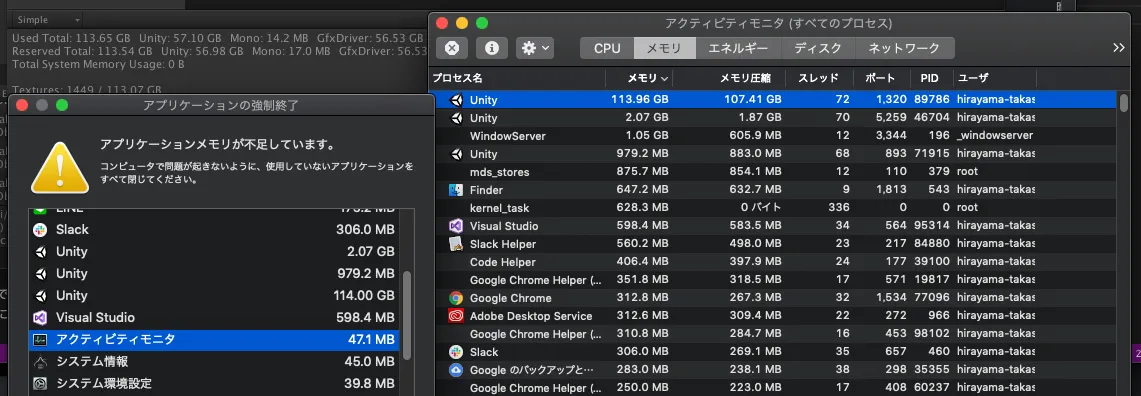
It's using over 110 GB. That's hopeless.
By the way, if you call UnloadUnusedMemory() in this state, the memory is freed all at once and drops to about 1 GB. So, at least in the editor, you have to call this function by hand.
In a PC build
Now let's try a PC build. If you search around, you'll find quite a few reports of memory not being freed in the editor even when you tell it to. If memory is freed automatically in builds, then calling it only in the editor would be enough.
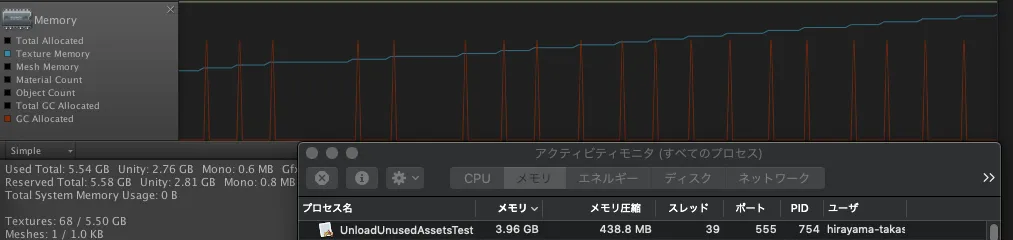
No change. It just keeps growing. It's the same whether you look in the profiler or in Activity Monitor. And if you call UnloadUnusedAssets() by hand, it's freed all at once.
So you have to call it in builds too.
So, the conclusion?
You have to call it.
Maybe it's freed automatically in other versions, or in builds for other platforms, but to be on the safe side, you should call it.
I also found a claim that Unity sometimes calls it internally on its own, but it isn't in the official manual, and it's about an old version, so I don't know if it's still true.
Granted, if "it's called internally when you load a Scene non-Additively" is true, then calling it yourself after loading a scene is wasted work and shows customers an unnecessary spike. If we can skip it, I'd like to. But that's hardly official information, and in our products we mostly load scenes Additive and in many cases unload what we no longer need by hand with UnloadSceneAsync(), so I think it's safer to assume that calling it by hand is still needed.
Think about it. If you call it when you didn't need to, the worst you get is a spike. If you don't call it when you needed to, you get a crash. The stakes are nowhere near the same.
So how often do we call it?
So the real question is "When do we call it, and how often?"
The longer you go without calling it, the more memory the app uses. But calling it when there's not much to free only produces a pointless spike.
It depends on the nature of the product and how it's built, but my personal view is roughly this:
- I don't want to call it while the customer can interact, or while something is animating on screen.
- At places where the screen fades to black, or a Now Loading display comes up, call it just in case.
Unlike in the old days, Unity now does this asynchronously, so calling it doesn't automatically mean a spike, and I can't say how long it actually takes. It will probably also depend on the number of assets in memory, the machine's performance, and what the threads are doing. Still, I'd rather not do anything pointless if I can help it.
For example, in a stage-based action game, calling it between stages seems like a good idea. And in a card game with separate screens like a "deck editing screen" and a "card purchase screen," if each has a fair amount of assets and takes 0.2 seconds or more to load, I think it's fine to call it when switching screens.
But what about an endless game where the player can keep playing for tens of minutes without a break? In that case you'd be in trouble unless you call UnloadUnusedAssets() along with some event that is guaranteed to come around every so often. Alternatively, if you design it so that once the game starts there's no Instantiate and no loading, you don't need to call it at all. That's a valid option too. Personally, though, I prefer creating a certain amount at the start and creating only what runs short on the fly.
Bonus: editor extensions and UnloadUnusedAsset()
I've had cases where calling UnloadUnusedAssets() while editing assets in the editor made the asset being edited suddenly become null.
For example, you might load a material with AssetDatabase.LoadAssetAtPath(), change its values, then save it with AssetDatabase.SaveAssets() (the one I ran into recently was NGUI's atlas generation). If a call to UnloadUnusedAssets() sneaks in partway through, the asset (here the material) suddenly turns into null.
As the manual says, calling EditorUtility.SetDirty avoids the problem, and we did call it, just too late. Calling it after changing the values seems natural, but if the asset has already been nulled out before you change them, you crash when you try. An asset that hasn't been SetDirty'd, isn't referenced by any GameObject, and can't be reached from any static variable is regarded as "unused" and gets deleted.
You might think, "Come on, nobody calls UnloadUnusedAssets in the middle of editor extension code," but there's a trap. AssetDatabase.Refresh() calls it internally. And that's exactly the kind of thing you'd call from an editor extension.
In the end, I made it call EditorUtility.SetDirty right after loading, and on closer inspection Refresh turned out to be unnecessary, so I stopped calling it. SaveAssets() and Refresh() are heavy operations that can take 0.5 seconds or more, so I'd like to avoid them if possible.
Note that this was on 5.6.5, so the behavior may be different now.