

I Made a Library That Eases Some of My Gripes with AssetBundles
Hello. I'm Hirayama from the Technology Department.
Word has it that something called the Addressable Asset System is coming out soon and will solve every AssetBundle-related problem, but for various reasons I couldn't wait, so I tried building my own.
The code is on GitHub along with the test project. The library itself is under Assets/Kayac/Loader. However, it hasn't been used in production. Please treat it purely as a sample.
I've tried swapping it in for a product's AssetBundle-related code and running it, and I've run endurance tests that load and release things at random over and over, but I can't believe for a second that every bug has been caught, and some features are probably missing. If the Addressable Asset System shows up in the meantime and magically solves everything, I'll probably throw this away without a second thought.
Feature overview
Put simply, it downloads AssetBundles, stores them in local storage, and loads assets from there into memory.
Its main features are:
- Downloads run in parallel, up to a specified number at once
- Downloading big files doesn't increase memory usage
- Writing to local storage is asynchronous and doesn't cause spikes
- Assets loaded into memory are released automatically by reference counting
- An in-memory cache for assets
- Initialization at startup runs asynchronously on a separate thread
- Deleting data from local storage runs asynchronously on a separate thread
- Besides AssetBundles, png/jpg/ogg/text files can also be saved to storage and version-managed
- Dependency support
The details will make more sense once you've seen it in use, so first I'll briefly introduce the interface.
How to use it
It looks roughly like this.
class Main : MonoBehaviour
{
    class AssetFileDatabase : Kayac.Loader.AssetFileDatabase
    {
        public override bool ParseIdentifier(
            out string assetFileName,
            out string assetName,
            string assetIdentifier)
        {
            var sharpPos = assetIdentifier.IndexOf('#'); // Up to # is the file name, after # is the asset name. An example implementation.
            assetFileName = assetIdentifier.Substring(0, sharpPos);
            assetName = assetIdentifier.Substring(sharpPos + 1, assetIdentifier.Length - sharpPos - 1);
            return true;
        }
    }

    public RawImage _image;
    Kayac.Loader _loader;

    void Start()
    {
        _loader = new Kayac.Loader(
         storageCacheRoot: Application.persistentDataPath + "/AssetFileCache", // Local storage location
         useHashInStorageCache: true); // Save with the hash value added to the file name
        _loader.Start(
            "http://hoge/assetBundles/",
            new AssetFileDatabase(),
         downloadParallelCount: 8);
        _loader.Load(
            "hoge.unity3d#fuga",
            typeof(Texture2D),
         onError: (errorType, name, exception) =>
            {
                Debug.LogError(errorType + " " + name + " " + exception.Message);
            },
         onComplete: asset =>
            {
                _image.texture = asset as Texture2D;
            },
         holderGameObject: this.gameObject);
    }
}
First, implement Loader.IAssetFileDatabase. Here I inherited from the default implementation, Loader.AssetFileDatabase, and implemented only ParseIdentifier(). This function extracts the file name and asset name from the asset identifier passed to Loader.Load().
Next, create a Loader with new. When you pass it the storage location for files, it starts checking what's already saved on another thread.
Then call Loader.Start(), passing the URL of the server to download from and the IAssetFileDatabase you just implemented. This is also where you specify parameters like the number of parallel downloads. This kicks off processing on a separate thread that, among other things, deletes files in local storage that are no longer needed.
The constructor and Start are separate because I want to start building the list of local files as soon as the app launches, whereas things like the download URL and the table for looking up hash values by file name may not be available until after the app has talked to the server. That was the case with Tokyo Prison.
Finally, issue a load request with Load(). If the file is available locally, it's read from local storage; if not, it's downloaded from the server. You pass an error callback, a completion callback and a gameObject that determines the asset's lifetime.
In this example, it calls Debug.LogError on error, and on completion it assigns the loaded Texture to RawImage.texture. It also specifies that when the gameObject this Main script is attached to is destroyed, the asset is released along with it.
I want to wait in a coroutine
In the example above, the data was received in the completion callback, but you can also wait in a coroutine.
IEnumerator CoLoad()
{
    var handle = _loader.Load(
        "hoge.unity3d#fuga",
        typeof(Texture2D),
     onError: (errorType, name, exception) =>
        {
            Debug.LogError(errorType + " " + name + " " + exception.Message);
        },
     onComplete: null,
     holderGameObject: this.gameObject);
    yield return handle;
    _image.texture = handle.asset as Texture2D;
}
Load returns a class called LoadHandle. It's an IEnumerator whose MoveNext returns false once loading is complete, so you can yield return it. When it's done, you can get the result from the asset property.
I want to manage lifetime independently of a gameObject
If you don't pass a gameObject to Load(), the loaded asset is released when the LoadHandle returned by Load() is garbage collected. In that case, you keep the LoadHandle in a field or similar, and set it to null when you want to release the asset. However, there's no telling when the GC will run, so if you've faded the screen out and want it "done right now!", call GC.Collect or Resources.UnloadUnusedAssets.
You may also want to tie the lifetime to a scene rather than a gameObject. In that case, you can just pass any gameObject in the scene. For example, our scene management library has something like a "MonoBehaviour placed exactly once per scene," so the natural choice is to pass the gameObject it's attached to. Partly for that reason, I haven't made a dedicated interface for scenes.
I want to make good use of the time spent scanning local files at startup
As mentioned above, calling the Loader constructor starts checking which files are in local storage. However, if that hasn't finished by the time you call Start(), Start() blocks until it completes.
Likewise, calling Start() starts deleting unneeded files on a separate thread, using the IAssetFileDatabase you passed in. Many functions, such as Loader.Load(), block until this completes.
You can avoid this blocking by checking Loader.ready periodically and waiting until it returns true. That doesn't make the work finish any sooner, though.
I want to read png and ogg too
If you Load() a png or jpg, you get a Texture2D. If you specify an ogg, you get an AudioClip. And if the extension is txt, html, json, xml, csv or yaml, you get a TextAsset. They're saved to local storage by the same mechanism as AssetBundles, and if a hash value is provided, they're versioned too.
In-memory cache
Say the player frequently goes back and forth between two screens. If you throw away the assets loaded on the previous screen just because the next screen doesn't use them, they have to be loaded every time, and the player is kept waiting. To ease this without writing tedious code for each screen, there's a feature that keeps assets in memory instead of discarding them, up to a certain size.
_loader.SetMemoryCacheLimit(32 * 1024 * 1024);With this, up to 32 MB of assets are kept instead of discarded. You might want to check the device's memory with SystemInfo and set an amount to match. It also depends on how much memory the product is expected to use, but for a smartphone game these days, how about something like zero on 1 GB devices, 32 MB on 2 GB devices and 64 MB on 3 GB devices?
Discarding files saved in storage
Naturally, there's a feature equivalent to Caching.ClearCache().
_loader.StartClearStorageCache();This starts a dedicated thread that deletes the files. If you call other functions before it finishes, most of them will wait until it's done, but as long as you don't start a load right away, it'll finish during screen transitions and the like, so it shouldn't keep players waiting much.
However, this function can only delete files when every loaded asset has been released and nothing is loading. Otherwise it returns false and does nothing. Deleting assets that came out of an AssetBundle while it's still open involves all sorts of complications and would need experimentation, so for now I've simply disallowed it. The assumption is that it's only called when no assets at all are loaded (on the title screen, for example).
There's also a feature for deleting a single file.
_loader.DeleteStorageCache("hoge.unity3d");Eventually, it would probably be better to automatically delete and re-download a file when a load fails and the file is suspected to be corrupted, but I suspect I'll leave that alone until I think of an easy way to implement it in a few lines of code.
About managing locally saved files
This is equivalent to UnityEngine.Caching, but it behaves quite differently, because it serves a different purpose. In this library, files are managed like this:
- If IAssetFileDatabase.GetFileMetaData() returns false, delete the local file
- Delete local files whose hash differs from the one returned by IAssetFileDatabase.GetFileMetaData()
- Nothing is deleted based on time
- Nothing is deleted based on a size limit
Deletion only happens in Loader.Start. Also, if the hash value returned by IAssetFileDatabase.GetFileMetaData changes while the app is running and a file is downloaded again, the old file is deleted immediately.
The UnityEngine.Caching class is probably implemented as a "cache," just as its name says. The idea is presumably to reduce download waits by setting aside a certain amount of storage. It doesn't assume that every downloadable file will be kept locally, and it has features like deleting files automatically after a certain time or when a size limit is exceeded. Even if several versions of the same file coexist, anything over the size limit gets deleted, so as long as the limit is small, there's no problem.
But for Tokyo Prison, which I worked on previously, and other products of the kind we often make, the situation is completely different. The assumption is that every file on the server is downloaded and saved locally, with no size limit. There's no need for files to disappear automatically over time, and no need for multiple versions to coexist. A mechanism that deletes files based on time is useless, even a hindrance, and if multiple versions pile up, they eat into storage. Not being able to control "which files to delete" from the server side is also a problem. Sometimes you want to wipe data from devices as soon as a limited-time event ends, and if the system is built so that "removing a file from the list of AssetBundles the server delivers also removes it locally," that becomes very easy.
About the relationship between URLs on the server and local save paths
Currently, it preserves the server's folder structure when saving locally.
For example, say you load http://hoge.com/assetbundles/character/1.unity3d.
If you give the Loader http://hoge.com/assetbundles/ as the download root folder and Application.persistentDataPath + "/assetFileCache" as the local save root folder, it's saved as assetFileCache/character/1.ハッシュ値16進32桁.unity3d (the hash value as 32 hex digits).
The hash value is supplied by IAssetFileDatabase.
The hash value is inserted before the extension, which stays at the end, so you can still open files by double-clicking them on a PC.
This is handy when pngs and jpgs are stored as is.
Preserving the folder structure means that even if the server has files with the same name, they can be saved separately. With the standard Caching, you can do the same thing using CachedAssetBundle. Be careful: without it, files are stored ignoring the folder structure, and files with the same name can't be told apart.
Also, some server setups may include the hash value in the path.
In that case, there's no need to add the hash value to the file name.
For this, an argument to the Loader constructor lets you turn off adding the hash value to the file name.
For example, if the hash value is included in the path like http://hoge.com/assetbundles/0123456789abcdef0123456789abcdef/1.unity3d, you can simply save it as assetFileCache/0123456789abcdef0123456789abcdef/1.unity3d.
Of course, preserving the folder structure has a cost. To the OS, a folder is a kind of file, and more of them means more overhead. There are more calls to functions that list a folder's contents, and more work checking what's saved at startup. So if you know "there are no duplicate file names," putting everything into a single local folder is more efficient all around. But for now, I haven't provided that option, because it would require a separate table for looking up the server path from a file name. IAssetFileDatabase would need more features, which means more implementation work. If the folder structure is preserved, the server URL can be derived from the local path, folders included, so no extra information is needed. For now, I've left it this way to keep the interface small. I'll add the feature if it's needed.
Dependencies
It also handles dependencies between AssetBundles. It isn't shown in the simple example above, but the class implementing IAssetFileDatabase needs to implement
IEnumerable<string> GetDependencies(string fileName);For example, if "hoge.unity3d" depends on "fuga.unity3d", implement it so that when you write
var dependencies = database.GetDependencies("hoge.unity3d");
foreach (var dependency in dependencies)
{
    Debug.Log(dependency);
}
"fuga.unity3d" is printed.
With this in place, when you load an asset from hoge.unity3d, fuga.unity3d is loaded automatically too, and if it's not in local storage, it's downloaded as well.
While I'm at it, a little more detail on dependencies
Dependencies aren't explained much anywhere, so let me go over them briefly.
For example, if a sprite in hoge references a texture in fuga, you need to create AssetBundle instances for both hoge and fuga. This implementation only does asynchronous processing, so the function it uses is AssetBundle.LoadFromFileAsync(). Once that's done, you load the asset you actually want (the sprite, in this example) from hoge with AssetBundle.LoadAssetAsync().
If you forget to create the AssetBundle instance for fuga at this point, you end up with a sprite that's loaded but has no texture attached. With a texture, it just turns pure white, but with other assets you won't get off so lightly. If a prefab in hoge has an animation from fuga plugged into it and a script accesses that animation, you'll crash with a null exception at runtime.
Dependencies can be daisy-chained many levels deep, one pulling in the next, and handling them in hand-written code is a real pain. So the library takes care of them internally.
While I'm at it, a little more detail on loading AssetBundles and loading Assets
When you call AssetBundle.LoadFromFileAsync(), you get an AssetBundle instance, but what is it actually doing?
The actual assets aren't usable until you call AssetBundle.LoadAssetAsync(), so having an AssetBundle instance doesn't mean any assets have been loaded.
Assuming the AssetBundle is LZ4-compressed, "creating an instance of the AssetBundle type" means "loading the AssetBundle's table of contents into memory." Only the table of contents. At the start of an AssetBundle file there's a table of contents listing which Assets the file contains, and only this is loaded. The bodies of textures and audio stay in the file.
Then, only when you call LoadAssetAsync() are the actual data, such as textures and audio, read from the file into memory and initialized.
So even after you've created the AssetBundle instance, nearly all the work of loading the assets is still ahead of you. If you're thinking "let's load the AssetBundle a little ahead of time to speed things up later," you can't stop at loading the AssetBundle; you need to go on and load the assets inside it too. Otherwise it has no effect.
Synchronous and asynchronous loading
This implementation supports asynchronous loading only. There's no knowing how slow storage or the network will be, so I don't want to bring everything to a dead stop until loading finishes, and I don't want the product teams building on this to do it either. So I left out synchronous loading altogether.
Or rather, that was the plan.
When I actually integrated this implementation into an existing product to test it, I found the game couldn't run without synchronous loading, so I reluctantly added a synchronous loading feature too. The Loader has a function whose name practically begs you not to use it:
LoadHandle LoadSynchronous_SHOULD_BE_REMOVED(string identifier, Type type)The LoadHandle this function returns is guaranteed to have isDone set to true, but it has restrictions: it only works for AssetBundles, and it fails if the download hasn't finished. If you deliberately want to use synchronous and asynchronous loading for different purposes, I'd suggest giving it a normal name and implementing it properly.
Aside: is synchronous loading faster?
I think many people believe that "asynchronous loading exists only to keep the game from freezing, and if a brief freeze is acceptable, synchronous loading is faster." Depending on how Unity implements it, that may actually be true.
But with a sensible implementation, I don't think that would be the case.
Loading data involves two broad kinds of work: IO and initialization. IO means downloading from the network or reading from local storage, and it doesn't use the CPU. So it can run in parallel with initialization, which does use the CPU.
When several assets are requested, a sensible implementation would make the most of this parallelism: doing IO for the second asset while initializing the first once it's loaded, doing IO for the third while initializing the second, and so on. That ought to be faster than waiting for each one synchronously.
Initialization, too, would be implemented to keep the parts that must run on the main thread to a minimum and do as much as possible in parallel on other threads. Splitting one asset across several threads would be hard and probably not worth it, but with several assets, it's easy to have different threads handle them. So for initialization as well, it ought to be faster to fire off several requests at once and process them asynchronously.
That said, for a single asset that takes less than a frame, synchronous processing would certainly be faster. Unity's asynchronous functions apparently don't report completion until the next frame, no matter how small the asset.
var req = assetBundle.LoadAssetAsync("hoge");
while (!req.isDone){}
If you write this and spin in place, it will loop forever and never finish. In other words, it always takes at least one frame, so for a small asset that loads in 1 ms, synchronous loading would be better.
But for now, I've made everything in this implementation asynchronous. An improvement like automatically using the synchronous version for assets below a certain size can be added later, but the reverse, building everything synchronously and then switching to asynchronous because of spikes, can't be done after the fact.
Debug features
Getting the state
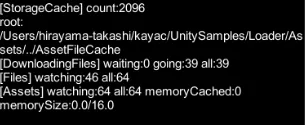
Loader.Dump() outputs the internal state as a string. The screenshot shows the number of files downloaded to local storage, the local storage location, the number of files being downloaded, the number of loaded assets, their total size and so on.
It can also output information that isn't suited to on-screen display, such as which assets and files are loaded and what each one's reference count is. That's a huge amount of data, so it's probably best to have it written to a log file at the press of a button or something similar.
Load limit
You can give the Loader a threshold meaning "if more memory than this is in use, make loads fail." For example,
_loader.SetLoadLimit(4 * 1024 * 1024);makes every Load() called while usage is over 4 MB fail and return null. During development, you should set this to a reasonable number.
When you're too busy building things to have any breathing room, memory and processing load inevitably get put off, and what that leads to is the hell of having to cut memory and load during the busiest, most precious stretch right before release. I think it's less wasteful to impose a fairly strict limit up front so you find out immediately when you exceed it.
However, the limit needs some teeth. If it just "shows a warning," people soon start ignoring it. It needs to be strong enough that "the game won't run unless you change the code to loosen the limit or make the data smaller." Even if the limit keeps getting looser and looser, isn't it better to at least be aware of "what limit we've set"?
That said, since we're using Unity, the memory count is only a rough estimate. There's no way to know how many megabytes everything other than the assets is using in the first place (before Unity, I wrote everything myself from malloc up, so I could track it completely...).
Moreover, if data built into the app dominates and only a small share is loaded dynamically from files like AssetBundles, measuring just that share doesn't mean much. Memory used by assets referenced from scenes and prefabs can't be measured with this mechanism.
There are also problems with the memory calculation itself. On the assumption that textures account for most of the size anyway, textures are calculated fairly accurately, but all sound is calculated as 16-bit uncompressed, and anything whose size I'm unsure of is counted as a flat 4 KB (I may change this later). Even so, it's better than nothing.
We're getting to the point where we can ignore 1 GB devices, but there are still plenty of 2 GB devices, and the more memory you use, the more likely the app is to be killed when it goes into the background. A game where you pop out to tweet, come back to find the app dead, and have to wait 30 seconds for it to restart is at a serious disadvantage when it comes to keeping people playing. If your thinking is "cut memory because it's a problem if the app stops working," you end up settling for "as long as it works." I think it's worth going a step further and thinking "the less memory it uses, the better the product and the happier the players."
Unimplemented features and planned improvements
The following features aren't implemented yet:
- AssetBundle Variants. I've never used them, so I don't really understand them.
- Switching between loading via Resources and downloading from a server.
- Automatic deletion and re-download when a local file is suspected to be corrupted
- Loading every asset in an AssetBundle at once
- Making it fail for files that haven't been downloaded
- Loading subAssets
- CRC checks
- Encryption support
I expect I'll implement each of them once I get a sense that they're actually needed. If I never get that sense, I'll probably never implement them. Variants in particular can probably be handled by users getting creative with their IAssetFileDatabase implementation.
The planned improvements are:
- Performance. Especially the number of GC Allocs.
- Faster listing and deletion of files in storage
Currently, it doesn't reuse objects at all, so there are quite a few GC Allocs. But given that the count is at most a few times the number of files and assets, and doesn't grow every frame, I doubt it affects the product's behavior much, and it may not be worth complicating the code over. If something like "discarding lots of assets at once causes a spike" happens, though, that hurts the product's quality, so I plan to deal with it.
Listing the files in storage and deleting unneeded files at startup could also be made faster. Splitting the work into one thread per folder would probably speed it up. But that would complicate the implementation, and arguably "having that many files is the real problem," so honestly, if I can get away without doing it, I'll probably leave it as is.
Closing
I spent about two weeks building this, but truth be told, even within our company nobody has "decided to use it." I built it so I could say "I prepared for just such an occasion," to learn, and to get a handle on the current problems. So I don't know when it'll be used in production, and it may never be. But building it taught me a lot. Even if we don't use it in-house, I think it was well worth it for the future, and if publishing it means someone uses it or finds it a useful reference, so much the better.
I'd weep with joy at any feedback! Send me a fix request and I'll fix it right away!
The testing done so far is roughly:
- Endurance testing with the published test app combined with real data from our products
- Trial integration into two of our products, adding missing features and fixing things until it more or less worked
I'm sure there are still bugs lurking, but I think it works reasonably well.
I haven't covered the implementation in this article, but if I run out of topics or there's demand, I may write about it too.