

Applying Filters to Sound in Unity
Hello. I'm Hirayama from the Technology Department.
Today I'll write about applying filters to sound at run time to adapt the original data to what's happening in the game. I've never made heavy use of filters in an actual product, so I can only cover the basics, but I'd be glad if this sparks your interest in the field.
The source code is on GitHub. Unfortunately the filters don't work on WebGL, so I haven't prepared a WebGL version this time. Please try it in the editor.
The sample
The sample lets you turn the filters Unity provides on and off and hear how the sound changes.
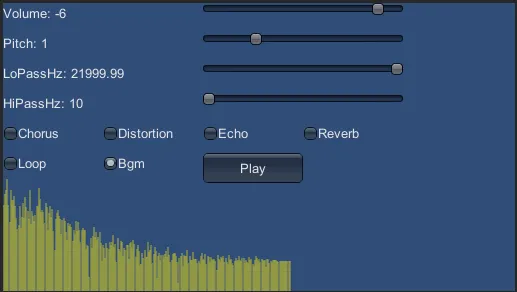
The BGM toggle turns the BGM on and off, and the Play button plays a sound effect.
The filters Unity provides are the following six:
- Chorus
- Layers slightly pitch-shifted copies of the sound so it sounds like a choir
- Distortion
- Makes the sound crack and distort, as if it had been amplified past its limit
- Echo
- Like an echo in the mountains. The sound repeats several times with a delay
- Reverb
- The feel of sound resonating in a hall. Applied heavily, it can also sound like a booming bathroom.
- LowPass (low-pass filter)
- Attenuates high frequencies
- HighPass (high-pass filter)
- Attenuates low frequencies
I'm not certain, but I imagine they're implemented in hardware or fast C++, so they probably cost far less than writing your own in C# (I haven't checked).
In the sample, chorus, distortion, echo and reverb can only be turned on and off with their default parameters, while lowPass and highPass let you set the frequency and nothing else.
Setting the lowPass frequency to 4000Hz means "pass everything below 4000Hz as is and cut what's above". The high frequencies don't vanish entirely, though; think of it as "trimming" them. highPass is the reverse: "pass what's above 4000Hz and cut what's below". This doesn't cut cleanly either, but the low frequencies are reduced.
The bottom left of the screen shows a graph of loudness by frequency, so watch how it changes as you adjust lowPass and highPass.
Pitch and volume aren't effects, but I've made them adjustable too.
Motivation
Try tapping your desk a few times. You get a slightly different sound each time.
Also, the same sound sounds different in a bathroom and outdoors.
Without this kind of variation, you end up with a cheap-feeling game where the exact same sound plays every time. Some people don't mind, and it's often hard to get sounds in early in development and polish them, but personally I'd like to take a bit more care.
That said, preparing lots of data to create variation isn't a good idea. It takes effort, and it makes the app bigger, which inconveniences customers. In game development these days, voice is often what eats up the size budget, and preparing variations of voice data that already runs to tens or hundreds of megabytes is close to impossible.
Even if you could, baking differences such as whether someone is speaking in a hall or outdoors into the data itself takes away far too much flexibility. You want to be able to use the same line in all sorts of places, right?
Filters let you handle that with computation instead.
Basic uses of each
Now let's briefly go over each filter.
reverb
Reverb is probably the easiest one to use.
You just pick parameters for a few situations, such as a bathroom, a gym or outdoors, and apply them at run time. It makes a big difference on things like gunshots.
lowPass
A filter that cuts high frequencies. It makes the sound muffled.
High-pitched sounds travel in straight lines and don't bend around obstacles much, and they're also easily absorbed by heavy objects, so sound coming through a wall loses more of its high frequencies than its low ones.
For example, when a gunshot comes from the other side of a door, cutting the high frequencies will probably make it sound right. It tells the player "the enemy is on the other side of the wall". Then, when the door opens, you turn off the filter and the sound becomes clear. That adds tension, doesn't it? If you can convey what's happening in the game through sound as well as visuals, the experience becomes that much richer.
Also, with a directional sound source such as a speaker, the high frequencies drop off when it isn't facing you, because they don't bend around. Used well, the sound itself might even carry information such as how you're oriented relative to the source.
Furthermore, the higher the sound, the more easily it's attenuated by the ground and the air, so the farther away the source, the more the high frequencies are cut. If you change the filter settings depending on how far away you're watching fireworks from, you can make them sound different with distance from just one original firework sound.
highPass
A filter that cuts low frequencies.
Cutting only the very bottom (say, below 80Hz) removes noise such as wind and vibration.
In the real world, higher sounds attenuate more easily, so there's no "physical phenomenon that cuts only low frequencies". If there were, soundproofing apartment buildings would be a much easier problem.
Turn that to your advantage, though, and by deliberately cutting the low frequencies to make the high ones relatively stronger, you might be able to "season the sound so the source feels closer". But at that point it's not something a sound amateur should be doing, and I'd want a sound specialist to tune it.
It could also give the feel of something played through a "crummy speaker". Every speaker has what's called a frequency response, and many can't reproduce low frequencies. Even if the sound data contains them, they simply can't be played. I'm checking the sample with cheap earphones right now, and they can barely produce low frequencies to begin with, so I can't really tell what the filter is doing.
Incidentally, sound with a high-pass filter on it reminds me of the music piped through shopping streets. Out of curiosity, I searched for trumpet speakers and looked at the frequency response, and it starts at 200Hz. That's enough to cut the fundamental frequency of an ordinary male voice. Think back to announcements over the speakers at a school sports day: they had a somewhat shrill, grating quality. That's probably because the low frequencies were cut and only the high ones remained.
So this filter could be used to express differences between speakers like that.
chorus,distortion,echo
I don't really have a feel for how to use these, so I'd rather leave them to a sound specialist.
Distortion is "the output was pushed too hard and overflowed", so it might work for the feel of "coming out of a poor-quality speaker". Echo is literally an echo, so it might suit something like a gunfight or explosions in a wide-open outdoor space with mountains in the distance. Since the distances are large, it would probably be good to combine it with lowPass. I'd really like to try it in a product.
Implementation
There's nothing to say about the implementation this time. You just add the components you need and set the parameters.
There's just one thing to watch out for. You can put filters on two things: the AudioSource and the AudioListener. For example, when "there's a door between the player and the sound source", which should you put the filter on?
If you put it on the AudioListener, the same filter applies to the sound from every AudioSource, so in a case like "sound source A behind the door ahead, sound source B in the same room", you need to put it on the AudioSource. But if you filter every source individually, the load also grows with the number of sources. In a bathroom scene where all the sound sources are in the room, it's probably better to just put it on the AudioListener.
However, I have no hands-on experience with the details of implementing this, so you're better off looking for other sources.
There's also something called the AudioMixer, which can do the same things as the filters, with finer control than setting them on the AudioListener. When you need to mix "sounds that aren't playing in the game world", such as BGM and click sounds, with "sounds playing in the world", such as sound effects, processing everything at once on the AudioListener is a problem, so this is the better option. The article on Zenigame's blog was very helpful.
Closing
This has been an introduction along the lines of "Unity provides filters like these!"
I'd like to work out how to actually use them in products in future development, but I think it will basically come down to having the sound team prepare several sets of "these parameters for this situation" and applying them at run time with smooth interpolation. The lowPass filter corresponds to a clear physical phenomenon, so you might be able to set it from measured data or theory, but games are partly about how convincingly you lie, so leaving the final seasoning to specialists will give better results.
Although I didn't cover it this time, another important piece of real-time sound processing is spatial positioning.
Changing the volume of the left and right speakers according to where the sound is playing is panning. It gives the sound a sense of direction, and it's the most basic technique.
Also, by offsetting the timing very slightly between the left and right speakers, you can reproduce the way sound reaches the two ears at different times. Sound from directly in front or behind is the same distance from both ears, so there's no offset, but sound from the left or right is at different distances from the two ears, so there is.
Sometimes there aren't exactly two speakers, and then it gets even more complicated. It's quite an interesting field once you get into it. I think it's essential in 3D, but even in a 2D game, if there are two characters on screen, you'd want to position the sound so you can tell which one is talking to you.
By the way, I have a disability: I'm deaf in one ear. When I handled sound control at a previous job, I'd hold the left and right headphones up to my good right ear in turn to check whether the positioning was right. It's a bit of a hassle, so I've skipped it this time.
Besides, smartphones often have mono speakers. It's fine if people play with headphones on, but for smartphone games, you can't really expect that of customers.